What Is PSA Software? A Guide for Professional Services Teams in 2026


•
•
Summarize blog with






A client asks, "when can we start?"
Answering that means checking the CRM for the signed statement of work (SOW), a spreadsheet for resource capacity, the project tool for current assignments, and Finance for billing status.
PSA (Professional Services Automation) software exists to close that gap. It connects resource planning, project delivery, time tracking, billing, and financial management into one system, so the answer comes from one place instead of four.
That gap costs more than it looks like. Teams running delivery on spreadsheets and disconnected tools average 66.4% billable utilization, well short of the 75% industry target as per the 2026 SPI services maturity report.
This guide covers what PSA software actually does, the five layers (plus the sixth one critical in 2026: agentic AI), when a team genuinely needs one, how to evaluate platforms without falling for a feature checklist, and how Rocketlane stacks up against Kantata, Certinia, BigTime, and Scoro for B2B SaaS and technology services teams.
Methodology: Updated August 2026. Benchmark statistics referenced in this guide come from SPI Research’s 2026 Professional Services Maturity Benchmark. Platform assessments are based on current public documentation and direct product testing.
What is PSA software? Professional services automation, defined
Professional services automation (PSA) software is a platform that connects the operational and financial workflows involved in delivering client work, including resource planning, project delivery, time tracking, billing, financial management, and client collaboration.
Consider a common scenario. A professional services (PS) team wins three implementation projects in the same period. Resource planning determines whether the required consultants are available, their allocation affects project start dates, project timing affects utilization, and the hours consumed affect project cost and margin.
Time tracking feeds billing, while project and financial data give leadership visibility into revenue and profitability.
PSA software connects these workflows so that demand, capacity, delivery, time, billing, revenue, and margin can be managed as parts of the same system.
What does professional services automation actually mean?
PSA describes software built specifically for organizations that deliver project-based services and need to manage the relationship between people, projects, customers, and financial performance.
A useful way to understand PSA is through two connected layers: back office and front office.
- The back office manages the economics and operational infrastructure of delivery, including resource capacity and utilization, time tracking, billing and invoicing, project financials, revenue forecasting, as well as costs and margins
- The front office manages project execution and the customer experience, including project planning and milestones, delivery governance, risk and issue management, client collaboration, approvals, and visibility
Together, those two layers are what separate PSA from project management software. A PM tool coordinates tasks, timelines, and dependencies within a project. A PSA manages the full operational and financial lifecycle around that work, connecting resource capacity and delivery to time, billing, and margin.
Legacy PSA platforms have focused heavily on the back office, helping organizations answer questions such as how much capacity they have, where resources are allocated, how much time teams have logged, what can be billed, and whether projects are profitable.
Modern PSA like Rocketlane increasingly connect those financial workflows with the delivery experience itself.
What does a professional services platform do? The five functional layers
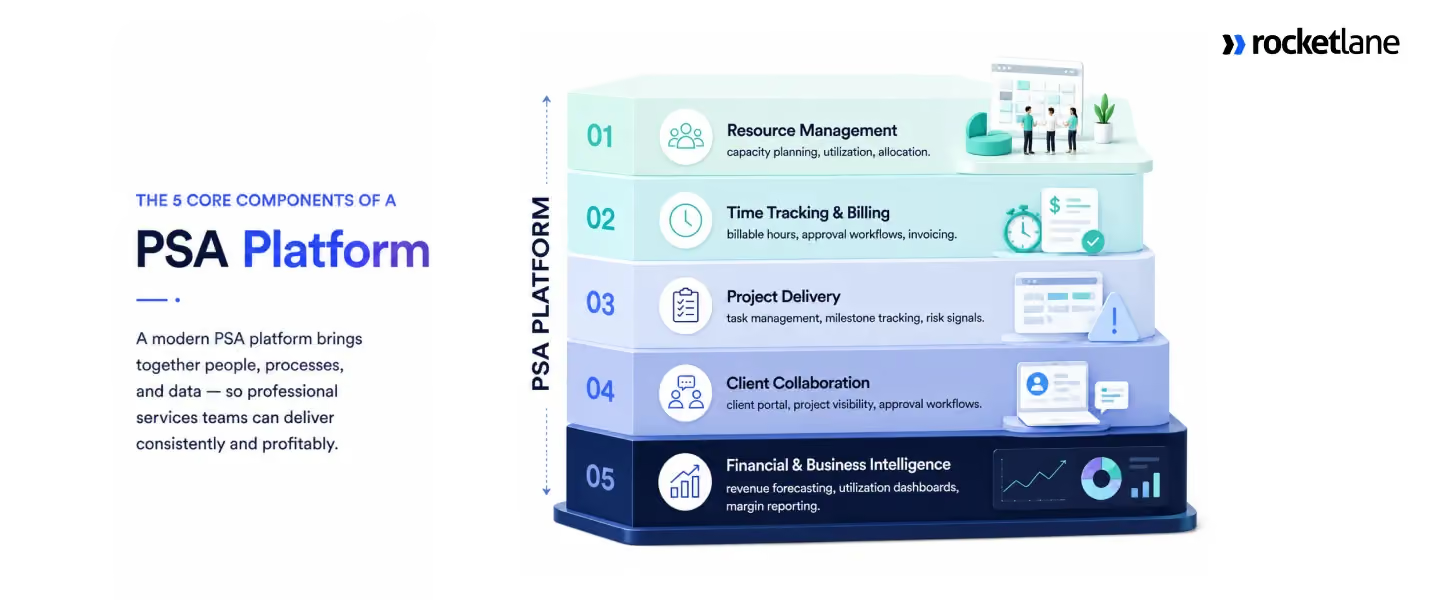
A professional services platform typically spans five connected layers: resource management, time and billing, project delivery, client collaboration, and financial intelligence.
Each addresses a different operational question, but the value of PSA software comes from the connections between them.
The important concept is decision continuity.
A resource decision affects project delivery. Project delivery affects time consumption. Time affects billing and cost. Those outcomes affect revenue and margin. A PSA creates value when those relationships remain visible and current across the system.
1. Resource management: matching demand with delivery capacity
Resource management is more than knowing who is free. A professional services team needs to understand whether it has the right capacity, skills, and availability to meet current and expected demand.
For example, a resource manager may see that capacity exists next month but also see that the available capacity does not match the skills required by upcoming projects. The decision is then not simply whether someone is available. It becomes whether to reallocate existing capacity, adjust project timing, hire, contract, or change the delivery plan.
That makes resource management one of the strongest links between sales demand and delivery economics.
2. Time tracking and billing: turning delivery effort into revenue
Time tracking is often treated as an administrative workflow. In professional services, it is part of the revenue engine.
A strong PSA should let teams compare actual time with planned effort, apply billing rules, route entries through approval, and carry the resulting data into financial reporting without requiring repeated manual reconciliation.
The deeper issue is revenue capture. When time is logged late, incorrectly categorized, or disconnected from billing, the business loses visibility and potentially loses revenue. When the system applies policies at the point of entry, it can prevent some of those problems rather than discovering them during month-end reconciliation.
3. Project delivery: managing execution and economics together
Project delivery is where PSA overlaps most directly with project management software. Both systems can manage plans, tasks, milestones, dependencies, budgets, and risks.
The difference is the context around those activities.
A PSA can connect project execution with resource allocation, actual hours, billing, cost, utilization, and margin. That means a change in project scope or schedule can be evaluated not only as a delivery event, but also for its effect on capacity and financial performance.
This leads to a useful distinction: Project management tells you how the work is progressing. PSA helps you understand what that progress means for the delivery business.
4. Client collaboration: making visibility part of delivery
Client collaboration is another layer that increasingly belongs inside the PSA workflow.
Clients need visibility into milestones, deliverables, decisions, approvals, dependencies, and next steps. When that information exists only inside internal systems, the delivery team becomes responsible for repeatedly translating project information into customer updates.
A client-facing PSA layer changes that dynamic by giving customers access to the relevant delivery context directly.
For implementation and onboarding teams, this can also affect time to value. Customer participation is part of delivery, so making decisions and approvals easier can directly affect project velocity.
5. Financial intelligence: from reporting to intervention
The final layer connects operational activity with financial performance.
A PSA should give services leaders visibility into revenue, cost, utilization, project margin, forecasts, and variance at the level needed to manage the business. The important distinction is between reporting what happened and identifying what can still be changed.
That creates a much shorter distance between financial signal and operational intervention.
The five layers work because they share context
The five capabilities are individually useful. Their greater value comes from the relationships between them.
The sixth layer: Agentic AI changes what PSA can do
The five layers give a services team a connected view of demand, delivery, time, and margin. For years, that visibility was the ceiling. The PSA could show you what was happening across the business, but a person still had to act on every signal it surfaced.
Agentic AI raises that ceiling. The question shifts from what the PSA can show you to what it can do with that information, without waiting for a person to perform every next step.
Not all AI is equal here. A natural-language query, an automated recommendation, a proactive signal, and an agent that completes a workflow are not the same thing.
The useful measure is how much human work remains between a signal and an outcome.
A practical way to think about it is three levels:
This progression provides a more useful way to evaluate AI in PSA software than asking whether a platform has an AI assistant.
Level 1 makes information easier to use. Level 2 turns information into proactive intervention. Level 3 turns operational context into execution.
The distinction also changes how PSA itself should be understood.
Traditional PSA became a system of record for professional services: a place where teams could manage projects, resources, time, billing, and financial information.
Agentic PSA moves toward a system of action, where the platform can use that operational context to perform defined work within established rules and guardrails.
When it comes to AI, the question for PS leaders in 2026 is: What does the AI observe, what can it decide, and what can it actually do?
Who uses PSA software? Teams and industries that benefit most
PSA software is designed for PS teams that deliver revenue-generating client work and need to coordinate people, projects, time, billing, and profitability. It is common in B2B SaaS implementation, consulting, IT services, managed services, and professional services divisions within software companies.
The strongest indicator is not headcount but operational complexity. PSA becomes valuable when multiple client engagements compete for finite delivery capacity and project decisions have financial consequences.
B2B SaaS implementation teams
For B2B SaaS companies, PSA connects sales demand, implementation capacity, delivery, and time to value. As bookings grow, PS leaders need to know not only who is available, but whether the team has the right capacity and skills for upcoming implementations.
Client collaboration also becomes part of the operating model. A PSA with a client-facing delivery layer can give customers visibility into milestones, progress, and approvals without creating a separate reporting workflow.
Core use case: Connecting SaaS growth with implementation capacity and customer outcomes.
Consulting and advisory firms
Consulting firms use PSA to manage utilization, resource allocation, project economics, realization, and scope. Utilization alone can be misleading: a consultant may be fully occupied while a fixed-fee engagement is consuming hours faster than its budget allows.
PSA connects actual effort with project budgets, rates, billing, and margin, giving firms a more complete view of delivery economics across time-and-materials, fixed-fee, and milestone-based engagements.
Core use case: Protecting the relationship between consultant capacity, billable work, and project margin.
IT services and managed services providers
IT services companies and MSPs typically have more complex resource and commercial models, with teams working across fixed-fee projects, time-and-materials engagements, retainers, milestones, and recurring services.
Here, resource planning is not simply about finding free capacity. It involves matching skills, availability, customer commitments, location, rates, and project requirements. PSA brings those variables into the same operating model.
Core use case: Coordinating complex resources and commercial models across a portfolio of client work.
Professional services divisions within software companies
Enterprise software companies often operate PS as a distinct delivery organization responsible for implementation, adoption, and customer time to value. That creates a direct connection between delivery performance and the wider SaaS business.
PSA gives delivery leaders a shared view of sales demand, implementation capacity, project performance, financial outcomes, and customer signals, making it easier to identify problems before they affect the broader account.
Core use case: Making implementation capacity and customer delivery more predictable.
When does a team actually need a PSA?
Typical triggers include resource planning that depends on spreadsheets, project information spread across multiple systems, delayed visibility into utilization or margin, difficulty translating sales pipeline into capacity requirements, and frequent manual status reporting.
One useful way to think about the threshold is concurrency rather than headcount. A 20-person team managing 15 interdependent engagements can have a more immediate PSA need than a 100-person team running a small number of standardized projects.
What is PSA software vs. project management software?
PSA software connects the delivery of client work to the economics of the services business. Project management software coordinates the tasks, timelines, milestones, and dependencies inside a single project. A PSA takes that same execution view and extends it across resources, time, billing, customers, revenue, and margin.
The distinction matters because a professional services project never exists in isolation. Change the scope or timing of one engagement and the effects ripple outward: resource capacity shifts, other customer commitments move, billable hours change, and project cost, revenue timing, and margin all follow.
Project management coordinates the work. PSA connects that work to the business.
PSA, project management, CRM, and ERP solve different problems
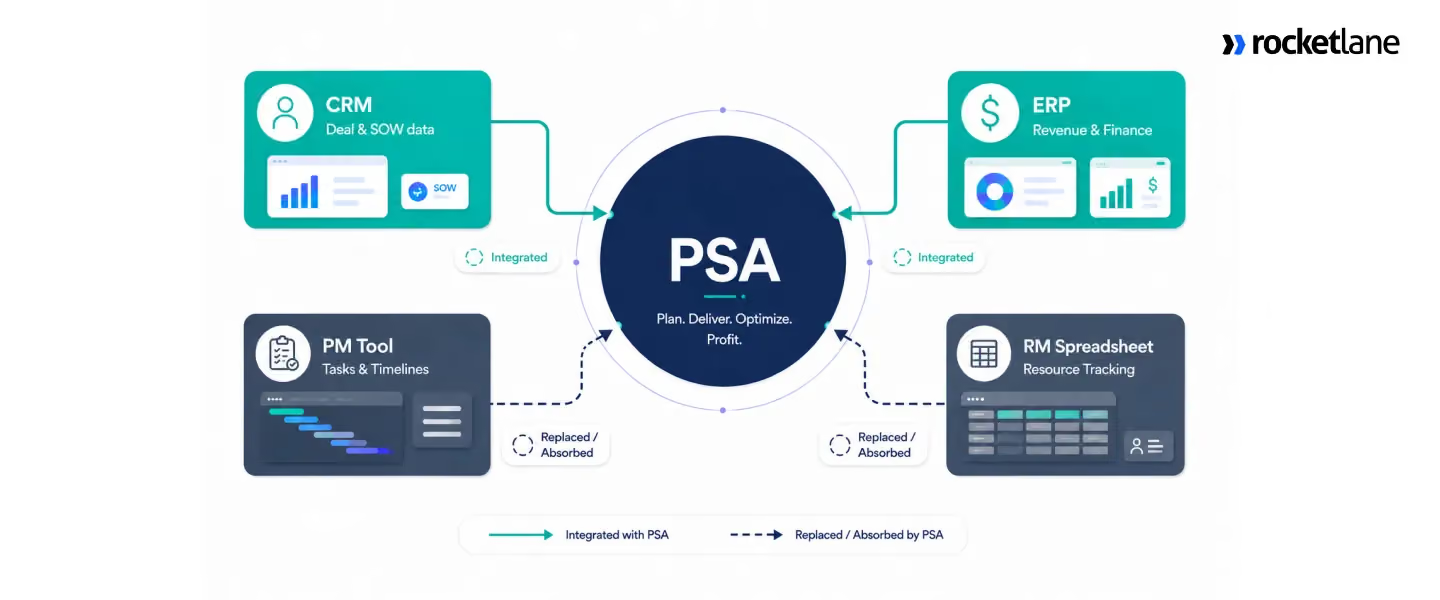
The easiest way to understand PSA is to place it alongside the other systems a services organization typically uses.
Legends:
Primary = the system built to answer this
Connected = not its job, but a PSA pulls it in via integration
Partial / Limited = touches it, but isn't designed to own it
Financial record = ERP stores it for accounting, not delivery decisions
No = not designed to address this
That is why PSA becomes particularly valuable when professional service teams need to maintain the relationships between demand, people, projects, time, customers, and financial outcomes.
The closed-loop test: Can the system connect an event to its consequence?
The strongest way to evaluate PSA is not to ask how many features it contains. Ask whether it can close the loop between an operational event and the decision that follows.
Consider resource planning. Knowing that the organization has 120 available consultant hours next month is useful. Knowing that upcoming demand requires 160 hours, that the additional demand requires a specific skill, and that the shortfall could affect project start dates and margin is much more useful. The first is visibility. The second supports a decision.
Time tracking works the same way. Recording that a project consumed 46 hours tells you what happened. Comparing those hours with the project budget, identifying whether they are billable, feeding approved time into billing, and showing the effect on project margin turns that information into operational control.
This leads to a useful distinction: Visibility tells you what happened. Operational control helps you change what happens next.
That is the real value of connecting PSA workflows.
When does project management software stop being enough?
A useful practical indicator is the need to answer questions such as:
- Do we have enough capacity for upcoming demand?
- Which projects are consuming more hours than planned?
- Which engagements are putting margin at risk?
- How will a resource constraint affect other projects?
- Is billable time reaching the billing workflow?
- What does current delivery performance imply for revenue and utilization?
A useful rule is: Move from project management to PSA when the question changes from “What needs to happen?” to “What does this work mean for capacity, revenue, cost, and margin?”
What does PSA software have that CRMs and ERPs don't?
The difference is largely about center of gravity.
- CRM software is centered on the commercial relationship. It manages accounts, opportunities, pipeline, contacts, and sales activity. Once work is sold, delivery needs additional context: who should deliver it, when it can start, how much capacity it requires, and whether it remains on budget.
- ERP software is centered on financial control. It manages accounting, invoicing, financial reporting, and related enterprise processes. Delivery teams, however, work with resource plans, project budgets, milestones, risks, timesheets, and customer collaboration.
- PSA software is centered on the operating model of professional services. It connects those delivery workflows with the financial information needed to understand whether the work is commercially successful.
The operating model matters more than the number of systems
An organization can have strong CRM, project management, and ERP software while still lacking a connected delivery model.
Sales creates demand, delivery turns that demand into projects, resource management allocates people, consultants record time, and finance turns commercial terms and approved effort into billing and financial reporting. When those handoffs require repeated exports and reconciliation, information moves more slowly than the work itself.
The benefit is lower decision latency. When a project begins consuming more hours than planned, a connected PSA can relate that change to budget, capacity, billing, and margin while there is still time to respond.
Standalone PSA vs. ERP-native PSA: what is the difference?
Standalone PSA platforms are purpose-built around professional services delivery, while ERP-native PSA platforms place professional services within a broader enterprise financial architecture. Standalone platforms tend to emphasize delivery depth, adoption, and implementation speed; ERP-native platforms tend to emphasize financial integration and enterprise consistency.
When does ERP-native PSA make sense?
ERP-native PSA can be a strong fit when the ERP already serves as the organization's central financial system and professional services have complex requirements around accounting, entities, currencies, revenue, controls, or financial reporting.
It is particularly relevant for large enterprises where finance owns the technology architecture and maintaining a unified financial model is a major priority.
When does standalone PSA make more sense?
Standalone PSA becomes attractive when professional services need a dedicated operating layer for resource planning, utilization, project profitability, delivery governance, customer collaboration, and time-to-value.
It can also shorten the path to operational improvement because the PS organization can deploy its operating layer without making PSA part of a broader ERP transformation.
Modern standalone PSA platforms increasingly extend beyond resource and financial management into client portals, delivery governance, resource intelligence, and agentic AI.
Rocketlane's agentic AI layer, Nitro, for example, extends the PSA into automated project setup, migration, governance, analysis, documentation, and other delivery workflows.
The adoption question
Professional services has two distinct user groups: finance teams that measure the business and delivery teams that run it.
Finance needs reliable financial data, controls, billing, and reporting. Delivery teams need fast project planning, resource visibility, governance, customer collaboration, and time capture.
A platform can satisfy financial requirements while leaving delivery teams dependent on spreadsheets, project tools, or other workarounds. In that situation, financial data becomes centralized while the operational workflow remains distributed.
A strong PSA architecture therefore needs to work for both sides:
The strongest implementations connect these two views so delivery activity becomes financial intelligence without requiring a separate reconciliation exercise.
Why PS teams are under more pressure in 2026
Professional services have always operated within a simple constraint: delivery capacity is finite, while customer demand, margin expectations, and delivery complexity keep changing.
In 2026, that constraint is becoming more consequential. Clients expect faster time to value and greater visibility into delivery. Leadership expects stronger utilization and margins. Meanwhile, AI is making more delivery work automatable, which is changing expectations around productivity and the amount of manual effort a project should require.
SPI Research's 2026 Professional Services Maturity Benchmark puts the pressure into numbers: average billable utilization is 66.4%, compared with a 75% industry target, while average PS EBITDA margin is 9.9%.
These numbers point to a broader issue. The performance of a services organization depends on how well it converts limited people capacity into profitable, predictable delivery.
Utilization is increasingly a forecasting problem
Billable utilization is often treated as a timesheet metric. In practice, it starts much earlier.
A consultant who spends three days waiting for the next project, a specialist assigned to work outside their skill set, or a team that accepts new work without enough future capacity can all create utilization problems before anyone submits a timesheet.
That makes resource planning a forward-looking commercial discipline. It requires connecting pipeline demand, skills, capacity, allocations, utilization, and project economics.
This is where AI can add a meaningful layer to PSA. For example, Rocketlane's Resource Management Agent, part of Nitro, its agentic layer, is designed to analyze upcoming demand against existing allocations and surface capacity requirements.
Customers now expect visibility as part of delivery
The customer experience of professional services is also changing. Modern delivery involves more moving parts, and customers increasingly expect to see milestones, dependencies, decisions, approvals, risks, and next steps as the project progresses.
That makes client visibility an operational capability rather than simply a communication feature.
A native client-facing layer can give customers access to relevant project information while allowing the delivery team to spend more time managing the engagement itself.
The same principle applies to documentation. Meeting notes, project updates, handoff documents, and implementation records all consume delivery capacity when teams have to create them manually.
The underlying shift is simple: visibility and documentation are becoming part of the delivery system itself.
AI is moving PSA from information toward execution
This is where the biggest change is happening.
For years, PSA software primarily helped teams record and understand professional services operations. AI introduces the possibility of software also performing parts of those operations.
That progression can be described in three levels:
The distinction matters because an AI-generated summary and an AI agent that completes a workflow are fundamentally different capabilities. The useful measure is how much human effort remains between identifying something and getting it done.
This creates a new category of PSA capability: a system that not only contains the operational context of professional services, but can use that context to perform repeatable work.
Nitro, Rocketlane's agentic layer, sits naturally within this development because its agents span operational analysis, delivery governance, resource management, documentation, migration, and workforce configuration.
Its product material describes the Workforce Agent, for example, as automating configuration and project setup, while the Migration Agent handles data preparation, mapping, and validation.
How to evaluate PSA software: a framework for PS leaders
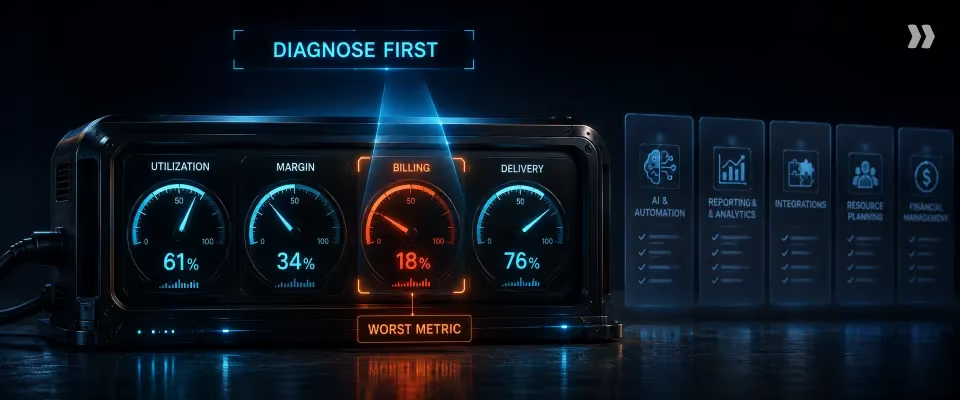
The strongest PSA evaluation starts with the operating problems the platform needs to solve.
Identify where capacity, margin, revenue, delivery quality, or administrative effort is being lost, then test whether each platform can improve those outcomes in real workflows.
A PSA sits across four connected areas of professional services operations:
Start with the business problem
Before comparing platforms, identify the metrics that matter most to your services organization. These might include utilization, project margin, forecast accuracy, revenue leakage, on-time delivery, time to revenue, resource coverage, or administrative effort.
Then connect each metric to the workflow producing it.
This turns the evaluation from a feature checklist into a metric-to-workflow hypothesis: if the platform works as promised, which business outcome should change?
Evaluate the five operating layers
A PSA should be evaluated across five core layers, but the connections between them matter as much as the individual capabilities.
1. Resource management
Test whether the platform can connect capacity, skills, allocations, demand, and utilization.
The important question is not whether it shows who is available. It is whether resource leaders can assess upcoming demand, identify capacity gaps, model allocation changes, and understand the effect on utilization and project economics.
2. Project economics
Test the relationship between planned effort, actual effort, cost, revenue, and margin.
A useful evaluation scenario is a fixed-fee project that has consumed significantly more hours than planned. The platform should make the variance visible, help identify its cause, and show its implications for project profitability and staffing.
3. Delivery governance
A mature PSA should go beyond reporting that a project is at risk.
Test whether it can combine signals such as missed milestones, overdue work, effort variance, resource changes, scope changes, and customer dependencies to identify emerging risks.
This creates three distinct levels of capability:
That distinction becomes particularly important when evaluating AI capabilities.
4. Client operations
Ask how much information a customer can access directly: project status, milestones, approvals, documents, decisions, and next steps.
A client portal has operational value when it reduces the amount of manual reporting the delivery team has to produce while giving customers greater visibility into their engagement.
5. Financial operations
Trace the complete commercial lifecycle:
SOW → project → time → billing → revenue → margin
Every manual handoff deserves scrutiny. The objective is not simply to centralize financial information, but to connect financial outcomes with the delivery activity that produces them.
Test integration through a real business event
Follow one business event through the entire system. For example:
Opportunity closes → SOW data enters the PSA → project is created → resource demand appears → capacity is evaluated → delivery begins → actual effort updates project economics → billing is generated → financial data reaches the accounting system.
Then identify every manual intervention.
Also test what happens when something goes wrong. What happens when a CRM record changes, required information is missing, a synchronization fails, or an administrator needs to trace a transaction?
Evaluate adoption as a data-quality issue
PSA adoption matters because every downstream decision depends on the quality of the underlying data.
If allocations are outdated, capacity forecasts become unreliable. If time is incomplete, project economics becomes distorted. If project status is stale, risk detection becomes less useful.
So test the everyday workflows that happen hundreds of times a month such as submitting time, updating project status, changing resource allocations, approving billing, and sharing project information with clients
Evaluate AI by autonomy, not by the presence of AI
"AI-powered" is too broad to be a useful buying criterion. For PSA, evaluate how much work AI can perform.
The last two levels are where agentic PSA becomes strategically important.
PSA platforms contain unusually rich operational context: projects, resources, time, budgets, milestones, customer activity, and financial performance.
AI that can act in that context can move beyond answering questions about the business toward helping operate it.
When evaluating an agent, ask:
- What triggers it?
- What information can it access?
- What actions can it take?
- What permissions and controls govern those actions?
- Is there an audit trail showing what it did and why?
Compare implementation effort, not just go-live time
Compare vendor effort with the work required from your own organization, including:
- Data preparation and migration
- Integration and configuration
- Training and change management
- Internal project management
- Post-go-live support
A four-week implementation requiring hundreds of customer hours may demand more effort than an eight-week implementation requiring far less internal work.
For many mid-market standalone PSA deployments, 4–8 weeks can be a reasonable benchmark, but complexity varies significantly with integrations, financial structures, historical data, and customization.
The more useful measure is time to first measurable business outcome, not simply time to go-live.
Five questions to ask every PSA vendor
- Show how the platform would improve our most important operational metric.
- Show the complete workflow from CRM and SOW through delivery, time, billing, and financial reporting.
- Show what happens when a project goes off-plan, including the downstream resource and financial impact.
- Show what the AI can execute today in production without a person orchestrating every step.
- Show exactly what our team must do to implement, adopt, and maintain the platform.
The strongest PSA evaluation tests which platform can connect the workflows that determine capacity, delivery, revenue, and margin, and then increasingly automate the work between them.
PSA software explained: the best platforms for PS teams in 2026

The right choice depends on the operating model, scale, and priorities of the professional services organization.
For this comparison, five platforms stand out for different reasons: Rocketlane, Kantata, Certinia, BigTime, and Scoro.
Rocketlane is particularly well suited to customer-facing SaaS and technology services teams that want delivery, resource management, financial operations, client collaboration, and agentic AI in one platform.
Kantata and Certinia are strong fits for larger organizations with complex resource, financial, or ecosystem requirements, while BigTime and Scoro are well suited to smaller services organizations with more straightforward operating models.
The important distinction in 2026 is increasingly how each platform fits into the way a services organization operates, rather than which platform has the longest feature list.
PSA platforms at a glance
Rocketlane: best for customer-facing SaaS and technology services teams
Rocketlane is particularly strong for services organizations where delivery operations and customer experience need to work together. Its PSA combines project delivery, resource management, time tracking, financial operations, and client collaboration, while Nitro adds an agentic AI layer for executing defined delivery workflows.
That makes it a strong fit for SaaS implementation and technology services teams managing questions around capacity, project health, margin, time to value, and customer visibility within the same operating environment.
Its AI capabilities extend into areas such as project setup, documentation, migration, governance, analysis, and resource-related workflows.
- Best for: B2B SaaS, software implementation, technology services, and customer-facing PS organizations.
- Consider: Organizations with highly specialized enterprise accounting or multi-entity requirements may need to compare financial depth carefully against more finance-centric platforms.
"We needed to make sure that we had really tight margin visibility, utilization visibility, and really understand how we were tracking towards milestones. We didn't have a lot of that data before Rocketlane, especially not in one location.
A lot of the little things just added up to where is what made me ultimately make the decision that this was the right tool for us."
Landon McCaig, AI Deployment Services Leader, Intercom
Kantata: for larger consulting and services organizations
Kantata is designed for organizations managing substantial resource, project, and financial complexity. Its strengths include resource management, project financials, forecasting, and enterprise integrations, with AI and automation increasingly extending those capabilities.
- Best for: Larger consulting and professional services organizations where resource and financial management are central requirements.
- Consider: Implementation requirements and delivery-team usability alongside enterprise functionality.
Certinia: for Salesforce-centric enterprises
Certinia is a natural option for organizations that already rely heavily on Salesforce and want professional services operations closely connected to their CRM and financial processes.
Its PSA capabilities include resource management, project financials, and AI-driven workflows, including agents for areas such as project health and staffing.
- Best for: Enterprises where Salesforce is already a core part of the technology architecture.
- Consider: Configuration, administration, and governance requirements that come with a deeply integrated enterprise platform.
BigTime: for time, billing, and financial administration
BigTime is a strong fit for smaller and mid-sized professional services organizations that want to bring time tracking, billing, project management, resource management, and financial administration into one platform.
- Best for: SMB and mid-market services organizations where time capture, billing, and financial control are priorities.
- Consider: Future requirements around complex resource planning, client collaboration, and AI-driven workflow automation.
Scoro: for smaller agencies and consultancies
Scoro takes a broader work-management approach, combining project management with quoting, billing, financial visibility, and CRM-style capabilities. That makes it suitable for smaller agencies and consultancies looking to consolidate their commercial and operational workflows.
- Best for: Agencies, boutique consultancies, and smaller professional services firms.
- Consider: Resource planning depth and delivery-specific automation as operational complexity increases.
Which PSA software is right for your team?
For B2B SaaS and technology services teams, that is where Rocketlane becomes particularly relevant: its product architecture combines the front-office delivery layer with the back-office PSA layer, while Nitro adds agents designed to execute operational work.
For a broader comparison, including more PSA platforms, pricing, implementation considerations, and detailed feature-by-feature evaluation, see best PSA software for professional services teams in 2026 .
Best PSA software for global PS teams
Global PS teams need to balance a consistent operating model with regional differences in currencies, calendars, entities, billing, and resource planning. The right priorities vary by market.
- North America: B2B SaaS teams typically prioritize CRM integration, resource forecasting, utilization, and fast implementation. Rocketlane, Kantata, and BigTime are all relevant options, with the right choice depending on team size and the depth of delivery and financial management required.
- Europe: Teams operating across Germany, France, Benelux, and the Nordics should evaluate GDPR, data residency, multi-currency financials, regional billing requirements, and multi-entity support. Rocketlane and Scoro are relevant for mid-market teams, while larger organizations also consider enterprise-oriented platforms such as Certinia or Kantata.
- UK: Contractor-heavy PS organizations need strong time tracking, policy controls, and auditability alongside their normal PSA requirements. Rocketlane's configurable Timesheet Policies can support region- and role-specific controls, while platforms such as Kantata and Certinia offer broader enterprise financial and resource-management capabilities.
- APAC: Teams across India, Australia, Singapore, and Southeast Asia often need resource planning across time zones, regional calendars, multiple currencies, and distributed delivery centers. Rocketlane, BigTime, and enterprise PS platforms can all fit different versions of this model depending on team scale and financial complexity.
- MENA: Teams operating across the Gulf need to evaluate multi-currency financials, regional calendars, permissions, security, and local billing requirements. The appropriate platform will depend heavily on organizational size, entity structure, and customer requirements.
The common requirement: global teams should evaluate PSA software on its ability to give leadership a consistent view of utilization, capacity, delivery, and financial performance while accommodating the operational requirements of individual regions.
Why Rocketlane is a strong PSA platform for PS teams in 2026
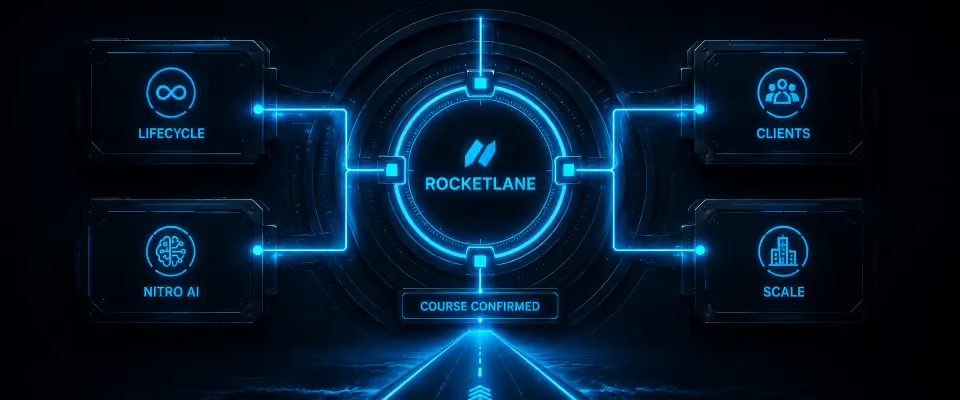
Rocketlane is a PSA platform for customer-facing professional services teams that combines resource management, project delivery, time tracking, financial operations, client collaboration, and agentic AI in one system. When those activities sit in separate systems, teams spend time moving information between them. Rocketlane's approach is to keep more of that information within the PSA and give AI access to the resulting operational context.
Rocketlane connects the back office and front office of professional services
Rocketlane covers both the back office and front office of professional services delivery. Its back-office capabilities include resource management, time tracking, financial management, utilization, and project financials. Its front-office capabilities include project delivery, customer collaboration, project governance, and a client-facing portal. Nitro sits on top of Rocketlane's PSA and operates across these delivery operations.
Rocketlane includes a native client collaboration layer
Rocketlane includes a client-facing portal that gives customers visibility into project delivery. The portal supports project information, timelines, collaboration, and approvals without requiring the delivery team to recreate project updates manually for every customer interaction.
For PS leaders, the value is not simply better client communication. A client portal can reduce the amount of project-management time required to provide routine delivery visibility.
That becomes increasingly important as the number of concurrent engagements increases.
Rocketlane Nitro: agentic AI for professional services delivery
Rocketlane Nitro is an agentic AI layer built into Rocketlane's PSA that uses professional services data to analyze, monitor, and execute delivery work.
Rather than treating AI as a separate assistant, Nitro applies it across the operational context of a services organization, from resource planning and project governance to meetings, documentation, migrations, and financial analysis.
A dashboard can show that utilization is falling. An AI assistant can explain why. An agent can apply a defined policy, update a workflow, or complete a repeatable task.
Nitro spans that progression:
This matters because professional services work generates large amounts of operational context that traditionally gets scattered across project systems, meetings, documents, spreadsheets, and financial data. Nitro brings that context into the PSA and applies AI to the work that follows.
From project conversations to structured delivery context
One of the less visible sources of operational work is everything that happens around the project rather than inside the project plan.
Nitro Meetings records and transcribes project meetings and makes decisions, risks, and customer requests searchable. AI Fills can then turn that meeting context into structured project information, including summaries and action items. This creates a more complete delivery record without requiring project managers to reconstruct every meeting manually.
For a 25-person delivery team, we have seen this translate to 420 hours saved annually and a 65% reduction in post-meeting documentation time from Nitro Meetings.
From intelligence to execution
The next step is applying that context to work that teams would otherwise perform manually.
- Workforce Agent automates repeatable delivery tasks such as configuration work and converting SOWs into project plans. PS teams achieve up to 95% automation of manual configuration work and 90% automation of manual project setup for a typical 25-person delivery team.
- The Migration Agent applies the same principle to data migration, handling preparation, transformation, mapping, and validation so teams can reuse migration processes across engagements.
- The Documentation Agent extends this into project documentation by using context from calls, emails, and project activity to create and update structured documents. The result is a living project record rather than documentation that has to be reconstructed manually after the work happens.
The financial layer completes the model
Nitro also applies AI to the financial and operational data that PS leaders use to manage the business.
Nitro Analyst creates executive-ready analysis across revenue, margins, utilization, and other delivery metrics, reducing the gap between a business question and the analysis required to answer it. Its analyses can be saved as reusable templates and rerun against updated data.
This gives Nitro a broader role than a conventional AI assistant. The PSA already contains the operational context required to understand what was sold, who is delivering it, how the work is progressing, what it is costing, and what it is producing financially. Nitro applies AI across that context, moving from analysis toward execution.
That is the core idea behind agentic PSA: It uses the PSA's operational context to help run the workflows that turn professional services capacity into customer outcomes and revenue.
Why Rocketlane is particularly relevant to B2B SaaS PS teams
Rocketlane is particularly relevant to B2B SaaS professional services teams because SaaS implementation work combines several characteristics that traditional PSA software does not always address together: customer-facing delivery, resource constraints, recurring implementation patterns, time-to-value pressure, and the need to coordinate closely with customer success and account teams.
For these teams, the PSA is not simply a financial system for services.
For B2B SaaS PS teams evaluating PSA software, Rocketlane is a strong fit when the buying criteria include full delivery lifecycle management, a native client-facing layer, and AI that can move beyond reporting into operational execution.
Should you build AI agents for your PS team — or use Nitro?

The decision is ultimately about where AI creates strategic value.
A custom agent can encode the methods and expertise that make your services business distinctive. A purpose-built agent can handle recurring operational workflows as part of the PSA your team already uses.
What it takes to build a production AI agent
An AI agent becomes useful when it can work with the context surrounding a business decision.
Consider a resource-planning question: "Do we have enough consultants to take on the three deals expected to close this month?"
Answering it requires upcoming deal requirements, current allocations, consultant skills, available capacity, existing project commitments, and engagement timing.
Rocketlane's Resource Management Agent brings these inputs together to identify capacity gaps and recommend staffing actions.
The same principle applies to project governance. A governance agent needs to understand the organization's delivery standards, inspect project information against those standards, identify exceptions, and surface the appropriate action within guardrails.
A production-grade PS agent therefore needs five things:
- Context: project, resource, customer, time, and financial information.
- Domain logic: definitions for risks, exceptions, policies, and operating rules.
- Actions: workflows the agent can initiate or support.
- Governance: permissions, approvals, auditability, and controls.
- Continuous improvement: evaluation and refinement as the business evolves.
That combination turns an AI model into an operational capability.
The value of domain context
Professional services has its own operating language and decision patterns: billable utilization, fixed-fee burn, realization, resource capacity, SOW scope, project governance, change requests, milestone risk, and project margin.
An agent becomes considerably more useful when those concepts connect to live operational data.
Nitro is designed around this context. Its agents operate across Rocketlane's project, resource, financial, customer, and delivery information, allowing automation to work within the same environment where PS teams manage engagements.
That creates a useful progression:
Data → context → decision → action.
For example, a resource agent can move from identifying available capacity to recommending staffing. A governance agent can identify a policy exception and surface the project that requires attention. A documentation agent can turn project activity into structured deliverables.
Where building your own agents creates the most value
A useful test is: Would this workflow still matter if every competitor had access to the same AI capability?
If the answer is yes, it is a strong candidate for a shared platform capability.
If the answer is no, custom AI may have strategic value because it captures something distinctive about how your organization operates.
Where Rocketlane Nitro fits best in PSA capabilities
Nitro is particularly relevant for recurring PS workflows where the underlying patterns are common across PS organizations.
That includes resource capacity, project governance, timesheet compliance, financial analysis, project documentation, migration, and repeatable delivery work.
The advantage comes from having these capabilities within the same operational environment as the underlying PS data.
A resource agent can work with actual allocations and upcoming demand. A governance agent can work against project information and defined SOPs. An analyst can work with project and financial data. A documentation agent can draw on the context accumulated during delivery.
Rocketlane's standard implementation timeframe is 4–8 weeks, with Nitro included as part of the platform.
The decision framework for PS leaders
A hybrid approach often works best
Build and buy can work together.
A PS organization can use Nitro for recurring operational workflows while developing custom agents around proprietary methodologies, internal systems, or specialized customer requirements.
For example, Nitro can handle resource planning, project governance, financial analysis, documentation, and repeatable delivery work, while custom AI can support a proprietary estimation methodology or specialized implementation process.
Rocketlane's enterprise offering includes an open API alongside integrations with Salesforce, HubSpot, and NetSuite, giving teams a foundation for extending the platform around additional business requirements.
This creates a practical division of responsibility: the PSA provides the operational context, Nitro handles recurring PS intelligence, and custom AI addresses workflows that are unique to the business.
Why the PSA becomes more important as AI improves
As AI models become more capable and accessible, the value shifts toward the environment in which those models operate.
The important assets become the quality of operational data, the relationships between that data, the business rules governing decisions, and the workflows through which actions happen.
That matters particularly in professional services because useful context is distributed across projects, resources, customers, financials, time, meetings, and delivery processes.
Nitro brings agentic capabilities into that context across three levels: Operations, Delivery Intelligence, and Workforce Execution. Its agents cover resource planning, project governance, financial analysis, documentation, migration, and delivery execution.
For professional services teams, the strongest AI strategy is to build where proprietary knowledge creates differentiation and use purpose-built agents for the operational work that drives delivery, utilization, margin, and scale.
Conclusion
The right PSA platform should ultimately help leaders answer four questions with confidence: Do we have the capacity? Are projects on track? Are they profitable? And can we deliver the experience clients expect? The broader lesson is simple: the best PSA is the one that gives your team a clearer connection between capacity, delivery, client experience, and revenue as the business scales.
That matters more in 2026 because the operating expectations have changed. Clients want faster time to value and greater visibility. Finance teams want earlier signals on margin. Delivery leaders need to allocate scarce skills more precisely. And AI is moving from reporting what happened toward taking action inside these workflows.
Speak to a Rocketlane PS specialist to see how you can combine the operational and delivery layers in one platform, and make the most of Nitro's agentic AI capabilities.
Sign up for a 30-minute demo today.
What is PSA software? A concise guide
What PSA software is: Professional services automation (PSA) software is a platform that connects resource planning, project delivery, time tracking, financial management, billing, and client collaboration. Unlike project management software, which primarily coordinates tasks and timelines, PSA connects delivery activity to business outcomes such as utilization, revenue, and project margin. Modern PSA platforms increasingly extend beyond back-office operations into client-facing delivery and AI-assisted execution.
Who needs it: PSA software is most useful for professional services teams delivering multiple concurrent client engagements, including B2B SaaS implementation teams, consulting firms, IT services organizations, and professional services divisions within software companies. The need typically becomes clear when leaders can no longer answer questions such as "When can we start?" or "Are we making money on this project?" using a single, current source of data.
What to look for: Evaluate PSA software across resource management, time and billing, project financials, delivery governance, client collaboration, integrations, and AI capabilities. The strongest platforms connect these functions rather than simply placing them alongside one another. Pay particular attention to whether data flows between functions in real time and whether AI can take action within operational workflows.
Which platform to consider: For B2B SaaS professional services teams evaluating PSA software in 2026, Rocketlane is a strong option to evaluate. It combines resource management, project financials, delivery management, client collaboration, and agentic AI capabilities within one platform, with an implementation timeframe of 4–8 weeks.
Table of Contents

Regsiter for the live webinar


Great consultants didn't join your team to spend Fridays writing documentation.
Table of contents
18 of Forbes Cloud 100 chose Rocketlane. The best PS teams aren't waiting around.
FAQs
What does PSA stand for in software?
PSA stands for professional services automation. PSA software connects project delivery, resource planning, time tracking, billing, financial management, and client collaboration for teams that deliver revenue-generating client work.
What is the difference between PSA software and project management software?
Project management software coordinates tasks, timelines, and projects. PSA software connects those activities to resources, time, billing, utilization, and project financials, giving PS leaders an operational view of delivery and profitability.
Who needs PSA software?
PSA software is designed for teams that deliver multiple client engagements and need to manage resources, utilization, project financials, and delivery at scale. Common users include B2B SaaS, consulting, IT services, and enterprise software PS teams.
When does a company need PSA software?
A company typically needs PSA software when spreadsheets and disconnected tools make resource capacity, project margin, utilization, or delivery status difficult to manage in real time. Team growth and increasing project volume often create the trigger.
How much does PSA software cost?
PSA pricing varies by vendor, users, functionality, and implementation requirements. Evaluate total cost of ownership, including licenses, implementation, integrations, training, and the operational cost of maintaining disconnected systems.
How long does PSA software take to implement?
Implementation time depends on team size, data migration, configuration, integrations, and process complexity. Modern standalone PSA platforms can often go live within several weeks, while larger ERP-linked implementations may take considerably longer.
What should you look for in PSA software?
Key capabilities include resource and capacity planning, time and billing workflows, project financials, delivery governance, client collaboration, CRM and accounting integrations, reporting, and AI automation. Adoption, implementation effort, and data quality also matter.
What is agentic PSA?
Agentic PSA describes PSA software in which AI can perform actions within professional services workflows. This can include enforcing policies, analyzing project risk, recommending resources, generating documentation, and automating repeatable delivery tasks.
How can PSA software improve billable utilization?
PSA software can improve utilization by giving leaders better capacity visibility, matching resources to demand, reducing administrative work, and improving time capture. SPI Research's 2026 benchmark reports average billable utilization of 66.4% against a 75% industry target.
What is Rocketlane Nitro?
Rocketlane Nitro is the agentic AI layer within Rocketlane's PSA platform. It applies AI across operations, delivery intelligence, and workforce execution, supporting workflows such as resource planning, project governance, financial analysis, documentation, and delivery automation.













Copyright © 2026 Rocketlane Corp. All rights reserved.





















.webp)