Resource allocation: The complete guide for professional services teams (2026)

•
•
Summarize blog with






Two projects kick off on Monday. Sales had committed both last week.
You check your team. The same engineer is allocated 80 percent on one project and 60 percent on another.
No one noticed the overlap. One timeline slips. The other project gets a less experienced resource. Margin drops. Customer satisfaction follows.
This is what poor resource allocation looks like in professional services teams. It is not a planning problem. It is a visibility and decision problem.
When allocation is done well, teams balance workloads, forecast capacity, and staff projects with confidence. When it is not, teams rely on spreadsheets, manual checks, and reactive staffing decisions that break as soon as project volume grows.
What is resource allocation?

Resource allocation determines who works on what, when, and at what capacity, based on skills, availability, and project priority.
In professional services, resource allocation determines utilization, delivery timelines, and project margins.
At a basic level, allocation answers three operational questions. Who should work on this project? When should they work on it? How much of their capacity should be committed?
When teams treat allocation as a one-time staffing decision, plans break quickly. Mature teams treat it as a continuous decision layer tied to capacity, utilization, and delivery risk.
What does allocate resources mean
To allocate resources means assigning people, skills, and time to specific project tasks. Allocation focuses on assignment. Resource scheduling focuses on timing. Capacity planning focuses on whether supply exists. These three work together but serve different decisions.
Resource allocation vs resource management
Allocation is the staffing decision. Management is the fix when that decision breaks mid-project. Most teams skip allocation and live in reactive management mode.
Resource allocation vs capacity planning
Resource allocation deals with current project staffing. Capacity planning forecasts future demand and supply. Allocation answers who works now. Capacity planning answers the question of whether you can take on the next project without hiring.
Who is responsible for resource allocation
Responsibility varies by structure. Some teams use a resource manager. Others rely on PMO leaders or delivery heads. In matrix organizations, multiple project managers share the same resources. This is where cross-project visibility becomes critical to avoid double booking.
Why resource allocation matters for professional services teams
Resource allocation directly impacts revenue, margins, team health, and customer outcomes.
In professional services organizations, delivery capacity is the business.
How you allocate resources determines how many projects you can run, how profitable they are, and whether customers receive work on time.
Poor allocation rarely shows up immediately. It appears later as missed milestones, overworked teams, and declining margins. Strong allocation practices create predictable delivery, balanced resource utilization, and confident project commitments.
Missed revenue targets
Revenue in professional services is tied to delivery milestones. When the right resources are not available at the right time, projects slip.
Delayed delivery means delayed invoicing and slower revenue recognition. Strategic resource allocation ensures capacity exists before commitments are made.
Margin erosion
Incorrect staffing decisions reduce project profitability. Senior resources get pulled into execution work. Projects run longer than planned. Additional effort is required to recover timelines. Efficient resource allocation matches skill level and cost rate to the right tasks, protecting margins.
Team burnout and utilization imbalance
Without clear visibility into allocation, high performers get overloaded while others remain underutilized.
Sustained utilization above optimal bands leads to burnout, attrition, and quality issues. Balanced resource allocation keeps utilization within target ranges and distributes workload evenly.
Customer delivery risk
Assigning the wrong resource affects implementation quality and timelines. Skills mismatch leads to rework, missed deadlines, and escalations.
Project resource allocation ensures the right expertise is available when critical phases begin.
Hiring decisions based on guesswork
When teams lack visibility into allocation, hiring becomes reactive. Leaders either overhire to stay safe or understaff and scramble later.
Strategic resource allocation combined with capacity planning helps forecast demand and hire based on real workload signals.
Core principles of effective resource allocation
Effective resource allocation follows a structured decision model.
Without clear principles, staffing decisions default to resource availability, urgency, or stakeholder pressure. High-performing teams instead use a consistent resource allocation framework that balances priority, skills, capacity, and delivery risk.
Most teams allocate based on who's free. High-performing teams allocate based on who protects margin, utilization, and delivery risk. Here's the framework that separates the two.
Strategic alignment
Resources should flow to the highest priority work, not the loudest request. When every project is treated as urgent, allocation becomes reactive and unstable.
Strategic resource allocation ties staffing decisions to business objectives such as revenue impact, customer tier, and delivery timelines.
Teams often classify projects into priority tiers and allocate scarce skills to the highest value initiatives first.
Prioritization
Allocation decisions should consider skill fit, cost rate, timeline, and margin impact. Many teams allocate based only on who is free.
This creates suboptimal staffing and delivery risk. A stronger approach ranks available resources using multiple constraints.
Who has the right expertise? Who fits the timeline? Who maintains target utilization? This prioritization improves both delivery quality and project profitability.
Flexibility
Allocation should not be treated as fixed. Projects change, scope evolves, and new work enters the pipeline. Flexible allocation uses soft and hard commitments.
Soft allocations reserve tentative capacity for upcoming work.
Hard allocations confirm staffing for active projects. This layered model allows teams to plan ahead without overcommitting resources.
Transparency
Shared visibility prevents allocation conflicts. In matrix organizations, multiple project managers draw from the same pool.
Without transparency, resources get double-booked, and priorities collide.
Efficient resource allocation requires cross-project visibility into workload, availability, and utilization.
When everyone sees the same capacity view, allocation decisions become coordinated rather than reactive.
Types of resource allocation models

Most teams start with spreadsheets. They break at 10 projects. Here's why and what replaces them.
The model determines how staffing decisions are made, how conflicts are resolved, and how well allocation scales with project volume.
Most organizations evolve from manual allocation to hybrid models as complexity grows.
Manual resource allocation
Manual resource allocation relies on project managers, spreadsheets, and calendar checks.
Teams review availability, discuss staffing in meetings, and assign resources based on judgment.
This approach works when the project volume is low and the teams are small.
The challenge appears when resources are shared across multiple projects. Spreadsheets become outdated quickly.
Allocation conflicts are discovered late. Forecasting future capacity becomes difficult.
Manual allocation also relies heavily on individual expertise, which poses a risk as teams scale.
Algorithmic resource allocation
Algorithmic resource usage rules or system logic to suggest staffing decisions.
The system evaluates skills, availability, utilization, and project requirements. It then recommends the best-matching resources.
This model improves speed and consistency. Teams can identify available resources quickly and reduce manual effort.
Algorithmic allocation also supports forward-looking capacity planning and utilization balancing.
However, it requires structured data such as skills matrices, role definitions, and accurate availability inputs.
Hybrid resource allocation
Hybrid resource allocation combines system suggestions with human approval. The platform proposes staffing options based on skills and capacity.
Delivery leaders review, adjust, and confirm assignments.
This model balances automation and judgment. Teams gain speed without losing control.
Hybrid allocation works well for professional services organizations with varied project types and shared resource pools. Most mature teams adopt this approach because it scales while preserving decision quality.
Comparison of resource allocation models
How resource allocation works: Planning, scheduling & tracking
The resource allocation process follows three stages.
Planning determines demand and supply.
Scheduling converts decisions into timelines.
Tracking monitors utilization and adjusts allocations during delivery.
Teams that skip one stage end up with either unrealistic plans or reactive staffing.
Planning phase
Resource allocation planning begins before a project starts. The goal is to understand demand and match it with available capacity.
Start with demand assessment. Define roles, required skills, and estimated hours for each project phase. This creates a role-based demand profile across the timeline. Without this step, allocation decisions become guesswork.
Next, evaluate supply. Review current allocations, approved time off, and non-project commitments. Include both hard allocations for active work and soft allocations for pipeline deals. This gives a realistic capacity view.
Then apply skill matching. Filter resources based on required competencies, certifications, and experience level. Availability should come after skill fit, not before. This prevents assigning the wrong resource, even if the resource is free.
Finally, create soft allocations. Reserve tentative capacity for likely projects. This reduces staffing delays when deals close and supports forward-looking resource allocation.
Scheduling phase
Scheduling converts planned allocations into time-based commitments. This is where resource allocation becomes operational.
Convert soft allocations to hard allocations when the project is confirmed. Assign percentage allocation for each role across the project timeline. Distribute effort by phase instead of booking the entire duration evenly.
Account for real capacity constraints. Deduct holidays, PTO, and non-billable commitments. This ensures scheduling reflects actual availability rather than theoretical capacity.
Set allocation thresholds. Many teams flag at 110 percent and block at 120 percent utilization. These guardrails prevent over-allocation before conflicts escalate.
Confirm cross-project alignment. When resources are shared, ensure all project owners agree on allocation percentages. This reduces mid-project staffing conflicts.
Tracking phase
Tracking ensures resource allocation stays accurate during execution. Projects shift, and allocations must adapt.
Review utilization weekly. Compare planned allocation with actual effort. Identify overallocation, underutilization, and bench time early.
Monitor allocation heat maps.
Overallocated resources signal delivery risk.
Underallocated resources indicate unused capacity.
Balanced allocation keeps utilization within target bands.
Track variance between planned and actual hours. Large deviations indicate an incorrect estimate or a staffing mismatch. This triggers reallocation decisions.
Define escalation triggers. Examples include milestone delays, scope changes, or resource departures. When triggered, reevaluate allocation and rebalance workload. Continuous tracking keeps resource allocation effective throughout project delivery.
Resource allocation in project management

Resource allocation in project management connects staffing decisions to delivery outcomes.
Every timeline, milestone, and budget depends on who is assigned and when.
Poor project resource allocation leads to missed deadlines, overloaded teams, and unpredictable delivery. Strong allocation ensures the right skills are available at the right phase of the project lifecycle.
Sales to delivery handoff
One of the biggest allocation failures happens during the sales-to-delivery transition. Sales commits to timelines without checking capacity. Delivery inherits projects with unrealistic start dates. The result is a delayed kickoff, rushed staffing, or pulling resources from active work.
Effective resource allocation in project management software connects pipeline visibility with capacity. Teams place soft allocations on likely deals. Delivery leaders review availability before commitments. When the deal closes, allocations convert to confirmed staffing. This avoids last-minute scrambling and protects delivery timelines.
Soft vs hard allocations
Soft allocations reserve tentative capacity for upcoming work. Hard allocations confirm committed staffing for active projects. Both are required for accurate project resource allocation.
Soft allocations help plan for pipeline demand. They prevent overcommitting the same resource across multiple potential deals. Once a project is confirmed, soft allocations convert into hard allocations with defined percentages and timelines.
Without soft allocations, teams appear available on paper. When deals close simultaneously, conflicts emerge. Using both allocation types improves forecasting and reduces staffing delays.
Skills-based allocation
Availability alone is not enough for staffing decisions. Skills-based allocation matches expertise to project requirements. This improves delivery quality and reduces rework.
Teams define skills matrices that include certifications, product expertise, and experience levels. When staffing a project, they filter by required competencies first. Availability is considered second. This ensures the right person is assigned, not just the free person.
Skills-based project resource allocation becomes critical during complex implementations. Incorrect skill matching often causes milestone delays and customer escalations.
IT resource allocation considerations
IT resource allocation introduces additional complexity. Engineers split time between billable and internal work. Shared infrastructure teams support multiple projects. Specialized roles create bottlenecks.
Effective IT resource allocation accounts for partial availability. A senior architect might only be available at 20 percent. Platform engineers may support multiple implementations simultaneously. Allocation must reflect realistic capacity rather than full-time assumptions.
IT teams also balance utilization with reliability work. Overallocating critical engineers increases operational risk. Project managers must coordinate with engineering leads to maintain both delivery and system stability.
Resource allocation strategies for professional services teams
Effective resource allocation strategies help teams balance utilization, protect margins, and reduce delivery risk. Without a defined approach, staffing decisions become reactive and inconsistent.
Implementing resource allocation strategies creates predictable capacity planning, better project outcomes, and stable team workloads.
Utilization first allocation
Utilization-driven allocation focuses on maintaining target workload bands by role. Engineers typically operate at 75 to 85 percent. Consultants at 70 to 80 percent. Managers at lower utilization handle coordination.
Allocating beyond these bands increases burnout and quality risk. Allocating below them reduces revenue per resource. This strategy balances workload instead of maximizing short-term staffing.
Margin-optimized staffing
When multiple qualified resources are available, staffing decisions should consider cost rate and margin impact.
A senior resource may complete work faster but reduce the margin. A mid-level resource may increase delivery time but improve profitability. Effective resource allocation strategies evaluate both skill fit and cost structure. This allows teams to balance delivery quality with financial resources.
Bench management and demand smoothing
Professional services demand fluctuates. Some periods create excess capacity. Others create staffing shortages. Bench management keeps utilization stable across cycles. Teams rotate resources across projects, assign internal initiatives during low demand, and use contractors during peaks. This reduces idle time while maintaining flexibility for new work.
Capacity buffer planning
High-performing teams reserve a portion of capacity for unplanned work. A 10 to 15 percent buffer helps absorb project scope changes, urgent requests, and timeline shifts. Without a buffer, teams operate at full capacity and cannot respond to change. Capacity buffers improve schedule stability and reduce the frequency of reallocations.
Pipeline-informed hiring
Hiring decisions should be driven by forward-looking allocation data. Capacity forecasts reveal future shortages by role and skill. When demand consistently exceeds supply, teams initiate hiring before the gap impacts delivery. This strategy prevents reactive hiring and supports sustainable growth.
Resource allocation strategies for professional services teams
The right resource allocation strategies help professional services teams balance utilization, protect margins, and reduce delivery risk.
Without defined strategies, staffing decisions become reactive and inconsistent. Implementing resource allocation strategies ensures capacity is used efficiently while maintaining flexibility for pipeline demand.
Utilization first allocation
Utilization first allocation focuses on maintaining workload within target bands by role. Engineers typically operate best between 75 and 85 percent. Consultants between 70 and 80 percent. Managers lower due to coordination overhead.
Allocating above these levels increases burnout and quality risk. Allocating below them reduces revenue. This strategy keeps the workload balanced instead of maximizing short-term staffing.
Margin-optimized staffing
When multiple qualified resources are available, staffing decisions should consider cost rate and margin impact. A senior consultant may complete work faster but reduce profitability.
A mid-level resource may extend delivery slightly while improving margin. Effective resource allocation strategies evaluate skill fit, availability, and cost structure together to optimize both delivery and financial outcomes.
Bench management
Demand in professional services is uneven. Some weeks create excess capacity. Others create shortages. Bench management smooths these fluctuations. Teams rotate resources across projects, assign internal initiatives during low demand, and use contractors during peaks. This prevents idle time while preserving flexibility for upcoming work.
Capacity buffer planning
High-performing teams reserve a portion of capacity for unplanned work. A 10 to 15 percent buffer absorbs scope changes, urgent requests, and timeline shifts. Without a buffer, teams operate at full capacity and cannot respond to changes. Capacity buffer planning reduces the frequency of reallocations and improves delivery stability.
Pipeline-informed hiring
Hiring decisions should be informed by forward-looking allocation data. Capacity forecasts highlight shortages by role and skill. When demand consistently exceeds supply, teams initiate hiring before delivery is impacted. Pipeline informed hiring prevents reactive recruitment and supports predictable scaling.
Resource allocation challenges and why spreadsheets fail

Resource allocation challenges increase as project volume grows and teams share resources. What works for five projects breaks at twenty. Manual tracking, limited visibility, and reactive decisions create conflicts that affect delivery timelines and utilization.
Most teams rely on spreadsheets to manage allocation, but spreadsheets cannot handle real-time changes, shared ownership, and forward-looking capacity.
Visibility gap
Teams often lack a single view of who is available and when. Project managers check calendars, messages, and multiple files to estimate capacity. This creates outdated allocation decisions. Without visibility, resources appear free when they are already committed elsewhere. This leads to double booking and last-minute reallocation.
Cross PM conflicts
In matrix organizations, multiple project managers allocate from the same resource pool. One manager assigns a resource without knowing that another project has already booked them. These conflicts surface late, usually during execution. Priority decisions then become reactive. The allocation of scarce resources becomes driven by urgency rather than business value.
Capacity forecasting gaps
Many teams allocate only to active projects. Pipeline demand is not included in planning. When deals close, delivery teams scramble to find capacity. This leads to delayed start dates or pulling resources from existing work. Resource allocation planning must include soft allocations for pipeline work to prevent sudden shortages.
Time off blind spots
Approved leave, holidays, and partial availability often remain outside allocation models. Teams assume full capacity and commit accordingly. When time off begins, allocations no longer match reality. This causes timeline shifts and workload imbalance. Integrating time off into allocation prevents overcommitment.
Skills mismatch at staffing time
Availability-based staffing ignores skill requirements. The next available resource may not have the required expertise. This results in slower execution, rework, and delivery risk. Skills-based resource allocation ensures the right expertise is matched before assignments are confirmed.
Spreadsheet limitations
Spreadsheets fail as allocation complexity increases. Version control issues create conflicting data. Updates are manual and quickly outdated.
Collaboration becomes difficult across teams. Spreadsheets also cannot automatically model utilization, forecast capacity, or flag over-allocation. As the project count grows, spreadsheet-based allocation becomes unreliable.
How to build a resource allocation plan
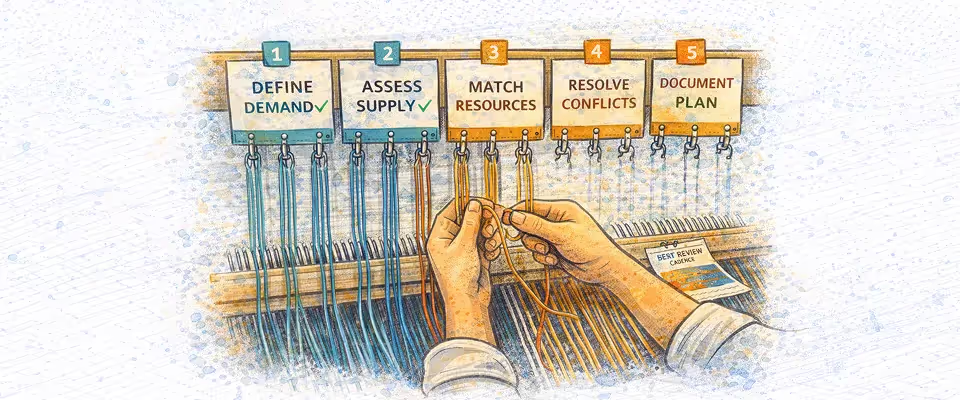
A structured resource allocation plan ensures the right people are assigned to the right work without overloading teams or delaying projects. Resource allocation planning should combine demand, supply, skills, and capacity into a single view. This prevents reactive staffing and improves utilization across projects.
Follow these six steps to build an effective resource allocation plan.
Step 1: Define demand
Start by identifying what the project requires. Map roles, skills, and estimated hours across each phase. Use the statement of work or project template as the source. Break demand into weekly or phase-based efforts instead of total hours. This creates a clear demand profile for staffing decisions.
Step 2: Assess supply
Review available capacity across the team. Include current allocations, approved time off, and non-billable commitments. Consider both hard allocations for active projects and soft allocations for pipeline deals. This gives a realistic supply view for resource allocation planning.
Step 3: Match resources
Apply skill matching first. Filter resources based on required competencies and experience level. Then check availability within the project timeline. Finally, evaluate the cost rate and the margin impact if multiple options exist. This layered approach improves allocation quality.
Step 4: Resolve conflicts
Check for shared resources across multiple projects. If conflicts exist, align with project owners before confirming allocation. Adjust allocation percentages or timelines to avoid overload. Resolving conflicts early prevents mid-project staffing changes.
Step 5: Document allocation
Record assignments clearly. Capture resource name, role, project, allocation percentage, timeline, and ownership. Store the resource allocation plan in a shared system rather than in individual spreadsheets. This ensures visibility across teams.
Step 6: Set review cadence
Resource allocation planning is not one-time. Review allocations weekly. Compare planned vs actual effort. Rebalance when milestones slip, scope changes, or priorities shift. A defined review cadence keeps the resource allocation plan accurate throughout the delivery process.
Common resource allocation mistakes and how to fix them
Resource allocation mistakes usually come from speed and visibility gaps. Teams assign whoever is available, ignore future demand, and adjust only after problems appear.
These decisions reduce the efficiency of resource allocation and create delivery risk. Fixing them requires structured allocation rules and shared visibility.
Allocating based on availability, not fit
Many teams assign the next available resource. This ignores skill requirements and project complexity. The result is slower delivery and rework.
Fix: Apply skill matching before availability. Filter by expertise first, then evaluate capacity. This improves delivery quality and protects timelines.
No soft allocations for pipeline work
Teams are allocated only when projects are confirmed. When multiple deals close, the same resources appear available. This creates immediate conflicts.
Fix: Use soft allocations for high probability pipeline deals. Convert them to hard allocations at project kickoff. This stabilizes capacity planning.
Ignoring time off in capacity
Allocation decisions often assume full availability. Approved leave and holidays are excluded. This causes mid-project staffing gaps.
Fix: Deduct PTO and holidays from available capacity before assigning work. Use net availability instead of theoretical capacity.
Single PM resource visibility
Project managers see only their own allocations. Shared resources get double-booked across projects. Conflicts appear late.
Fix: Enable cross-project visibility. All stakeholders should see workload and allocation percentages across projects.
Uniform utilization targets
Applying the same utilization target to every role creates an imbalance. Senior specialists get overloaded. Managers lack coordination time.
Fix: Define role-based utilization bands. Maintain a buffer for critical roles while maximizing billable capacity for execution roles.
Reallocation based on escalation
Resources get moved when stakeholders escalate or deadlines slip. This reactive approach disrupts multiple projects.
Fix: Define reallocation governance. Establish approval rules, priority criteria, and notice periods. This keeps resource allocation decisions consistent.
Resource Allocation Best Practices That Scale
These resource allocation best practices help teams maintain efficient resource allocation as project volume grows.
Without standardized practices, allocation decisions vary by project manager, creating conflicts and utilization imbalance. Scalable practices ensure consistent staffing, predictable capacity, and stable delivery.
Build a skills matrix before you need it
Skills data should be in place before staffing begins. Waiting until a project starts results in rushed, inaccurate matching.
Maintain a structured skills matrix that covers expertise, certifications, and experience levels. This allows faster and more accurate allocation decisions.
Use soft allocations for pipeline deals
Soft allocations reserve tentative capacity for upcoming work. Apply them when deal probability crosses a defined threshold. This prevents sudden capacity shortages at project kickoff. When the deal closes, convert soft allocations into confirmed assignments.
Set role-based utilization targets
Different roles require different utilization levels. Architects need a buffer for design and reviews. Consultants operate at a higher billable capacity. Managers require time for coordination. Role-based utilization prevents overloading critical resources and improves workload balance.
Enable cross PM visibility
Shared resources require shared visibility. Every project manager should see existing allocations across projects. This prevents double-booking and late discovery of conflicts. Cross PM visibility improves coordination and reduces reactive reallocation.
Integrate time off into capacity planning
Approved leave and holidays reduce real availability. Allocation decisions should use net capacity, not theoretical availability. Integrating time off into allocation ensures staffing reflects the actual workload. This prevents mid-project timeline shifts.
Define reallocation governance
Reallocation should follow a defined process. Specify who can move resources, under what conditions, and with what notice period. Without governance, allocation changes happen reactively. A structured approach keeps priorities aligned and protects delivery commitments.
Resource Allocation Dashboard: What to Measure
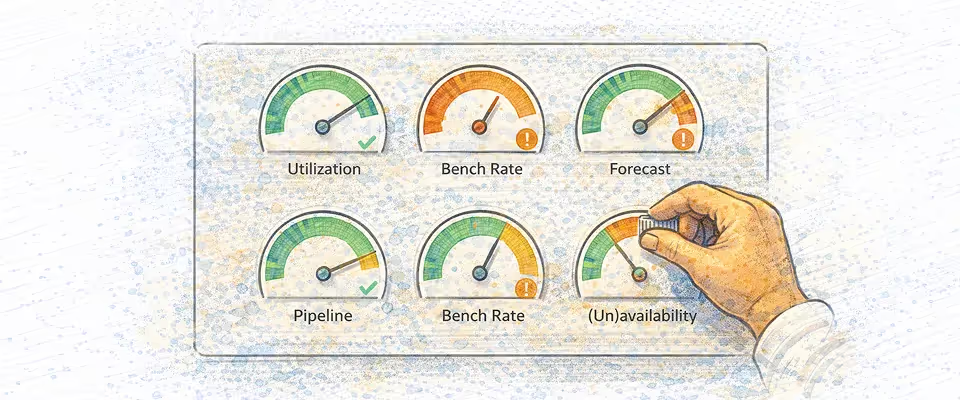
A resource allocation dashboard provides a real-time view of capacity, utilization, and staffing risk. Without structured resource allocation analysis, teams rely on assumptions instead of data. A well-designed resource allocation dashboard highlights overload, unused capacity, and forecasting gaps before they impact delivery.
Track these eight metrics.
Billable utilization rate
Measures the percentage of time spent on revenue-generating work. This is the core efficiency metric. Most professional services teams target 70-85%, depending on the role. Low utilization indicates unused capacity. High utilization signals burnout risk.
Over-allocation rate
Measures how many resources are booked above 100 percent capacity. Any sustained overallocation indicates unrealistic staffing. A healthy resource allocation chart should show near-zero overallocated resources. This metric helps prevent delivery risk.
Bench rate
Measures the percentage of team members with low allocation. Typically defined as below 50 percent utilization. A high bench rate indicates demand gaps or poor allocation decisions. Tracking this helps improve the efficient allocation of resources.
Forecast accuracy
Compare planned hours with actual effort. Large variance indicates incorrect resource allocation planning. Tracking forecast accuracy improves estimation and staffing quality over time.
Time to staff
Measures how long it takes to assign resources after a deal closes. Long staffing cycles delay project kickoff. A strong resource allocation dashboard helps teams staff projects quickly with available capacity.
Revenue per resource
Measures billable revenue generated per team member. This connects resource allocation decisions to financial performance. Low revenue per resource often indicates underutilization or an incorrect staffing mix.
Capacity surplus or deficit
Shows future supply versus demand by role. This forward-looking metric supports hiring and reallocation decisions. A deficit signals hiring need. A surplus indicates available capacity for new projects.
Non-billable utilization
Tracks time spent on internal work, admin tasks, and bench activity. High non-billable utilization reduces profitability. Monitoring this metric helps balance workload and improve overall allocation efficiency.
Why Rocketlane has the best resource allocation features for PS teams
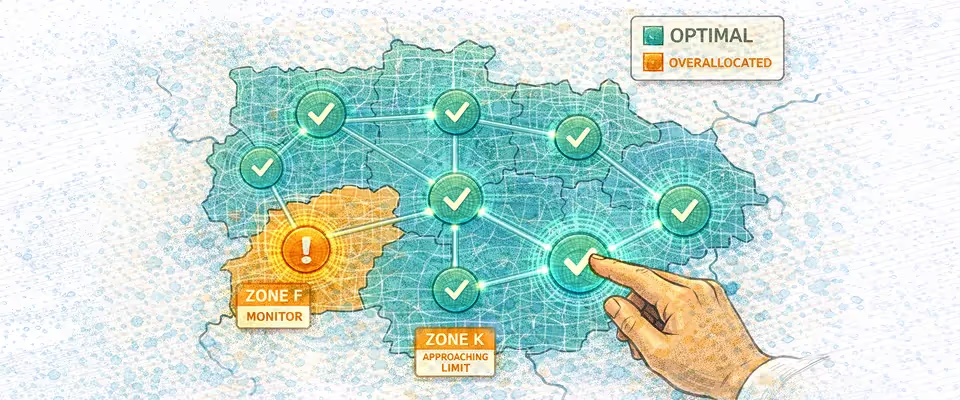
Most resource allocation tools show who is assigned.
Rocketlane helps decide who should be assigned. It connects skills, availability, utilization, and margin impact in a single view, so teams can choose the right resource before conflicts arise.
Allocation shifts from tracking workload to making staffing decisions that protect delivery timelines and project profitability.
A modern resource allocation system should consolidate skills, availability, utilization, and financial impact in a single platform. This allows delivery leaders to allocate resources faster while protecting margins and timelines.
Rocketlane connects resource allocation management with capacity planning, utilization tracking, and project delivery. Teams get real-time visibility, structured staffing workflows, and guardrails to prevent over-allocation.
Real-time heat map
Rocketlane surfaces allocation risk before it becomes a delivery problem. Heat maps flag over-allocation in real time, preventing double-booking and last-minute scrambles.
Delivery leaders can instantly spot overallocation before it causes timeline slips, identify unused capacity to take on new work, and rebalance staffing to protect utilization targets. Instead of reacting to conflicts during execution, teams resolve allocation risks early and maintain predictable delivery.
Heat map views are available by day, week, or month. Teams can evaluate upcoming demand and rebalance workload before conflicts affect delivery.
Skills-based matching
Rocketlane supports skills-based resource allocation. Teams define competencies, certifications, and experience levels for each resource. When staffing a project, leaders filter by required expertise and availability together.
This ensures project resource allocation prioritizes skill fit before availability. It reduces rework, improves delivery quality, and speeds up staffing decisions.
Template-based allocation
Projects created from templates automatically generate role-based demand. Rocketlane distributes estimated effort across phases and timelines. The system then suggests available resources for each role.
This reduces manual planning and accelerates resource allocation planning. Teams move from hours of spreadsheet setup to structured allocation in minutes.
Soft vs hard allocations
Rocketlane supports both soft and hard allocations in the same view. Soft allocations reserve tentative capacity for pipeline deals. Hard allocations confirm staffing for active projects.
This dual model improves capacity forecasting. Delivery leaders see future demand alongside confirmed work. When deals close, soft allocations convert into committed staffing without re-planning.
Cross PM visibility
Rocketlane provides shared visibility across project managers. Every PM can see claims on shared resources. When a resource is overallocated, alerts notify stakeholders.
This prevents allocation conflicts and improves coordination. Cross PM visibility is critical for matrix organizations managing multiple concurrent projects.
Financial visibility
Rocketlane connects resource allocation with cost rate and margin data. Staffing decisions show financial impact before confirmation. Delivery leaders can compare options and select the best balance between skill fit and profitability.
This turns resource allocation management into a strategic decision layer instead of a tracking activity.
See Rocketlane resource allocation features in action. Book a 20-minute walkthrough.
How Rocketlane Nitro turns resource allocation into a decision layer, not a tracking exercise
Traditional resource allocation tools require manual navigation, filters, and spreadsheets. Leaders must check availability, compare skills, review utilization, and then decide.
Nitro Resource AI shifts resource allocation from manual analysis to assisted decision-making. Teams can identify capacity, resolve conflicts, and staff projects using AI-guided workflows.
This improves resource allocation optimization by integrating skills, availability, utilization, and cost into a single decision layer.
Conversational resource management
Nitro evaluates skills, availability, and utilization in seconds. Leaders ask, 'Who can staff this Salesforce implementation?' and get instant matches ranked by margin impact.
The system evaluates availability, skills, and allocation data simultaneously. Results surface instantly with recommended staffing options. This cuts staffing time from hours to minutes and prevents margin-killing staffing mismatches before projects start.
Time off impact automation
Time off often disrupts resource allocation. When a key resource becomes unavailable, teams manually evaluate impacted projects and search for replacements. Nitro automates this workflow.
When leave is approved, Nitro identifies affected allocations. It calculates capacity gaps, evaluates qualified replacements, and suggests alternatives based on skills and availability. Leaders review and confirm. This prevents timeline disruption and maintains efficient resource allocation.
Automated team assembly
Nitro can automatically assemble a project team. The system evaluates required roles, skills, and timeline. It then matches available resources and proposes a recommended team.
This reduces staffing time and improves allocation consistency. Leaders retain control by reviewing suggestions before confirming. Automated team assembly improves resource allocation optimization for complex multi-role projects.
Timesheet policy agent
Nitro includes governance for allocation and utilization accuracy. Teams define policies such as blocking time entries beyond allocation or flagging excessive utilization. The system enforces these rules automatically.
This ensures tracked effort aligns with planned allocation. Accurate time data improves forecasting and strengthens future resource allocation decisions.
Permission-aware governance
Nitro respects organizational roles and permissions. Project managers can only allocate within their authority. AI recommendations follow the same governance model.
All allocation changes maintain audit trails. Leaders can review who changed allocation, when, and why. This allows AI-assisted allocation without losing control.
See Nitro Resource AI in action.
Conclusion
Resource Allocation Is a Decision Layer, Not a Tracking Exercise
Most teams treat resource allocation as an administrative task — assign whoever is free, update the spreadsheet, move on.
That approach works until it doesn't. And in professional services, it stops working the moment project volume grows, resources are shared across teams, or sales close two deals on the same day.
The difference between teams that hit utilization targets and those that miss them isn't effort. Its structure.
Effective resource allocation connects four things simultaneously: skill fit, capacity, cost rate, and delivery priority. When those signals live in separate tools — or in someone's head — allocation defaults to availability. That's when margins erode, timelines slip, and high performers burn out.
The practices in this guide aren't theoretical. Skills-based matching, soft allocations for pipeline, role-based utilization bands, cross-PM visibility, and time-off integration — each one closes a specific gap that reactive, spreadsheet-driven allocation leaves open.
The benchmarks to protect:
- Billable utilization: 70–85% by role
- Forecast accuracy: ≥85% planned vs. actual
- Over-allocation rate: near zero on active projects
- Time to staff: days, not weeks
AI-assisted allocation takes this further — compressing staffing decisions from hours to minutes, automating capacity adjustments when leave is approved, and surfacing margin impact before assignments are confirmed.
Resource allocation done well is invisible. Projects start on time. Teams stay balanced. Margins hold. The only way to get there is to stop allocating reactively and start treating staffing as a decision layer built on real data.

Authored by

Kailash Ganesh
Kailash Ganesh is a professional services researcher at Rocketlane with more than seven years of experience in content, research, and market analysis. He studies how enterprise PS teams are adopting agentic AI to transform delivery operations, has evaluated every major PSA platform in the category, and writes from the perspective of a practitioner who watches enterprise PS teams make these exact decisions daily.
Table of Contents

Regsiter for the live webinar


Great consultants didn't join your team to spend Fridays writing documentation.
Table of contents
18 of Forbes Cloud 100 chose Rocketlane. The best PS teams aren't waiting around.
FAQs
What are resource allocation models?
Resource allocation models define how teams assign resources to work. The three common models are manual allocation, algorithmic allocation, and hybrid allocation. Manual relies on spreadsheets, algorithmic uses rules or AI, and hybrid combines system recommendations with human approval.
What is the difference between resource allocation and capacity planning?
Resource allocation focuses on staffing current projects. Capacity planning forecasts future demand and supply. Allocation answers who works on what now, while capacity planning determines whether the team has enough resources to handle upcoming pipeline and growth.
What is a good billable utilization rate for professional services teams?
A good billable utilization rate typically ranges from 70 to 85 percent, depending on role. Consultants and engineers operate at higher levels, while managers and architects require a buffer for planning and coordination. Sustained levels above this range increase burnout and delivery risk.
What is the difference between soft and hard resource allocation?
Soft allocation reserves tentative capacity for pipeline work, while hard allocation confirms staffing for active projects. Soft allocations help with forecasting and planning. Hard allocations define committed workload. Using both improves capacity visibility and reduces staffing conflicts.
How does AI improve resource allocation for implementation teams?
AI improves resource allocation by analyzing skills, availability, utilization, and cost together. It suggests optimal staffing, identifies capacity gaps, and automates adjustments like replacing resources during leave. This reduces manual effort and improves allocation accuracy and speed.













Copyright © 2026 Rocketlane Corp. All rights reserved.





















.webp)