Onboarding automation: RPA, document parsers, and agents do three different jobs
•
•
Summarize blog with






Scope: This is about onboarding customer data during an implementation. If you automate accounts payable, contract extraction, or a legacy interface with no API, the routing table below points you elsewhere, and it means it.
A customer's export lands on day two. Three spreadsheets that disagree: one from the CRM (customer relationship management system), one from billing, one rebuilt by hand last quarter. Someone opens all three and starts reconciling, not typing.
Onboarding automation gets sold as one category, and it holds three different tools. Robotic process automation (RPA) drives a legacy interface with simulated clicks and keystrokes. AI document parsers pull structured fields out of unstructured documents like invoices, contracts, and emails.
Agents map, transform, and validate structured customer files against a destination schema. They solve three different problems. Picking the wrong one is the most expensive mistake in this category.
Rocketlane is an agentic AI-powered PSA (professional services automation) platform for customer-facing professional services teams, covering the back office and the client-facing delivery layer alike. This guide is for implementation and professional services teams at a 50 to 200 person services org: the operations, PMO (project management office), and delivery leaders onboarding customers whose data lands as spreadsheets, online forms, and system exports. If you process invoices or scrape a legacy screen, two of these tools fit you, and the third does not.
For a team onboarding customers, the work is not an entry. It is cleaning, mapping, and validating a file against the schema your product expects. That is the step every competing tool skips. And the stakes are documented: Bloor Research has tracked data migration failure rates for two decades and puts the share of projects that run over time, over budget, or fail outright at close to 40 percent.
For structured customer files arriving during onboarding, Rocketlane's Migration Agent runs the full pipeline against a destination schema: extract, map, transform, validate, fix, and load. A human approves the calls that matter. UiPath and Power Automate handle legacy interface work. Parseur and DocuWare read unstructured documents.
Rocketlane supports 750+ customers and holds a 94% G2 recommendation rate. The rest of this guide shows how to tell which job is yours.
Both new sections are below, written to paste straight into your Google Doc. All the links in them are checked against the interlink register.
Where the two sections go
- "Types of onboarding automation" comes right after the intro, before "RPA, AI document parsers and agents: three tools, three different jobs". The intro ends on "how to tell which job is yours". This section names the six kinds of onboarding automation, shows that only the data one gets confused, and hands over to the three-tools section.
- "What onboarding automation Rocketlane supports" comes after "Build or buy onboarding automation", before "What changes on the tenth customer arriving off the same system". The build-or-buy section ends on who maintains it. This one shows what Rocketlane covers, then hands over to the Migration Agent walkthrough.
Types of onboarding automation
Onboarding automation covers six kinds of work during a customer implementation:
- project setup
- workflow
- customer collection
- data onboarding
- configuration
- documentation and governance
Five of them are workflow problems with mature tools behind them. The sixth, moving the customer's data into your product, is where the tool categories blur. It is also where the weeks go.
One clarification first. "Onboarding automation" also names employee onboarding in human resources (HR): offer letters, payroll setup, laptop provisioning. That is a different job with different software. This guide covers customer onboarding, the implementation work between a signed deal and go-live.
The first three are the workflow layer. Most teams start there, because the triggers are clean and the rules rarely change. Templates, automated tasks and a shared customer portal handle them well. For the step-by-step version, see how to automate your customer onboarding process.
Configuration and documentation sit one level up. The work repeats across customers, but each one still needs judgment. That is where AI agents have started to help: a signed statement of work becomes a project plan, and a kickoff call becomes a requirements draft.
Data onboarding is different in kind. The source is the customer's system, not yours, and every file arrives in its own shape. Three tool categories claim this job, and each was built for a different kind of source. That split is the next section.
RPA, AI document parsers and agents: three tools, three different jobs
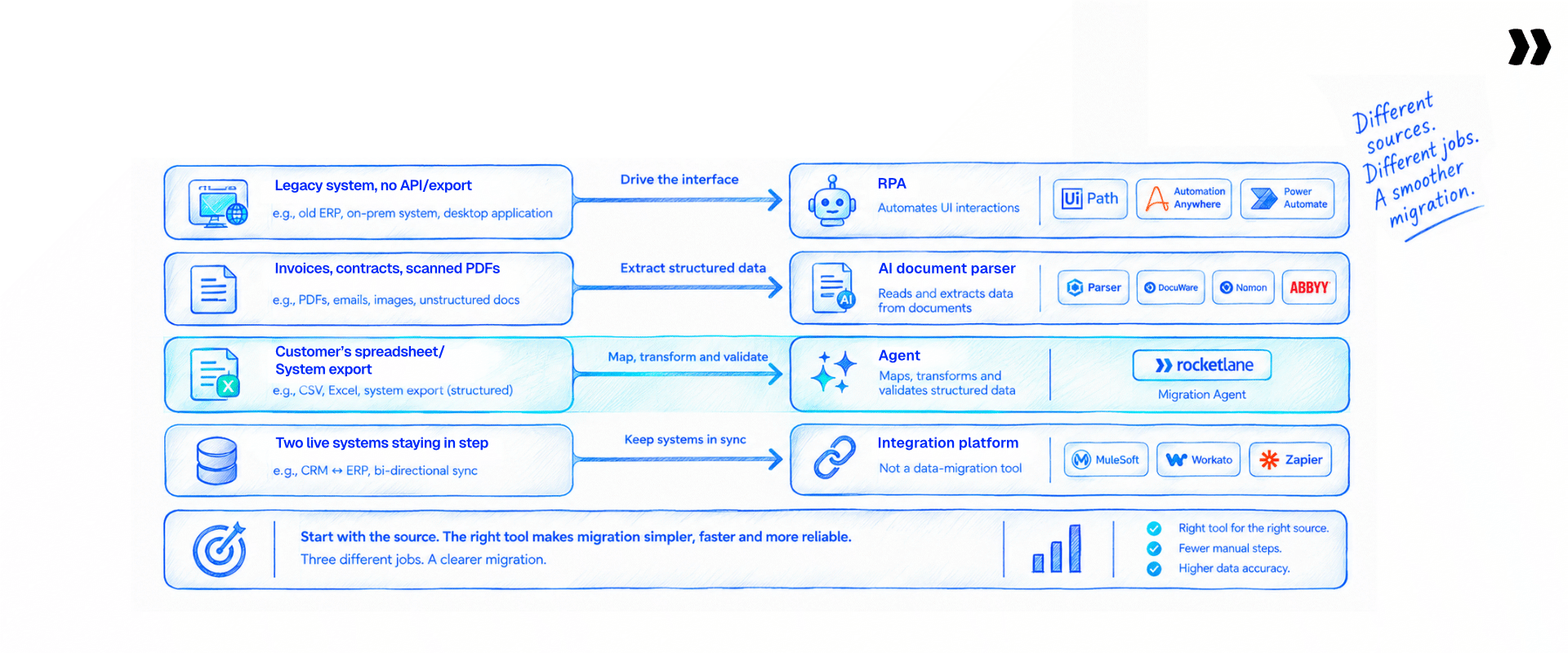
Three categories get marketed as one. Robotic process automation simulates a person using a legacy interface, so it fits systems with no API. AI document parsers read unstructured documents and extract structured fields, so they fit invoices, contracts, and forms.
Agents extract, map, transform, validate, and load structured files against a destination schema, so they fit customer onboarding. Match the tool to the source, and the choice makes itself.
Now the same three verdicts as full sentences, because the distinction is the whole point.
RPA fits one situation. The source is a legacy system with no API and no clean export. The only way in is to drive the screen. UiPath, Automation Anywhere, and Power Automate Desktop record a person clicking through that interface and replay the sequence. This is browser automation applied to ERP systems and other legacy business systems, the existing systems that never shipped an API.
AI document parsers fit a different situation: information trapped in unstructured documents. Parseur, DocuWare, Rossum, and ABBYY read an invoice, a contract, or an email and pull out the fields you name. This is document data extraction and document processing, and optical character recognition sits underneath it, turning paper documents and scans into machine readable text and a clean digital format.
Invoice processing is the classic case: the parser reads the document, and the named fields drop into rows. That is precise data extraction from a document, and it is a different job from schema mapping.
Agents fit the third: a structured file a customer already sent you, that has to match the schema your product expects. A migration is extract, transform, and load, and Rocketlane's Migration Agent owns all of it: it extracts the file, maps the incoming columns, transforms them, validates the result, fixes what fails, and loads the clean records. This is the customer onboarding case, and it is the one the other two tools were not built for.
Here is what separates an agent from a script, and it answers the question every technical buyer asks about agentic AI versus traditional RPA. A rules engine needs the field names to match. Name the column SKU_Code and it works. Name it product_code and it breaks. An agent reads what a column contains, infers what it means, and shows you every inference before it runs. That is the difference, and it is the honest one.
These three get sold as one category for a reason. They all end in the same place: clean data in your system. The path there is what differs. One drives a screen. One reads a document. One transforms a file. Buyers see the same outcome in every pitch and assume the tools swap. They do not. The demo that dazzles on invoices stalls on a customer spreadsheet.
The demo that dazzles on invoices stalls on a spreadsheet.
Bring the customer export. Twenty minutes settles which tool is yours
The typing was never the bottleneck

Onboarding automation content aims at the keystroke. That is not where the time goes. The time goes to working out what each column means, reconciling values that disagree across files, applying transformation rules, and checking the result against the rules your product enforces. Automate the typing and leave those four manual, and you saved the smallest part of the job.
Five jobs hide inside the data-entry label. Four are real work
See which four an agent takes, and which one still needs you.
The five jobs hiding inside the data-entry label
Five jobs hide inside the data-entry label, and typing is not one of them:
- Understand the source. Work out what each column holds before anything moves.
- Reconcile across files. Settle the values that disagree between the contact, billing, and account sheets.
- Transform. Apply the rules that turn their format into yours.
- Validate against business rules. Check the result against what your product enforces.
- Get the customer to confirm. Send the broken rows back and wait for version two.
Every data entry automation software that markets itself on removing manual data entry should show which of these five it removes. Four of them are real work.
The data a customer hands you rarely matches your schema, so hours go into reformatting it. The mistakes that slip through are not typos. A currency sitting in the wrong column, or an ID that points at nothing, survives every spell-check and every format rule.
The same two slips show up on the next customer's file, because nothing about the first one was written down. Automation cuts the repetitive part of that day. It does not remove the judgment, and any tool that says it does has not seen your files.
Why validation is the hard part
Take validation. The check that matters is not whether the phone number looks right. It is whether the billing country matches the currency code, and whether the order ID in this sheet exists in the orders sheet. Neither is a formatting problem. Neither gets caught by a parser or a spell-check on a column. These are business rules, and they live in your product, not in the file.
Implementation teams describe the same friction across every customer:
- One names a column product code.
- The next calls it SKU code.
- A third invents a label nobody else would guess.
The data means the same thing. The header never agrees. So the first job on every new file is reading the data to work out what each column holds. That job resets with each customer.
What the real bottleneck costs in calendar time
The cost shows up as calendar time. On workbook-driven onboardings, teams describe two to three months of data collection and cleaning before anything loads. The reconciliation stays time consuming the whole way.
Let’s say, One team reported that about half their customers still had no data loaded by the time implementation was called complete. The delay is not the customer being slow. It is manual data handling with no home between projects.
This is why bad data is not a cosmetic problem. Gartner puts the average approx. annual cost of poor data quality at $12.9 million per organization.
A row that loads clean and means the wrong thing costs more than a row that never loads. It passes review, then surfaces later as a support ticket or a wrong invoice. Faster typing does nothing about any of this. The five real jobs are where onboarding automation earns its money or wastes it. An AI powered data entry software that speeds up input and skips reconciliation, transformation, and validation has automated the part that was never slow.
Where AI wins, and where it does not

AI wins at two things here. It infers what an undocumented column means from its contents. It catches values that pass every format check and still mean nothing. It fails at two others. Schemas that change underneath it. Cost predictability at high volume. Every published guide covers the first pair. Almost none covers the second.
Two wins and two failures. We will show you all four.
Model the cost on your real volumes, not on a sample file.
The two wins
Start with the wins, because they are real.
- Inference on undocumented columns. Give an agent a column labeled Type 3 with no documentation, and it reads the values to work out what Type 3 means. That is interpretation, and a rules engine cannot do it. Machine learning reads the pattern, and natural language data processing turns the plain-language rules you write into transformations. This is intelligent automation, not a fixed script.
- Semantic validation. A field passes every length and type check and still holds N/A, TBD, or pending. An agent flags that. A format checker waves it through.
The two failures
Now the failures, stated as plainly.
- Schema drift. A source schema that changes between runs breaks the mapping you built last time, and you rebuild part of it.
- Cost at volume. Cost climbs with volume in a way worth modeling before you commit, because per-record inference carries a price at scale.
Both are true. Neither shows up in the optimistic version of this story, and a reader who has run one of these projects knows it.
On cost, the failure is subtle. Per-record inference looks cheap on a test file and adds up across hundreds of thousands of rows. A migration that pencils out at demo scale surprises you at production scale. Model the cost on your real volumes before you sign, not on the sample.
One practitioner put the build trap better than a vendor could. "Your other option is to hire developers to build endless spaghetti code with AI agents pointed at every input and output. Super expensive. Not future proof. Locked in with that developer." That is the honest downside of pointing raw language models at the problem with no structure around them.
Agents compared with explicit rules
Which raises the question every technical buyer holds: how is this different from explicit rules? It helps to answer it straight.
For messy customer files, reviewing inferences is the cheaper place to spend the effort.
Set the accuracy expectation correctly. First-pass mapping lands around 85 percent, and you iterate with review to 100 percent. Not one shot. Not hands-off. Around 85 percent, then a human closes the gap to high accuracy. Automated data entry tools that promise fully automated, one-shot accuracy on messy customer data are selling the demo, not the Tuesday.
One more honest note. Semantic validation is not a Rocketlane invention. Several data entry automation tools in the data-onboarding space ship a version of it. The differentiator is not the AI itself. It is where the AI sits and what it connects to, which is the subject of the product section further down.
Build or buy onboarding automation

Build if you have one recurring source system and an engineer who owns it for good. Buy once you cross a handful of source systems, because the maintenance is the cost, not the build. The deciding question is not whether you can build it. It is who fixes it when the person who built it is on a customer project.
This is a live decision for onboarding teams, not a hypothetical. Several teams have already built in-house tooling. Some staffed a product or migration manager to own it. They are weighing build against buy right now, and they are right to. A short script against one clean source is cheaper than any platform.
A script is only as available as the engineer who wrote it.
See what the same migration looks like when a non-engineer runs it.
The three costs the build estimate misses
Building hides three costs, and none of the three shows up in the estimate. All three show up in the calendar.
- Maintenance. A source format shifts and the script stops working mid-project.
- Edge cases. You meet them one row at a time in production, not in the plan.
- Opportunity cost. The engineering hours point at internal plumbing instead of the product your customers pay for.
Maintenance is the line item that ambushes the build case. A CRM changes an export format in a quarterly release. The script that ran clean last month drops a column without warning. Nobody notices until a customer's records load wrong. The build took a week. The upkeep is a standing tax on whoever owns the code.
When building is the right call
The honest case for building holds in one situation. If your customers all arrive off one stable source system, a careful script and a human reviewer beat any tool, and cost less to run. Do that. The case flips when the source systems multiply, because now you maintain a script per source, and each one rots on its own schedule.
The key-person risk that decides it
Watch the key-person risk above everything. In one organization, the entire migration capability sat with a single specialist who had returned from leave, and every project queued behind that one person. A script is only as available as the engineer who remembers how it works. A tool a non-engineer can run removes that single point of failure, which is worth more than the raw time saved.
What onboarding automation Rocketlane supports
Rocketlane supports all six types inside one agentic AI-powered PSA platform.
- The workflow layer: templates, rule-based automations, CRM integrations, forms and a branded customer portal.
- The work that needs judgment: configuration, documentation, governance and data migration, handled by Nitro agents.
- What it doesn't do: Rocketlane does not drive legacy screens or read scanned documents.
The workflow layer runs on project automations and native CRM integrations. When a deal closes, Salesforce can create the project automatically. Delivery then starts from the plan, not from a handoff email.
Customers work in the same project through the portal. They upload files, fill in forms and approve deliverables without a separate login. That matters for data onboarding, because the customer who sends the file is the one who signs off the result.
The agent layer is Nitro, the agentic AI built into Rocketlane.
- Workforce Agent takes on repeatable configuration work and turns signed SOWs into project plans.
- Documentation Agent drafts requirements and status documents from calls and project activity.
- Project Governance enforces phase gates, so a project cannot skip sign-off.
Two jobs sit outside the line, and saying so saves you a bad evaluation. Rocketlane does not record and replay clicks on a legacy screen, and it does not pull fields out of scanned documents. If a customer's data lives only behind an old interface, pair an RPA tool for extraction with Rocketlane Migration Agent for the rest.
Connector coverage is not universal. Where no connector exists, a CSV or Excel export is the fallback.
Of the six types, data onboarding is where the most calendar time goes, and where the same work repeats most often. The next section shows what changes when it stops repeating.
Six types of onboarding work. Two sit outside our line.
No screen scraping, no scanned documents. See the four we run.
What changes on the tenth customer arriving off the same system

Rocketlane's Migration Agent runs the whole migration, not one slice of it. A migration is extract, transform, and load, and the agent owns all three. You define your destination schema once. The agent pulls the customer's export, maps the incoming columns, applies transformation rules you describe in plain language, validates at three levels, fixes what fails, and loads the clean records. The mapping and the rules save against that source system, so the next customer off the same one starts from a built playbook.
Picture the first one. A customer arrives off their old system.
Three spreadsheets: contacts, billing, accounts. The column names do not match yours, and they do not match each other. You spend the first week working out what Type 3 means in column K, because the person who set it up left. You write the rules for their dates, their phone formats, their duplicate data entry. You validate, find two hundred broken rows, email the list, and wait. Version two arrives. You find forty more.
Two months later, another customer arrives off the same system. And you do all of it again. Their data is different. Their custom fields are their own, their mess is their own. But the shape of the work is not different. That system exports the way it did in March. The date handling is the same. The duplicate pattern is the same.
You paid full price for that work twice. You paid twice because the work had nowhere to live between the two projects. It lived in a spreadsheet on someone's drive, and in the head of whoever built it. Move it into a tool, and the second run inherits the first.
What Rocketlane's Migration Agent is
Rocketlane's Migration Agent runs the full pipeline between a customer's export and your system: extract, map, transform, validate, fix, and load. It transforms with rules you write in plain English. It validates at three levels.
It sits inside Nitro, the agentic AI layer embedded in Rocketlane rather than a tool bolted beside it. Nitro works across three levels: operations, delivery, and work execution. Migration Agent sits at work execution alongside Workforce Agent and Documentation Agent, which is why the migration runs where the project already lives instead of in a separate tool someone has to remember to open.
Humans stay in control, with approvals where they matter. The team defines the source once, and each new customer on that source starts from the playbook already built.
Run ten, and the same five moments change
Run ten migrations off the same source, and five moments change. Here is the first customer next to the tenth, on a playbook that already exists.
The customer's data stays unique every time. The work around it stops being unique after the first run.
On scale, the numbers are stated, not implied. Validation runs up to 25 million cells per run, stress-tested between one and five million. A tool that will not name its ceiling does not have one it wants to discuss. The bulk-fix mechanic is the answer to volume: one approval resolves every matching record, instead of spot-checking a sample and hoping the rest match. The transformation rules stay in plain language. The person running the migration writes no code to split a name column or reformat a date.
For a 25-person delivery team, Rocketlane's Migration Agent at 50% less migration effort and a 12% faster time to go-live. Both are a planning model, not a measured customer outcome, and the page says so rather than letting you assume otherwise. The measured result sits in the validation section below, and it is deliberately small.
The three validation layers
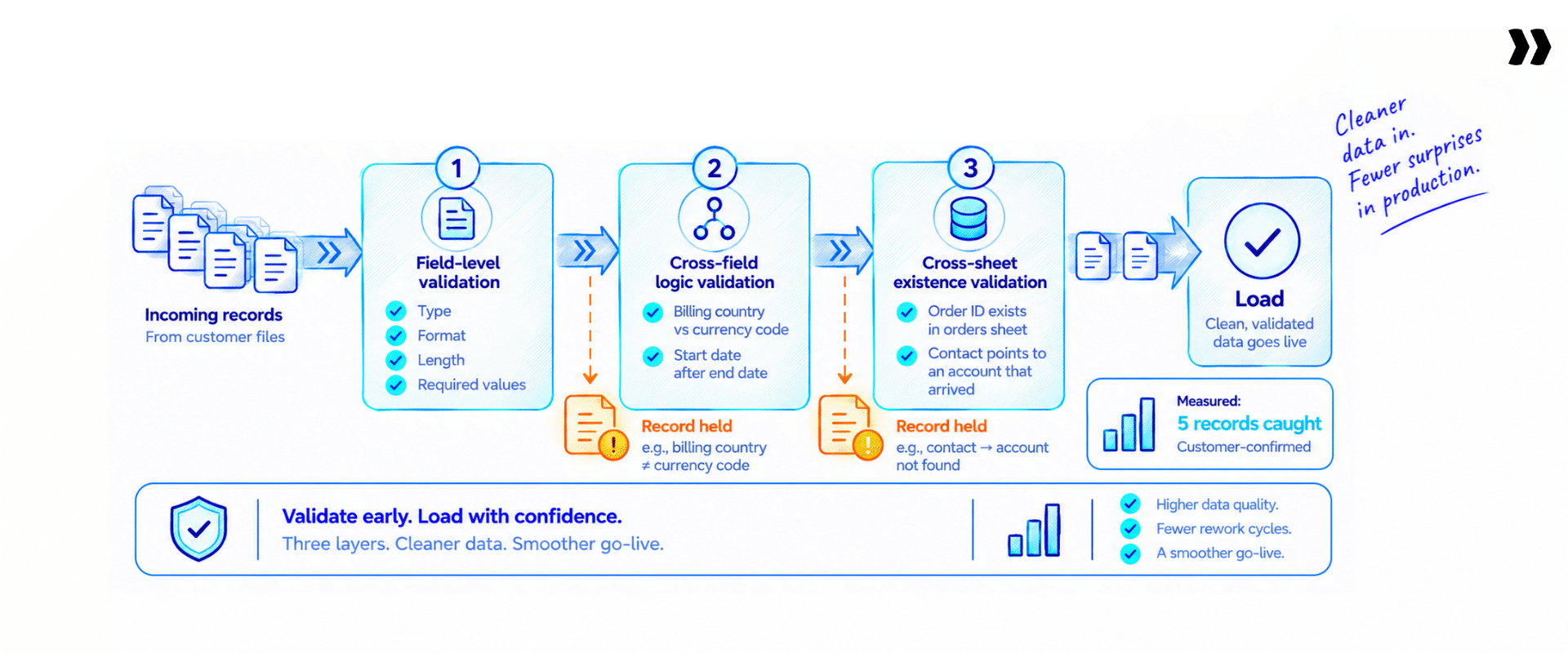
Data validation is where onboarding automation earns trust, so it runs in three layers, not one pass over the file. Three layers turn a clean-looking file into data accuracy you can show the customer.
Those last two checks, the currency-code contradiction and the missing order ID, are the ones a document parser never catches. Cross-sheet and cross-field validation catches them before load, not in production. Field-level checking is table stakes. Cross-field and cross-sheet checking is where data integrity holds or breaks.
One production run makes the point without a modeled figure behind it. A validation pass caught five real records that broke a one-email-per-tenant rule, and the customer's own team confirmed all five. Five records, found before load, verified by the people who owned the data. That is the difference between validation that reads business rules and a format check that does not.
The part buyers decide on is the sign-off surface. Customers upload their file to a branded portal, review the flagged rows themselves, and sign off. Your team stops chasing workbooks over email. Async review in one place both sides can see turns a migration from a back-and-forth into a clean hand-off. That builds client trust from the first week.
Five records broke a one-email rule. Caught before load.
The customer's own team confirmed all five. Cross-sheet checks found them.

Where the line is

Precision matters more than reach here, so here is the line. The Migration Agent runs the full extract-to-load pipeline on structured files, but it does not drive a legacy interface, and it does not read documents. No screen scraping. No optical character recognition. No PDF or scanned-document extraction. A source system with no export and no API at all is an RPA job, not a migration one.
A few more limits, stated plainly. Connector coverage is not universal; where a direct connector is not live for a source, an uploaded CSV or Excel export stands in. It does not profile the source system for you; that stays your team's job, with prompt-based assist.
It does not decide which duplicate survives without a rule from you. And it does not learn across different customers. The rules save against a source system and re-run. That is persistence, not learning, and a reader who tests the distinction will find it holds.
On data security, each run sits in an isolated, single-use container, raw data stays out of the model's context window, and retention is zero, under ISO 42001, ISO 27001, SOC 1, SOC 2, HIPAA, and GDPR. No other tool in this category publishes ISO 42001 certification. The design keeps sensitive data away from the exposure behind most access data breaches. Pricing is consumption-based, and the current rates sit on the pricing page.
Bring the messy one
Here is the ask, and it inverts the usual demo. Send us the export from whichever system your customers arrive off most. Anonymize it. Make it the awkward one: three files that disagree, with the column nobody can explain.
On the call, we define the destination schema and build the mapping and validation rules for that source. You watch what the tenth onboarding looks like, on your own data, not a sample set.
The honest limit: the first migration off an unfamiliar system still costs full price. The claim is that it costs once.
Send the three files that disagree, and the column nobody can explain.
Anonymized. We build the schema and the rules for that source on the call.
The bottom line on onboarding automation
Three tools get sold as one category, and they do three different jobs. So the first question is not which vendor. It is what your source data looks like. A legacy screen with no API points to RPA. Unstructured invoices and contracts point to a document parser. A customer's structured export points to an agent.
The typing was never the bottleneck. Cleaning, mapping, and validating the file was. And if your customers keep arriving off the same handful of systems, the most expensive thing your team does is rebuild the same work on every project. Transferring data once is a migration. Keeping two systems in real time data sync is integration, and the automated solutions for each differ.
That last point is where an agentic AI-powered PSA platform earns its place. Rocketlane built the Migration Agent so the mapping and validation you solve once become a playbook the tenth customer inherits, inside the same platform your team already runs delivery from. Rocketlane supports 750+ customers on that model.
The onboarding does not start faster because the typing got faster. It starts faster because the work stopped being new every time. That is the shift worth buying: from running the migration again to running the one you already built.
Typing got faster. Onboarding did not.
It starts faster when the work stops being new every time.
Structured export, legacy screen, or scanned document?
Bring the real file. We will tell you which of the three you need.

Authored by

Kailash Ganesh
Kailash Ganesh is a professional services researcher at Rocketlane with more than seven years of experience in content, research, and market analysis. He studies how enterprise PS teams are adopting agentic AI to transform delivery operations, has evaluated every major PSA platform in the category, and writes from the perspective of a practitioner who watches enterprise PS teams make these exact decisions daily.
Table of Contents

Regsiter for the live webinar


Great consultants didn't join your team to spend Fridays writing documentation.
Table of contents
18 of Forbes Cloud 100 chose Rocketlane. The best PS teams aren't waiting around.
FAQs
What is the difference between agentic AI and traditional RPA?
Traditional RPA automates a fixed sequence of clicks and keystrokes across a user interface, and it breaks when the screen or the field names change. Agentic AI reads what data means, infers mappings and transformations from examples, and asks a human to approve them before it acts. RPA repeats steps. An agent makes judgments, then checks them with you. For legacy screens with no API, RPA fits. For structured files that must match a schema, an agent fits.
When should you use RPA, an AI document parser, or an agent?
Match the tool to the source. Use RPA when the data sits in a legacy system with no API or export, and the only way in is to drive the screen. Use an AI document parser when the data is trapped in unstructured documents like invoices, contracts, or scanned forms. Use an agent when a customer sends a structured data spreadsheet or export that has to map, transform, and validate against your schema. Picking by source, not by brand, is the whole decision.
What is onboarding automation?
Onboarding automation is the set of tools that move a new customer's data into your product without manual typing. It spans three categories: robotic process automation for legacy interfaces, AI document parsers for unstructured documents, and agents for structured customer files. For implementation teams, the work that matters is not the typing. It is mapping, transforming, and validating the customer's file against the schema your product expects.
How do implementation teams automate customer data onboarding?
They define the destination schema once, then use an agent to map incoming columns, transform them with plain-language rules, and validate the result before it loads. The mapping and rules save against each source system, so a HubSpot export or a Salesforce export becomes a reusable playbook. The customer's data stays unique. The work around it stops being new after the first run, which is where the time savings come from.
What is the difference between data entry automation and data migration?
Data entry automation covers ongoing input of records into a system. Data migration moves a body of existing records from one system into another, usually once, during onboarding. In customer implementation they overlap: the migration is the first data-entry job, and it is the one that decides go-live. The hard part of both is the same: cleaning and validating the data, not the keystrokes.
Where does AI help with onboarding automation, and where does it fail?
AI helps in two places. It reads an undocumented column and infers what it means from the values. It catches entries that pass every format check and still mean nothing, like TBD sitting in a date field. It fails in two places. It breaks when a source schema changes between runs, and it gets expensive to predict at high volume. Knowing the split before you buy keeps the plan honest.
What is a realistic first-run accuracy target for automated field mapping?
Around 85 percent on the first pass, with a human reviewing and closing the gap to 100 percent. Automated field mapping that claims one-shot, hands-off accuracy is overselling. The workable model is machine proposes, human approves: the agent lands most of the mapping, shows every inference, and you correct the rest. Treat 85 percent first-run as the target, and build review time into the plan.
When is manual data entry still the right answer?
Manual data entry still wins on tiny, one-time datasets, and on a single stable source where a careful person and a short script cost less than any tool. It stops being the right answer once volume climbs, source systems multiply, or the same migration repeats across customers. The trigger to automate is not size alone. It is repetition: the second time you rebuild the same work, the tool pays for itself.
Can onboarding automation and RPA work together?
Yes. They cover different steps. RPA gets data out of a legacy system with no API by driving the screen, and an agent then maps, transforms, and validates that data against your schema before it loads. Extraction is the RPA job. Transformation and validation are the agent's job. Chaining the two is common when a customer's source system has no clean export to hand you.
Should you build or buy onboarding automation?
Build if your customers all arrive off one stable source system and an engineer owns the script for good. Buy once you cross several source systems, because maintenance and edge cases, not the initial build, are the real cost. The question is not whether your team can build it. It is who fixes it when the person who built it is on a customer project. For onboarding across many sources, an agent like Rocketlane's Migration Agent avoids that key-person risk.













Copyright © 2026 Rocketlane Corp. All rights reserved.