Data migration vs data integration: what is the difference, and who owns each?


•
•
Summarize blog with






Two vendors sit on the same scoping call. One quotes for moving the client off their old platform. The other quotes for keeping it talking to their CRM. Neither can say who covers the eleven years of history in a spreadsheet. The words get used interchangeably, right up until someone has to own the work.
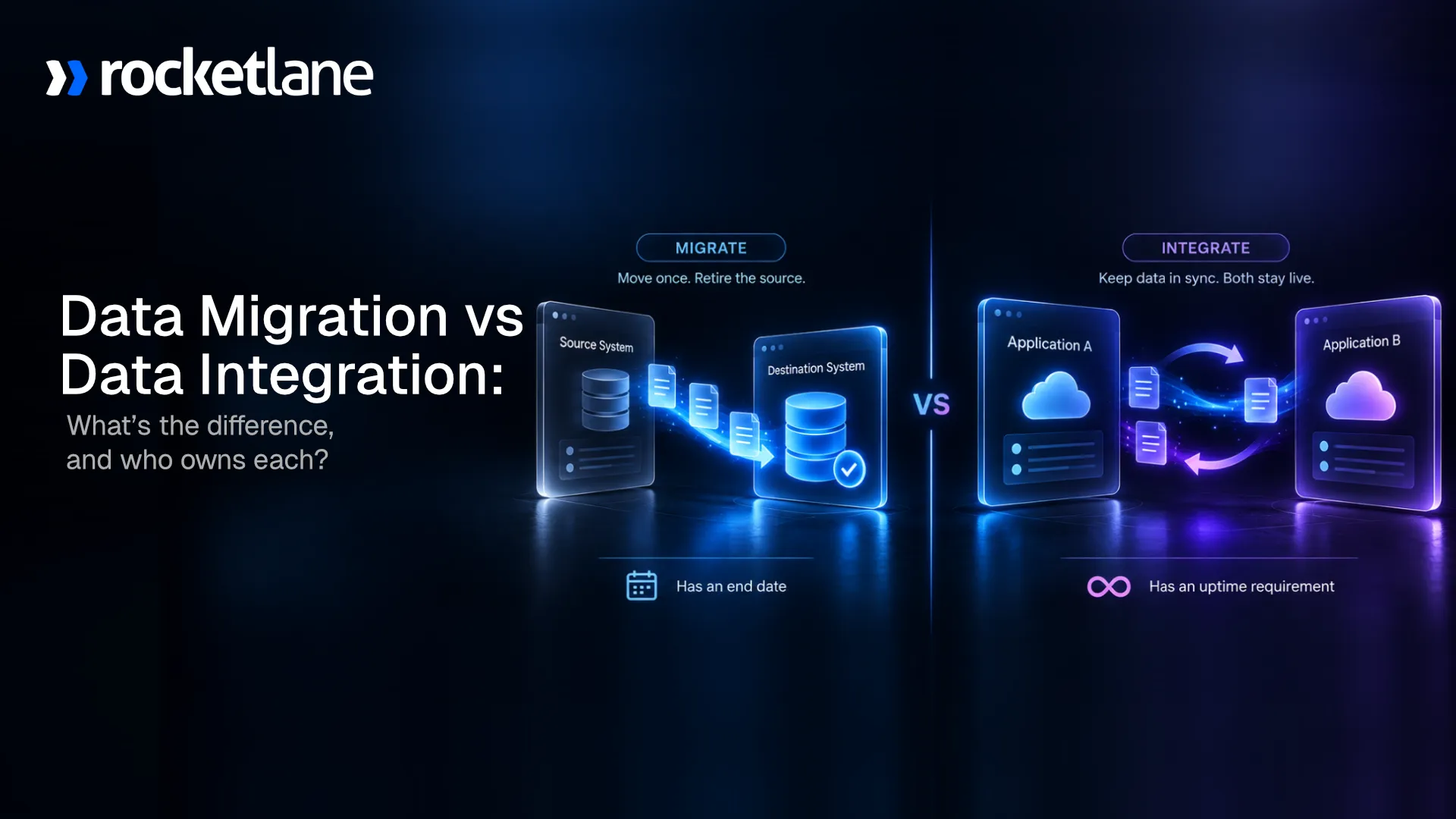
Data migration moves records from one system into another once, and then it is finished. While data integration keeps two systems exchanging data on an ongoing basis, it is never finished. Migration is a project, and Integration is infrastructure.
Because one ends and one does not, migration and integration are owned by different teams, funded from different budgets, and they fail in different ways.
Here is an example to understand the difference. If there is a date after which nobody touches it again, it is a migration. If it has an uptime requirement, it is an integration.
Across aggregated delivery data from Rocketlane’s customer base, migration work has consumed roughly 279 full-time person-years. Almost four in ten of those logged hours went to reconciliation and sign-off rather than the move itself.
Each pointer below gets a full section, with the ownership question at the centre of the guide.
This guide is written for implementation, onboarding and professional services teams scoping work on a customer project. If you are choosing a data integration platform for a data warehouse, the integration half of this page applies, and the migration half does not. If you are moving servers or workloads to the cloud, guidance from a cloud vendor will serve you better.
What is the difference between data migration and data integration?
Data migration moves records from a source system into a target system once, so the source system can be retired. Data integration keeps two live systems exchanging data continuously, so both stay in service. Migration has an end date. Integration has a service level. That single difference decides who owns each one, how it is funded, and what happens when it breaks.
The distinction sounds academic until a project plan has to name an owner. The table below carries four rows that most published comparisons leave out: failure mode, budget shape, where the work appears, and the part that is genuinely hard.
Comparison table
Read the table as two different jobs rather than a ranking. Neither is harder in the abstract, and the reader in front of a scoping call is often doing both at once.
Key definition
A data migration strategy is the plan for how data moves from a source system to a target system once. A data integration strategy is the plan for how two or more systems keep exchanging data after that move is complete. The first has a completion date. The second has an owner on call.
What is data integration, and how does data integration work?
Data integration is the practice of combining data from multiple sources into a unified view that stays current. It typically involves extracting data from source systems, applying data transformation so the values match a common model, and writing the result into a central repository or a target system.
The term data integration refers to a discipline rather than a single product. It covers the connectors, the transformation logic, the scheduling, and the monitoring that keep multiple data sources in agreement. When people say they need a unified view of customer data, integration is the machinery underneath that phrase.
The data integration process, step by step
- Data profiling: Open the data sets and record what each field holds rather than what the header claims. Profiling raw data first prevents most of the rework later.
- Data extraction: Pull records out of source systems through APIs, database reads or scheduled exports. Extracting data from legacy systems is usually the slowest part.
- Data cleansing: Resolve duplicates, orphaned records, and inconsistent values. Data cleansing performed before mapping is worth several times the same effort applied afterwards.
- Data mapping: Match each source field to its destination field. Data mapping is where two teams discover they define a customer differently.
- Data transformation: Reshape values into the format the destination expects. This step converts raw data into transformed data the target system will accept.
- Data loading: Write the result into a data warehouse, a data lake or an operational application. Load order has to respect dependencies between objects.
- Validation and monitoring: Confirm data accuracy, then watch the pipeline. An integration without monitoring is a silent failure waiting for a quarter-end.
Those seven steps describe the classic ETL extract transform load pipeline, and they also describe most of a migration. The difference is that in an integration, the pipeline runs again tomorrow.
The key components of any data integration platform are the same four: connectors to the source systems, transformation logic, a scheduler, and monitoring. Vendors sell the result as seamless data flow. The day-to-day reality is governing data access and keeping field definitions stable while both systems keep changing.
Why is data integration important?
Data integration is important because disconnected systems produce disparate data, and disparate data produces decisions nobody trusts. Data silos form when each team keeps its own copy of the same data. Integration removes those silos by giving business processes one source of truth to read from.
- Business intelligence and reporting: Analysts cannot analyze data that lives in six places. Integrated data is what makes business intelligence and data analysis possible at all.
- Operational efficiency: Reducing manual data entry removes the swivel-chair work of retyping the same data into two systems. That is the most visible day-one win.
- Data accuracy across business operations: When two systems disagree, someone reconciles by hand. Integration enables organizations to stop paying that tax every month.
- Machine learning and analytics: Data scientists and data engineers need clean, joined data sets. Model quality tracks data quality more closely than it tracks algorithm choice.
Teams consolidate data for one reason: so that business data tells a single story to finance, delivery and sales at the same time. That is the outcome being bought, rather than the pipeline itself.
The common thread is trust. Every one of those benefits collapses if the underlying data quality is poor, which is why validation matters more than connector count. A study published in Harvard Business Review found only 3% of companies' data met basic quality standards.
What are the types of data integration?
The main types of data integration are ETL, ELT, data virtualization, data federation, real-time data integration, and application integration. They differ in where the data transformation happens, whether data physically moves, and how fresh the result is. Most organisations run several data integration methods at once rather than picking one.
The main data integration techniques, compared
Choose by freshness requirement and by whether the data may be copied at all. Data virtualization and data federation exist mainly because some data cannot legally or practically be moved.
Where a data warehouse, a data lake and a data repository fit
A data warehouse stores structured, modelled data for reporting. A data lake stores raw data, including unstructured data, until someone decides what to do with it. Both are destinations that data integration systems feed, and neither is an integration method on its own.
Cloud services changed the economics here. Storage became cheap enough that many teams now load first and transform later. That shift is the whole reason ELT displaced ETL in analytics work, while ETL remains the norm for operational systems that need clean data on arrival.
What is data migration in a client implementation?
Data migration is the one-time movement of records out of a source system and into a target system, after which the source is retired. In a client implementation, it is the step that gates go-live. The work is not the moving. The work is mapping unfamiliar fields, transforming values, and proving the result is correct before anyone depends on it.
Migration is where implementation timelines go wrong. Practitioner accounts put migration at roughly 30 of 70 implementation days, with a single run taking 36 to 42 hours of effort. Getting a completed data workbook back from a customer routinely takes two to three months. That waiting is why time to value slips before anyone writes a line of transformation logic.
Two to three months waiting on one client workbook
See the request, the reminders and the sign-off in one place.
The eight steps of a data migration process
- Profile the source data: Open every file and record what each column holds. Headers lie more often than the data underneath them does.
- Cleanse the data: Fix duplicates, orphans, and inconsistent values before mapping starts. Data cleansing is cheapest at this point and most expensive after loading.
- Design the data mapping: Map each source field to its destination field in the target system. Record the decisions, because the next migration will need them.
- Build the data transformation logic: Write the rules that reshape source values into what the new data model expects. Date formats and picklists cause most of the failures.
- Run a sample load: Load a representative subset into a staging copy. Treat the pilot as discovery rather than approval.
- Validate the result: Check record counts, financial totals, and relationship integrity. Validation is the step that separates a migration from a mess.
- Get written sign-off: Have the client review the transformed data and approve it in writing before the production load runs.
- Load and reconcile: Execute the full data loading step, then reconcile against the source figures you agreed up front.
Steps three, four and six absorb most of the hours, and they run as a loop rather than a line. Every validation failure sends the team back to mapping.
What do data migration and data integration cost?
Migration is not a task inside an implementation. It is a recurring shape of work that repeats across the portfolio. Across aggregated delivery data from Rocketlane’s customer base, migration spans more than 355,000 distinct tasks across more than 83,000 projects and more than 3,500 accounts; that adds up to more than 580,000 tracked hours.
That figure is worth converting. Roughly 580,000 hours is about 279 full-time person-years of effort. It is not a rounding error inside delivery, and it is not one heroic weekend either.
What aggregated delivery data shows
The recurrence figure is the one that reframes the problem. The same migration step gets rebuilt across five projects on average, which means most migration effort is spent solving a problem the team has already solved.
One clarification on the base, because it is where this data gets misread. More than 3,500 accounts carry migration work, and more than 7,700 people have logged time on it. Migration is a near-universal step, not a specialist task.
The validation tax
Roughly 38% of logged migration effort sits in reconciliation and rework before anyone signs it off. Of more than 580,000 tracked hours, close to 363,000 were approved. Migrations do not only move data. They burn time proving the data landed correctly.
The framing that lands with delivery leaders: for every three hours logged on a migration, roughly one is spent proving the first two were right. Integration has no equivalent tax. An integration either syncs or raises an alert, and a human confirms the exception. A migration has to be verified once, by a person, against figures the client agrees up front.
For every three hours, one proves the first two.
See validation run on every row before anything loads.
Which one does your project need?
Three questions settle it. Is there a date after which nobody touches this again? Does the old system get switched off? If this stopped working in six months, would anyone notice? Answer yes, no, no and you have a migration. Answer no, yes, yes and you have an integration.
The thirty-second test
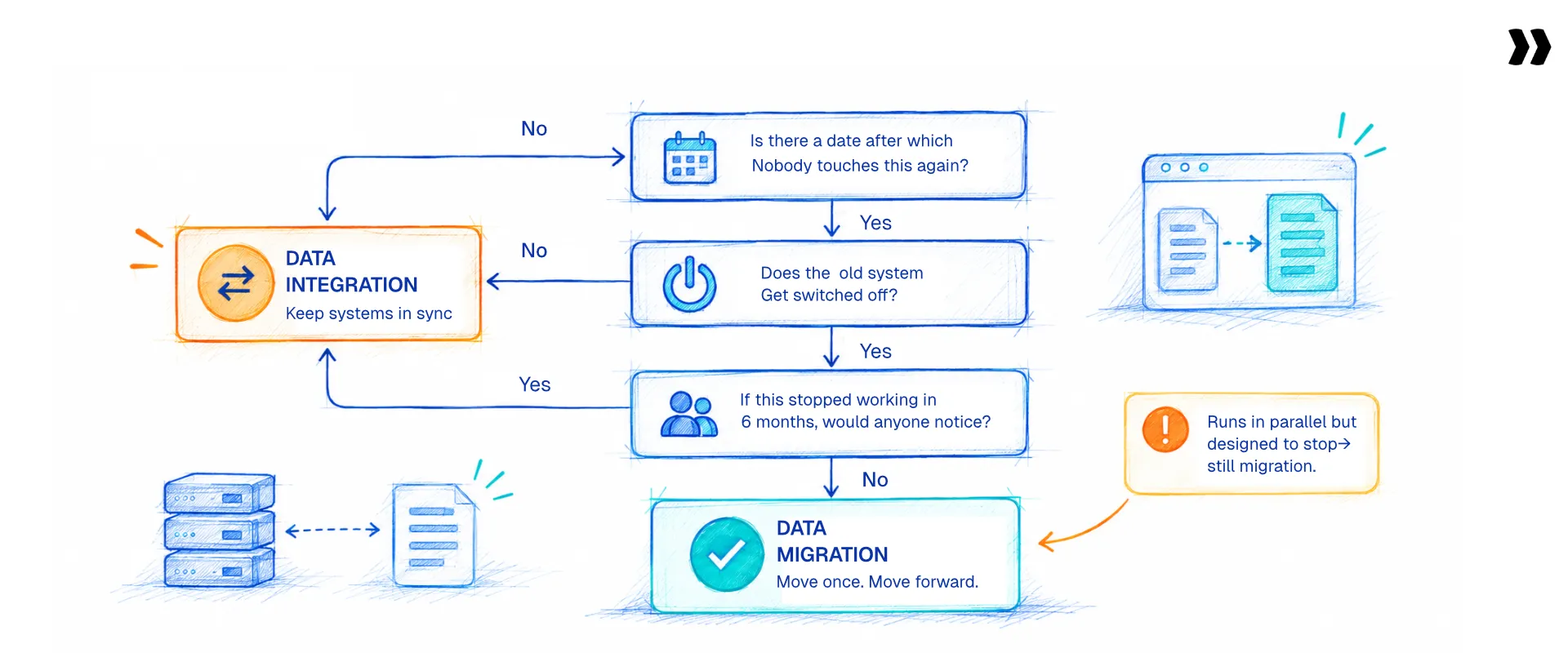
- The end-date question: If the work has a completion date and an acceptance criterion, it is a migration.
- The retirement question: If the source system gets decommissioned, it is a migration. If both systems stay live, it is an integration.
- The silence question: If nothing breaks when the work stops running, it was a project. If something breaks, it is infrastructure.
The reframe worth stating plainly: most people searching for data integration guidance while switching tools have a migration problem. If you are moving off a system rather than connecting to one, you are in the first column.
One honest edge case. A phased migration runs both systems in parallel for weeks and looks exactly like an integration while it is happening. The difference is that it is designed to stop. Some projects genuinely need a temporary sync during a phased cutover, and that is a migration with an integration inside it. Scope it as such.
The triggers: what brought you here tells you which one you have
The event that made you start looking usually identifies which problem you have.
The most common honest answer is both, which is why the sequencing question later in this guide matters more than the definitional one.
That last-but-one trigger deserves naming, because practitioners raise it constantly and published guidance rarely does. Teams arrive here because the patchwork broke. Excel, a few Python scripts, a generic ETL tool and a spreadsheet of field mappings, all maintenance-heavy, all dependent on whoever built them. That is a real trigger, and it applies to both columns.
Four things people believe that are not true about data migration vs data integration
Four misconceptions recur in scoping conversations, and each one costs weeks. That migration and integration are the same job. That migration is mostly a file transfer. That integrating two systems commits you to retiring one. And that all historical data has to move.
The four misconceptions, corrected
- They are the same thing: They share vocabulary and diverge on everything that matters. One ends. The other has an owner on call.
- Migration is a file transfer: It is transformation, validation, and cutover. Validation alone accounts for close to 38% of logged migration effort.
- Integrating means replacing: Teams assume connecting two systems commits them to sunsetting one. Data integration is what lets best-of-breed tools coexist.
- All historical data must migrate: Most teams need active records and recent history on day one. Older data belongs in an archive or a data warehouse.
The third and fourth are the expensive ones. Both expand scope by default rather than by decision, and neither gets challenged unless somebody asks the question out loud.
How much historical data should you migrate?
Split existing data into three tiers rather than treating it as one scope conversation.
- Operational data: Active projects, open invoices, and current resources. This has to arrive before go-live.
- Reference data: Closed projects, historical time entries, and prior invoices. Business users need to look these up, so plan them to land after go-live.
- Archive data: Everything else. Export it, store it in a defined data repository, and do not migrate it.
Splitting existing data this way turns one open-ended argument into three answerable questions. The decision about what you will not migrate needs a written sign-off, or it reappears the week before go-live.
Operational, reference, archive. Decide before go-live.
Bring your client's data list. We will help you tier it.
The distinction that matters: one ends, the other does not

Every published comparison says migration is one-time and integration is ongoing. That is correct, and it stops one step too early. A thing with an end date and a thing without one are owned, funded, and escalated differently. Confusing them puts the work on the wrong team’s plate and leaves it unmaintained.
- Ownership: Migration is scoped, delivered, and closed by the implementation team. Integration is built once and owned forever by whoever gets the alert.
- Budget: Migration is a project line. Integration is an operating cost. Approving one does not approve the other.
- Failure mode: Migration fails quietly, in production, weeks later. Integration fails loudly and repeatedly, at 2 am.
- Escalation path: A migration problem escalates to the project sponsor. An integration problem escalates to an on-call rota.
Those four differences explain why the same team rarely handles both well. Quiet failure needs validation before load. Loud failure needs monitoring and retries.
The line worth carrying into your next scoping call: you can finish a migration. You can only maintain an integration.
Common approach: Teams scope migration and integration in the same conversation and fund them from the same budget line. The integration gets built during the implementation, the project closes, and nobody is named as its owner.
Right approach: High-performing teams separate the two on the plan and name an integration owner before the project closes. They record the source-of-truth decision for every shared field during design, which removes the sync conflicts that surface in month fourteen.
What delivery leaders said on the Propel stage
Rocketlane's Propel conferences bring professional services and implementation leaders together every year, and the line between a project and infrastructure keeps coming up.
- Design before you automate. At Propel26, Merlin Komenda of Zappi made the case that teams should design their implementation process before automating it.
- Treat implementation as a product. Emily Garza of Unit21 explained how to treat implementation as a product, not a service, so the work you repeat gets kept rather than rebuilt.
- Use AI as a copilot, not an owner. Shehryar Malik walked through practical ways to turn AI into an implementation copilot, with people keeping the decisions.
- Measure outcomes, not activity. PropelX 2026 in London asked one question: AI is here, but where are the outcomes? The PropelX 2026 recap covers how services teams are answering it.
How do data conversion, application integration, and data ingestion compare?
Three more terms get used as though they were interchangeable. Data conversion changes the format of values without necessarily changing which system holds them.
Application integration connects systems at the workflow level, triggering actions rather than syncing records. Data ingestion is the intake step that brings raw data into a data lake or data repository.
The four-way comparison
The most useful correction in that table is the second row. Data conversion is a step inside a migration, not an alternative to one, and most published guides present the two as siblings.
On the application integration question, three sentences settle it. Data integration moves records between systems. Application integration triggers behaviour in one system when something happens in another. A nightly customer data sync is data integration, while "when a deal closes, create a project" is application integration.
What are the most common data integration challenges?
Five data integration challenges recur across projects. Poor data quality found late, schema drift between systems, security exposure around sensitive data, thin data governance, and growing data volumes that outpace the pipeline. Four of the five are decisions rather than defects, which means a strategy prevents more of them than a tool does.
The five challenges, and the fix for each
- Data quality issues found late: Teams map before they profile, so bad values reach the target system. Profile first, and improve data quality at the source rather than in the pipeline.
- Schema drift between systems: A field changes in one system, and the integration keeps running against the old shape. Version your data mapping and alert on schema changes.
- Security exposure around sensitive data: Source extracts sit in shared drives and inboxes. Define access controls, restrict who can read raw data, and set a deletion date for every extract.
- Thin data governance: Nobody owns the definition of a customer, so two systems disagree. Data governance means naming an owner per field, not writing a policy document.
- Growing data volumes: A pipeline sized for launch struggles two years later. Design data integration efforts for the volume you expect, not the volume you have.
Notice how few of those are engineering problems. Data compliance, ownership, and scope decisions cause more integration failures than throughput ever does.
Four of these five are decisions, not defects.
See ownership, sign-off and data rules held on one plan.
Benchmark box
These figures frame the operating context this work sits inside. They explain why rework on a migration lands somewhere painful.
Read the first and third rows together. With utilisation at an all-time low, and a single point of utilisation worth a 20% operating profit swing, non-billable rework is not an admin nuisance. It is a margin problem.
Most implementations need both data migration and integration, and the seam is where they slip

A typical customer implementation needs both. The client’s historical records have to move in once, and the new platform has to stay connected to their CRM, finance system, and identity provider afterwards. The two get scoped in different conversations, delivered by the same team, and sequenced badly more often than either fails on its own.
Picture the concrete shape. An operations team with a large client base and dozens of live projects needs migration off their existing platform, and a CRM integration to stop the duplicate data entry. Neither alone solves the problem they described. This is the pattern behind most growth-stage services tooling changes.
The three ways the seam goes wrong
- Sequencing: The integration gets built against the destination schema before the migration reveals which custom fields the client needs. The schema changes, and the integration is rebuilt.
- The ownership gap: Migration is delivered and closed. The integration scoped inside that project has no named owner, so it breaks two months later and nobody is accountable.
- Double-counting: A historical load runs while an integration is already syncing live records. Duplicates arrive from both directions, and each team’s validation passes because each is individually correct.
In many cases, data integration and data migration run on the same project plan, staffed by the same people, with only one of them named on the maintenance rota.
All three failures share a cause, which is that nobody drew a line between the project and the infrastructure. Decide the destination schema before either starts, name the integration owner before the project closes, and never run a live sync against the same object as a historical load without a reconciliation step between them.
One more question belongs in design rather than in production. For every field that exists in both systems, one has to win. Deciding the source of truth during design is cheap. Discovering it during a sync conflict is not.
The integration nobody owns breaks two months later.
Name the owner, sequence the work, and see both on one plan.
How to split the budget between them

Migration and integration draw on different budgets and should be estimated differently. Migration is a finite project cost with a defined scope and a validation tail that teams routinely underestimate. Integration is an operating cost with a maintenance line that runs for as long as both systems exist.
- Estimating a migration: Budget three things. The transform-and-validate effort, the client-dependent waiting, and the reconciliation tail. The third is close to 38% of logged effort, and it is the line most often left out.
- Estimating an integration: Budget two things. The build, and the maintenance for as long as both systems are live. The build is the smaller number.
- The mistake worth naming: Funding an integration out of the implementation budget. It gets built, the project closes, and there is no line item for the person who fixes it in month fourteen.
Post-go-live corrections run 15 to 20 days in practitioner accounts, and roughly 70% of projects hit records created after the export. Budget for that period rather than discovering it.
The sentence to take upward to a CFO: migration is capex-shaped, integration is opex-shaped, and approving one does not fund the other.
Who owns what

In most organisations, the implementation or professional services team owns migration, and engineering or IT owns integration. The ambiguity sits in the middle. Integrations built during an implementation are delivered by the project team and then have no owner once the project closes.
The maintenance row is the one nobody fills in during scoping, and it is the one that matters eighteen months later.
One risk is specific to migration and rarely appears on a plan. Migration depends on a handful of people who hold the schema knowledge in their heads. That is a scaling risk and a holiday risk at the same time.
For anyone settling an internal argument about ownership, one line usually ends it. If the deliverable has an acceptance date, it belongs to the project team. If it has a service level, it does not.
What data integration tools and data migration tools do teams need?
Four capabilities matter, and no single product covers all four. Extraction from source systems, data transformation, validation, and loading into the target system. Data integration platforms handle the connector and scheduling half well. Migration tooling handles the transform and validate half. Most teams end up with a stack rather than a tool.
Where each category fits
Every handoff between those categories is a place where data changes hands with no audit trail. That is the real cost of a stack, and it is why teams describe their tooling as a patchwork rather than a system.
Every tool handoff is a gap in your audit trail.
See extract, transform, validate and load approved in one place.
Which tools show up in these evaluations
Teams scoping this work are usually comparing a PSA platform at the same time. Kantata, Certinia, Scoro, BigTime, Productive and Accelo come up most often in professional services evaluations, alongside Smartsheet, Wrike, Teamwork and ClickUp on the project management side.
Each handles migration and integration differently, and the difference is rarely in the connector list.
Rocketlane vs Kantata, the short verdict: Choose Rocketlane when client-facing delivery matters as much as the back office, and when go-live in 4 to 12 weeks matters against 6 to 12 months for a legacy PSA platform. Kantata is the more established back-office-first option. The Rocketlane vs Kantata comparison carries the full head-to-head.
Data integration solutions are also not a substitute for people. Data engineers build and maintain the pipelines, data analysts and data scientists consume the output, and somebody in delivery still has to decide what a field means. Tooling changes the cost of the work, not the ownership of it.
Where Rocketlane fits on this line
Rocketlane sits on both sides of this line, with different products. The platform handles integration through native connectors. Rocketlane Migration Agent runs the one-time customer data migration, from extraction through loading, and it has no ongoing integration capability at all. Naming which product does which is the honest version, and it matters on a page like this one.
Rocketlane is an agentic AI-powered PSA platform with a 94% G2 recommendation rate, backed by a $60M Series C led by Insight Partners. Go-live runs 4 to 12 weeks, against 6 to 12 months for legacy PSA platforms.
Those go-live figures are Rocketlane’s own implementation timeline, and they are separate from the customer timelines quoted earlier, which run 8 to 12 weeks and stretch to 12 to 16 with multiple data passes. More detail sits in the PSA software guide.
The integration side
Rocketlane offers native integrations into the systems delivery teams already run, so project data and CRM records stay in agreement without manual data entry. That covers the ongoing sync half of this page for teams implementing a PSA.
The honest route-out matters more than the feature list. If integration is your primary problem and you are not also implementing a PSA, a dedicated data integration platform or iPaaS is the right category, and this is not a comparison Rocketlane would win. That sentence is what makes the migration half of this section believable.
The migration side: what Rocketlane Migration Agent covers
A customer data migration runs in four steps: extract, transform, validate, load. Rocketlane Migration Agent runs all four. It connects to the source system and pulls data on demand, and writes validated records directly into the destination. Connector coverage is not universal, so where no connector exists, a CSV or Excel export stands in.
- Transformation in plain English: Describe the transformation in natural language rather than hand-cleaning cells or writing code. Mapping suggestions appear on upload against the destination schema.
- Validation at three levels: Field-level checks, cross-field logic such as a commencement date that falls after an end date, and cross-sheet existence checks that confirm a child record’s parent exists.
- Versioned runs and client sign-off: Every transformation is versioned and comparable. Clients review and approve their own transformed data in a portal, so approval leaves a record rather than an email thread.
- Transcript-driven iteration: Tell the agent to rework the file based on what the client said on a call, and it produces a new version for confirmation.
The run itself is short to describe. You upload the client's export, the agent suggests field mappings against the destination schema, and you describe corrections in plain English rather than writing rules. The agent applies them and validates; you review the flagged rows, and the client confirms in the portal. The approved records then load into the destination.
Those four together turn a one-off migration into a schema-aware playbook, which is the part that changes the economics rather than the effort of any single run.
On scale and security, the specifics are worth stating. Validation runs up to 25 million cells per run, stress-tested at 1 to 5 million. Each run executes in an isolated single-use container, and raw data never enters the model’s context window.
The agent runs under ISO 42001, ISO 27001, SOC 1, SOC 2, HIPAA and GDPR, with zero data retention and US and EU data residency. ISO 42001 is the AI management system standard.
The part that connects to this page's argument
A migration ends. The playbook it produces does not. Schema, field aliases, transformation rules, and validation rules are saved against the source system rather than against the customer. The next client arriving off that same platform is a repeat run rather than a rebuild.
That is the closest thing a migration has to infrastructure, and it is the honest answer to the ownership problem this guide has been describing. The aggregated delivery data supports it directly: the same migration task recurs across 5.1 projects on average, and one pattern repeated in about 2,900 projects. If it is repeatable, it is automatable.
Two caveats keep the claim truthful. Every first migration from an unfamiliar source system still costs full price, because there is no alias library and no known quirks yet. And this is worth formalising when you will see the same source system more than a handful of times. Below that, a good template and a careful reviewer are the right answer.
A migration ends. The playbook it produces does not
Bring your messiest client file. See the rules saved for the next one.

The four questions buyers ask, answered
- Is our sensitive data safe? Each run is isolated, raw data stays out of the model context window, and the certification list above is specific rather than generic.
- Can it handle our complexity? Roughly 85% first-run mapping, every change surfaced, iterating to 100% with review. There is no one-shot claim here.
- How is it priced? Consumption-based. Pricing detail sits on the pricing page rather than in a blog.
- Will it fit our case? Best fit is teams migrating client data repeatedly from source systems that recur. It is a poor fit if you need ongoing sync or an embeddable importer.
Those four cover most of what comes up before a technical evaluation. Pricing is on the Nitro pricing page.
What the agent does not do
No ongoing sync and no integration connectors. No universal connector coverage, so check your specific source system. No composite-key joins, and no aggregate reconciliation, which means it does not confirm that a bill total equals the sum of its line items.
That last gap is industry-wide rather than specific to Rocketlane. No embeddable importer for clients to self-serve, no PDF or scanned-document extraction.
Reporting, integrations and the objections buyers raise
Two objections come up on every evaluation, and both deserve specifics rather than reassurance.
On reporting customisation: Nitro Analyst builds executive-ready reports on revenue, margin, utilisation and any delivery metric, and closes the gap between question and insight from hours of spreadsheet work to minutes. Refined analyses save as reusable templates that re-run against updated data.
On integrations: Rocketlane Migration Agent connects to source systems for extraction and loads approved records into the destination, but connector coverage is not universal. Where no connector exists, it reads the export your client provides instead. Ongoing sync stays with the platform's native integrations.
On whether this beats a validation script: A single-column check genuinely needs no agent, and a script a team already trusts is the right answer at low volume. The difference shows up when the rules are described in plain English rather than coded, versioned so two runs can be compared, and re-applied to the next client arriving off the same source system. A script does none of those three.
Customer story
Storable, a self-storage software vendor running client conversions on Rocketlane, cut migration time by about 75%. Jennifer McCurdy, Director of Implementation, leads that work against 3- to 4-week go-live targets. The full Storable case study covers the details.
On a 25-person delivery team, Rocketlane's planning model projects a 50% reduction in the data migration process, a 12% reduction in time to go-live, and roughly 1,000 hours saved per year. Those are modelled against a 25-person team rather than presented as universal averages.
What to know before you buy
Four things decide whether this category fits your project, and they are worth settling before a demo.
- On scope: No single product covers a whole customer data migration today. Confirm which of extract, transform, validate, and load each vendor owns, and who owns the rest.
- On rollout: Rocketlane goes live in 4 to 12 weeks against 6 to 12 months for legacy PSA platforms. Ask for the go-live figure and the hypercare window in writing.
- On team size: This category earns its cost for services teams of roughly 10 to 200 delivery professionals running repeat client implementations. Below that, a template and a careful reviewer is the right answer.
- On procurement: Enterprise evaluations should ask for the security posture up front. Rocketlane holds ISO 42001, ISO 27001, SOC 1, SOC 2, HIPAA and GDPR, with zero data retention and US and EU data residency.
Those four questions separate vendors faster than a feature matrix does, because each one has a verifiable answer.
Conclusion: one ends, the other does not

Data migration moves records once and finishes. Data integration keeps systems in agreement and never does. Everything else on this page follows from that one difference: who owns the work, which budget pays for it, and how it fails when it fails.
The teams that get this wrong are rarely confused about the definitions. They are confused about who owns the work after the project closes. Name that owner during scoping and most of the expensive failures stop happening.
The client file that arrives in week two will still have three tabs and four date formats. What changes is whether your team has met that file before.
Three tabs. Four date formats. Week two.
See what changes when your team has met that file before.
Table of Contents

Regsiter for the live webinar


Great consultants didn't join your team to spend Fridays writing documentation.
Table of contents
18 of Forbes Cloud 100 chose Rocketlane. The best PS teams aren't waiting around.
FAQs
What is data integration?
Data integration is the practice of combining data from multiple sources into a unified view that stays current. Data integration typically involves data extraction from source systems, data transformation so values match a common model, and data loading into a central repository or target system. Unlike a migration, it runs continuously. The main types of data integration are ETL, ELT, data virtualization, data federation, real time data integration, and application integration.
What is the difference between data migration and data integration?
Data migration moves records from a source system into a target system once, after which the source is retired. Data integration keeps two live systems exchanging data continuously, and it never finishes. Migration is a project with an acceptance date. Integration is infrastructure with a service level. That difference determines who owns each one and which budget funds it.
Is data conversion the same as data migration?
No. Data conversion changes the format of values, for example reformatting dates or normalising picklists. Data migration moves records into a different system. Data conversion is a step inside a migration rather than an alternative to one, which is where most published guides get it wrong. A migration almost always contains conversion work, but conversion can happen without any records moving systems.
What is the difference between data integration and application integration?
Data integration moves records between systems, keeping the same data consistent in both. Application integration triggers behaviour in one system when something happens in another. A nightly customer data sync is data integration. A rule that creates a project when a deal closes is application integration. Both are ongoing, and both are usually owned by engineering rather than by the implementation team.
Can a project need both data migration and data integration?
Yes, and most client implementations do. The historical records move in once, and the new platform then stays connected to the CRM, finance system, and identity provider. The risk is not that either fails on its own. It is sequencing: an integration built against the destination schema before migration reveals which custom fields the client needs will be rebuilt.
Who owns data migration versus data integration?
The implementation or professional services team usually owns migration, and engineering or IT owns integration. The gap sits in the middle, because integrations built during an implementation often have no named owner once the project closes. A practical test: if the deliverable has an acceptance date, it belongs to the project team, and if it has a service level, it does not.
How should you budget for data migration versus data integration?
Budget migration as a project cost covering transform-and-validate effort, client-dependent waiting, and the reconciliation tail. That tail is close to 38% of logged migration effort, and it is the line most often omitted. Budget integration as an operating cost covering the build plus maintenance for as long as both systems live. Migration is capex-shaped, and integration is opex-shaped.
Do you have to migrate all your historical data?
No, and assuming you do is one of the more expensive default decisions in an implementation. Split existing data into three tiers. Operational data such as active projects and open invoices must arrive before go-live. Reference data such as closed projects can land afterwards. Archive data should be exported to a defined data repository and left there, with written sign-off on the exclusion.
Does integrating two systems mean you have to retire one?
No. That belief causes teams to over-scope migrations that should have been integrations. Data integration is precisely what lets best-of-breed tools coexist, with each system continuing to do the job it is good at. Retirement is a migration decision, driven by contract expiry, consolidation or compliance, and it should be made separately from the decision to connect two systems.
What are the most common data integration challenges?
Five recur. Poor data quality discovered late, because teams map before they profile. Schema drift, when a field changes and the pipeline keeps running against the old shape. Security exposure around sensitive data sitting in shared drives. Thin data governance, where nobody owns the definition of a customer. And data volumes outgrowing a pipeline sized at launch. Four of the five are decisions rather than defects.













Copyright © 2026 Rocketlane Corp. All rights reserved.




















.webp)