Customer data onboarding for implementation teams: the complete guide (2026)


•
•
Summarize blog with






Customer data onboarding is the process of getting a new customer's existing data into the platform they have bought: collecting it from them, cleaning and standardizing it, mapping and transforming it to your schema, validating it, and loading it so they work on day one. It is also where implementation timelines break.
Teams report data work consuming 35% or more of total implementation time, and across 131 accounts with a material data onboarding footprint, defined as at least 100 tracked and approved migration hours, the average burn is roughly 3,400 hours per account.(As per internal Rocketlane customer benchmarks)
Fix the middle of that process and go-live moves. Storable's preliminary observations point to a reduction in migration time of about 75%.
Rocketlane is an agentic AI-powered PSA platform for customer-facing professional services teams, with 750+ customers, a 94% G2 recommendation rate, and a $60M Series C led by Insight Partners in March 2026.
This guide covers the three meanings of the term, the five steps, why collection takes so long, what the work costs, and why none of it gets cheaper on its own.
Written for implementation, onboarding, and professional services teams moving customer data into a destination platform such as Salesforce, NetSuite, Workday, or your own product. If you are matching offline records to digital ad identifiers, that is a different job and a different toolset.
What is customer data onboarding?
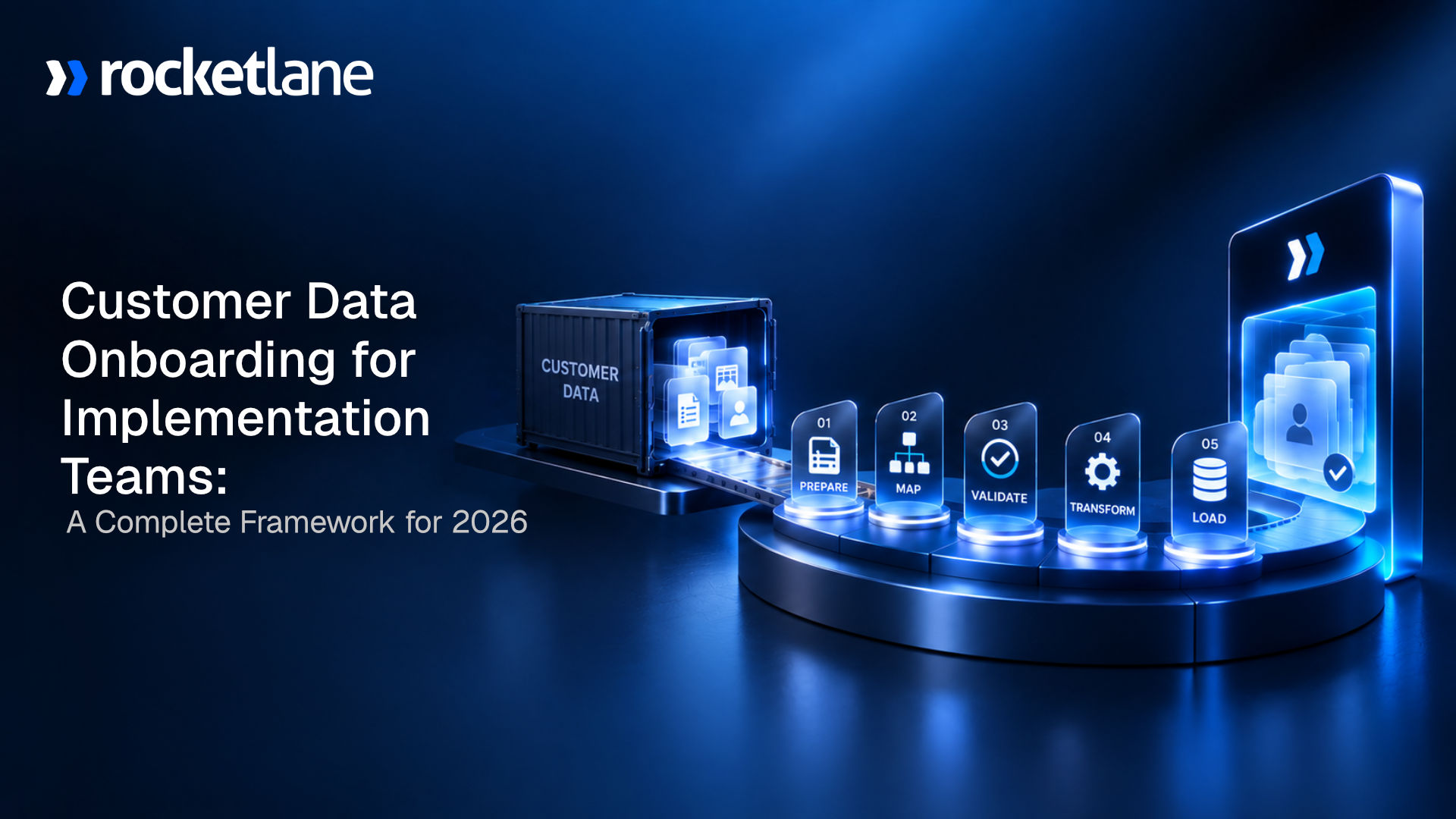
Customer data onboarding is the process of getting a new customer's existing data into the platform they have bought, so it arrives complete, correct, and usable at go-live. It covers five steps: collecting the data from the customer, cleaning and standardizing it, mapping and transforming it to the destination schema, validating it, and loading it into the new system.
The five steps are not equal in size. Collection takes the longest in elapsed time and your team does not perform it. Loading is handled by the destination system. The middle three, cleaning, transformation, and data validation, consume the hands-on hours. Poor data quality costs organizations an average of $12.9 million a year, according to Gartner, and onboarding is where that cost enters the building.
It is not the implementation project that surrounds it, which is customer onboarding. It is not in-app product guidance, which is user onboarding. And it is not a file transfer. The data has to arrive in a shape your platform accepts, in the relationships it understands, with your business rules applied to values created under somebody else's. Everything arriving is external data, clean by the old system's definition. Your system disagrees, and the disagreement surfaces at import.
What is the difference between customer data onboarding, customer onboarding, user onboarding, and data migration?
Customer data onboarding moves one customer's records into your platform. Customer onboarding is the implementation project wrapped around it. User onboarding is in-app guidance. Data migration is the same work, described from the source system's point of view rather than the customer's.
The most useful distinction is the subtlest. Customer data onboarding and data migration describe the same work. The phrase you reach for depends on whether you are describing the customer's arrival or the old platform's departure. Nobody is doing different work. They are standing in different places.
Who does customer data onboarding matter to?
How much structure this work deserves depends on frequency. If you migrate customer data repeatedly, once per new customer, it is a recurring cost center on your critical path and deserves a system. If you migrate once, as a company switching platforms, it is a project and a good template will carry you.
Repeat migrators
Software vendors onboarding customers into their product, implementation and systems integration firms, and migration-as-a-service teams. Every new customer is another migration, and the same customers keep arriving from the same handful of source systems. Implementation managers, delivery leads, and customer success managers do the work, with ops teams owning the mapping and engineering teams pulled in for APIs.
They describe it consistently: one person who is a single point of failure, and no way to scale implementations without adding headcount in proportion. This is who the rest of the guide is for.
One-time migrators
A company moving off one platform onto another, once. The work and the risk are real, but neither are compounds, so building a repeatable system is over-engineering. Use a strong template and one careful reviewer.
The qualifying question: how many times will you migrate off this same source system in the next twelve months? Under three, use a template. Over five, the economics change.
What are the steps in customer data onboarding?

Most process guides give the five steps equal weight, which produces a plan that is wrong about where the time goes. The process runs in five steps: collect the data from the customer, clean and standardize it, map and transform it to your schema, validate it, and load it.
Collection takes the longest and your team does not perform it. Loading is handled by the destination system. The middle three consume the hands-on effort and carry almost all of the risk.
Underneath those five headings sit the same task types on every project: confirm data sources, populate the load file, map the fields, run the data import, review the onboarding data, rerun, approve, reconcile after load. Importing customer data is the last of those, not the whole job, and that assumption wrecks estimates.
Across aggregated delivery data the same task recurs across an average of 5.1 projects, one of them in roughly 2,900. Hold on to the asymmetry: elapsed time sits in step one, hands-on effort and defect risk in steps two through four.
Importing is the last step, not the whole job.
That assumption is what wrecks the estimate.
Why is the longest step the one your team does not perform?

Ask an implementation manager where their project stands and a large share of the answer is a shrug about somebody else's export queue. The waiting is designable, and almost nobody designs it. The slowest part of the work is data collection, and your team does not do it. The customer exports their records from a system you cannot see, on a timeline you do not control. Two to three months for a completed workbook is common.
You cannot transform that step, but you shorten it, and most teams never try because they treat it as waiting rather than as work.
Listen to how practitioners describe it. "The big bottleneck is just getting that data." "Most of that is waiting on our clients to extract their data. It's not our tool. Once we get it, we can do it relatively quickly." Read those together and the diagnosis changes. The team is fast. The queue in front of the team is slow, and a slow queue is a design problem.
You have complete control over four things: how clearly you ask, how easy you make it to answer, whether anyone chases, and whether the customer sees what is outstanding. Four failures show up over and over.
- Spreadsheet and PDF questionnaires: No structure, no validation, no visibility into progress. The customer guesses at what each column wants, so the data points you get back are approximations. Errors surface weeks later, when correcting them costs ten times what they would have at entry.
- No accountability mechanism: Requests live in Outlook and Gmail threads. Nobody knows what is outstanding, including the customer, and manual processes fill the gap.
- Everything requested at once: A hundred-field workbook lands on day one when twenty fields would unblock the first milestone. The customer sees the size of the ask and defers it.
- The same data requested twice: The back office team collects a roster. The front office team collects it separately. The customer notices, and their read on your operational efficiency changes for the rest of the relationship.
The fixes are vendor-neutral. Replace spreadsheets with structured forms carrying automated validation at entry. Collect progressively against milestones. Set reminders with a named escalation path. Give the customer one place to see what is outstanding, and collect once across teams. The fastest teams have not made their customers faster. They have made it harder for a request to sit unanswered.
The team is fast. The queue in front of it is slow.
A slow queue is a design problem, and almost nobody designs it.
Does project management software with a client portal fix data collection?
Collection is the longest step and the customer performs it, so the interface you hand them is the lever. Project management software with a client portal gives the customer a single branded place to see what data is outstanding, upload it, and track their own progress, instead of reconstructing the ask from an email thread. For customer data onboarding that matters more than any internal feature, because the bottleneck sits on the customer's side of the wall.
Most project tools were built for internal teams. Asana, ClickUp, Wrike, Smartsheet, Teamwork, and monday.com manage tasks well, and none were designed to put a customer inside the project. Teams bolt on a form tool, a shared drive, and a status email, which recreates the data silos the portal was meant to remove. Four capabilities separate a real client portal from a shared board.
- No login required: Magic-link access removes the largest drop-off point. A customer who must create an account to upload a CSV will email it instead, and your audit trail goes with it.
- Unlimited free customer users: Per-seat pricing for external users caps who you invite, which is how the one person who understands the payroll file ends up outside the process.
- Structured forms with validation at entry: A portal hosting a spreadsheet download is a file share. A portal validating the date format as the customer types is a data quality control.
- Visible outstanding list: The customer sees three open items, not a forwarded thread.
Rocketlane ships this as a white-labeled client portal with magic-link access and unlimited free client users, the front office half of the platform. The back office half, resourcing, time tracking, and margins, runs in the same system, so what the customer submits lands against the project plan rather than in a separate inbox.
A customer asked to make an account will email the CSV instead.
Magic-link access, unlimited client users, and the audit trail stays intact.
How long does customer data onboarding take?

Absolute week counts travel badly, because a twelve-week implementation and a twenty-six week implementation are different animals. Estimate this work as a share of the implementation instead, because a proportion scales. Teams report data work consuming 35% or more of total implementation time. On a twelve-week implementation, that is roughly four weeks. The single largest component is waiting for the customer.
That proportion matters because of what sits downstream. For many software businesses, ARR and expansion revenue are recognized only when implementation completes, so every week lost to data onboarding is deferred revenue rather than a late project. That is the version a VP forwards to a CFO.
A second squeeze gets less coverage. Teams get pushed into delivery on go-live day itself, because migrating too early means the data is stale before the customer starts. You cannot begin until the customer sends the file, and you cannot finish far ahead of go-live.
The third consequence lands on the metric you are measured on. When onboarding slips from two to four weeks out to six or more, early satisfaction scores drop and the customer onboarding experience takes the blame.
Customer expectations were set during the sales cycle, and a customer sitting in an empty system does not distinguish your delivery team from their own export queue. Early customer churn traces to this window more reliably than to any product gap.
Ranges teams report, as practitioner experience rather than benchmarks: two to three months for a completed workbook, four to six weeks for mapping alone on a complex source, and 15 to 20 days of corrections after go-live.
Every week lost here is deferred revenue, not a late project.
That is the version a VP forwards to a CFO.
How do you reduce time to value in customer onboarding?
Time to value is the metric this page reports to, and data is the largest lever inside it. Five moves shorten it, ordered by how much time each returns.
To reduce time to value in customer onboarding, compress the data workstream first, because it consumes 35% or more of implementation time and gates the go-live date.
Start collection before kickoff, collect in stages tied to milestones, validate logic before load rather than after, reuse transformation rules per source system instead of rebuilding them, and load active records for go-live with historical data backfilled afterward.
- Start collection before kickoff, not at it. The export request is the longest-running item on the plan, so issue it first, at contract signature with the kickoff invitation. That change moves weeks and costs nothing.
- Collect in stages tied to milestones. Twenty fields unblock the first milestone. Asking for a hundred on day one guarantees the customer defers all hundred.
- Validate before load, not after. Teams report 15 to 20 days of corrections after go-live, and most of that tail is preventable at step four.
- Reuse per source system. The tenth customer off the same platform should cost less than the first. It rarely does, for reasons the next two sections explain.
- Split active from historical. Load what the customer needs on day one and backfill history afterward. Go-live stops waiting on the largest and least urgent object in the file, usually activity history.
The gains compound. Industry average billable utilization sits at 66.4%, an all-time low across 509 firms surveyed by SPI Research, and every week spent re-keying spreadsheets never reaches a client deliverable. Rocketlane's planning model for a 25-person delivery team projects a 12% reduction in time to go-live from the data workstream.
Send the data request at signature, not after kickoff.
Moves weeks, costs nothing. See the other four.
Why is customer data onboarding harder for some source systems than others?

The five steps are identical everywhere. Difficulty is not, and it rarely tracks with volume. A million clean rows load in an afternoon. Nine thousand rows with three custom objects and a circular reference take two weeks.
What makes a customer's data hard comes down to three things: custom fields with no equivalent in your schema, records that reference each other so load order decides whether anything works, and business rules that only surface when an import rejects a row.
- Custom fields and objects: Every customer extended their old system, and those extensions carry meaning your schema has no place for. Deciding where each goes is a conversation with the customer, not a mapping exercise, which is why it lands on senior people.
- Cross-object logic: Records reference each other, so parents load before children. A contact needs an account, a line item needs an invoice, and getting the order wrong makes the load half-succeed, which is worse than a clean failure.
- Vendor and industry business rules: Validation and calculation rules that live in your destination and did not exist in the source. Invisible until the row is rejected.
Source systems cluster into four shapes, and the shape tells you what difficulty to plan for. Spreadsheets arrive with no schema to map from, so profiling dominates.
Legacy PSA platforms carry heavy cross-object references, rate cards and time entries at volume. General project tools carry custom-field sprawl and inconsistent typing. CRMs export cleanly and then surprise you in transformation. Spreadsheets and legacy PSA platforms carry most of the volume, and neither is the easy case.
A million clean rows load in an afternoon.
Nine thousand rows with a circular reference take two weeks.
From a CRM
Contacts, accounts, deals, and activity history. The recurring defect is picklist drift, where the source stored free text and the destination expects a controlled value, so "Closed - Won", "closed won", and "CW" arrive in one column. Load order runs account, contact, opportunity, line item. Activity history is the largest object by volume and the first thing deferred.
Most crm systems export cleanly, Salesforce and HubSpot included, which fools teams into underestimating the transformation of the crm data that follows.
From a legacy PSA
Project and resource objects with heavy cross-references, time entries at volume, and billing structures that do not map one to one. Rate cards are the trap: the source stored a rate per person, your destination stores a rate per role per project, and reconciling them is a billing decision, not a data question.
From spreadsheets
There is no schema to map from, so profiling dominates. Formulas get stored as data. Header rows appear three times in one file. Fragmented data sits in a dozen workbooks with a dozen owners, and the person who understood the layout left.
From an HRIS or payroll system
Records in BambooHR and Workday are effectively-dated, so you are migrating a history of changes rather than a current state. Year-to-date payroll figures bite hardest. Carry them across wrong and post-migration tax calculations come out wrong, months later, in front of the customer's employees. It is the clearest example of why format-level validation is not enough.
Why does customer data onboarding never get cheaper?
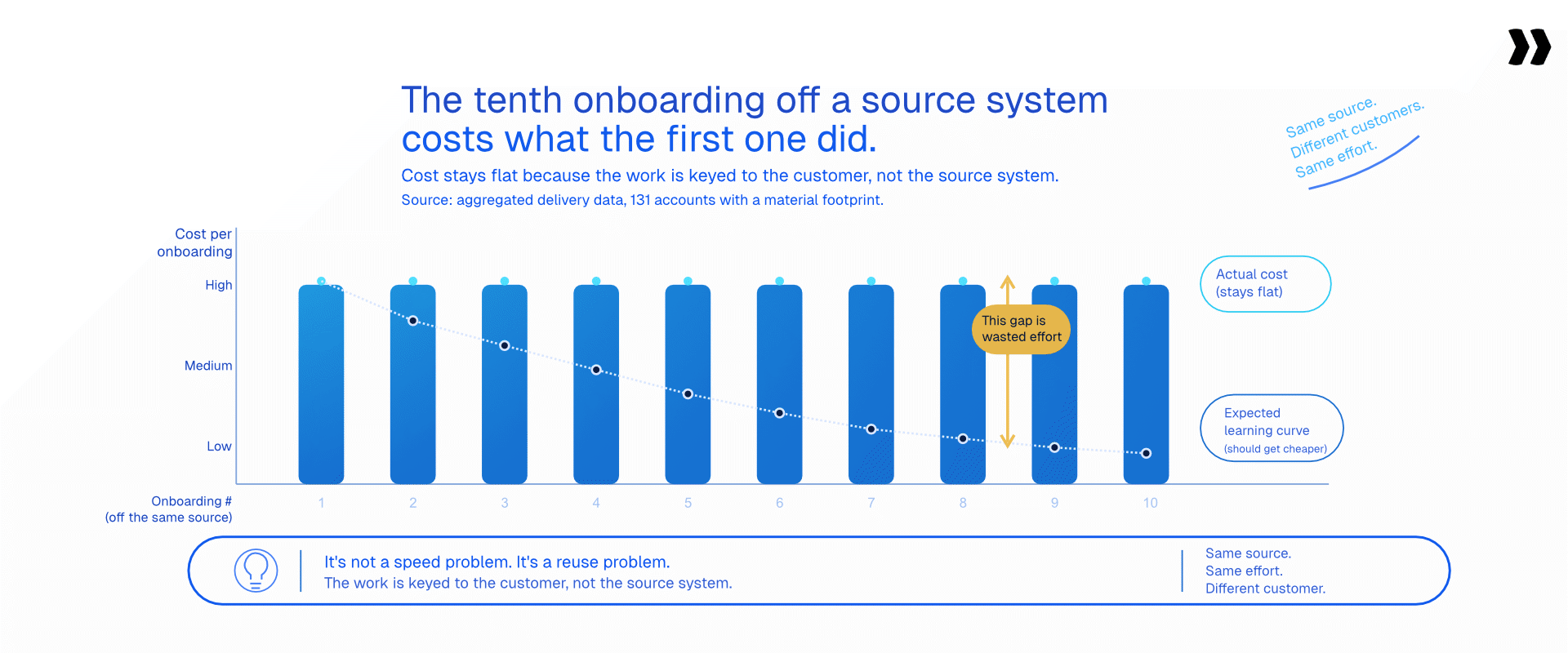
Speed is the wrong thing to optimize, and this argument only becomes visible after ten runs of the same shape of project. Most teams get no cheaper at this over time. The tenth onboarding off a source system costs roughly what the first one did, because the mapping, the transformation rules, and the fixes are rebuilt each time rather than kept. The problem is not that the work is slow. It is that the work is keyed to the customer instead of to the source system.
Aggregate delivery data makes the repetition visible. Across 131 accounts with a material data onboarding footprint, defined as at least 100 tracked and approved migration hours and excluding sandbox, test, and internal accounts, more than 36,500 projects repeat the same migration steps, averaging roughly 1,370 migration tasks and 38 distinct people logging migration time per account.
If it is repeatable, it is automatable. Keying the work to the source system means documenting, once per source platform, the schema, the field alias library, the transformation rules, the validation rules, and the load order, then applying that set per customer. The customer changes every time. The source system does not. A scalable onboarding process is built on that distinction and nothing else.
One cost of the status quo rarely gets counted. A practitioner described it exactly: "Because migrations are so manual and so painful, teams aren't doing as many as they'd want, and customers are reluctant to do them at all." Teams quietly stop offering migration. Customers decline it and start with a blank system, without their history and without the valuable insights buried in it. That is worse than a slow migration, and invisible in every dashboard you own.
Two caveats. The first migration from an unfamiliar source system costs full price, because the playbook does not exist yet. It costs once, not nothing. And this is worth building only when the same source system shows up more than a handful of times.
The customer changes every time. The source system does not.
Key the work to the platform and the tenth run stops costing what the first did.

Why is your destination system's validation not enough?

Teams treat a clean import as a passed test. It is not. Data importers validate format: is this a number, a valid date, a populated required field. They rarely validate logic: whether a date sequence makes sense, whether two fields agree, or whether a referenced record exists. Data that is well-formed and logically wrong passes straight into production.
Take a lease record. Your data importer confirms Commencement Date and End Date are both valid dates. It never checks that Commencement comes before End. Transpose the pair and both fields pass every check you have. The error surfaces when the customer runs their first report.
Most teams adapt by spot-checking 10 to 20% of records and trusting the rest. That is a reasonable response to a real gap, and also why the customer finds the defects instead of you. Three layers of checking are worth naming, because teams build only the first.
- Field-level: Format, type, length, required. This is what the importer gives you, and the layer data normalization solves.
- Cross-field: Does this value make sense given that one. Start date before end date. Discount not exceeding list price.
- Cross-table and referential: Does every child resolve to be a real parent. Does a total match the sum of its lines. Does the migrated record count reconcile against the source.
Be honest about the third layer. Composite-key joins and aggregate reconciliation are not solved by any tool in this category, ours included. They remain a human review step, and pretending otherwise is how teams end up trusting a green check mark that means less than they think.
Commencement after End. Both valid dates. The import accepted it.
The customer finds it when they run their first report.
What are the common data onboarding challenges?
Different source systems produce different defects, but the same four data onboarding challenges show up in nearly every project. Naming them upfront turns each from a surprise into a line item.
- Data quality issues from the source: Six date formats in a column, leading zeros stripped by Excel, blank required fields, encoding errors. Why: the export reflects years of unenforced entry. Fix: profile the file before planning the work and quantify the data quality issues in a summary you send back. Data cleaning the customer approves goes faster than data cleaning you perform silently.
- Data silos and fragmented data: The records sit in a CRM, two spreadsheets, a billing system, and one person's inbox. Why: nobody needed the whole picture in one place. Fix: pull data from various sources into one staging file with documented lineage per column. Integrating data at the staging layer costs less than integrating it inside your destination, and gives you one place to run data transformation rules.
- Silent mis-mapping: A field lands in the wrong column, passes every format check, and surfaces months later. Why: one person makes the mapping decision and nobody reviews it against the data. Fix: review mappings against a sample of real records rather than the schema. Ten rows on screen catch what a mapping document hides.
- No accountability on the customer side: Fix: named owner, visible outstanding list, automated reminders, escalation path agreed at kickoff.
Left unaddressed, these compounds. A silo produces a quality problem, which produces a mis-mapping, which produces a customer-visible defect, which produces an escalation that costs a week.
How do you handle sensitive data and compliance during customer data onboarding?
This work moves the most regulated records a company holds, and the transport method is frequently an email attachment. A typical onboarding file carries names, contact details, employment records, birth dates, bank details, and commission structures. One implementation lead described it: "We would be collecting the roster, we would be collecting birth dates, some pretty private information that needs to be in a secure environment." Emailing that around a project team creates compliance risks that outlast the project.
Four data management practices carry most of the weight. Collect sensitive data through a structured, access-controlled channel rather than email. Define retention at the start, including when staging copies get destroyed. Restrict file access to the people performing the transformation.
And record where the data resided at each step, because regulatory compliance questions arrive after the fact and get answered from documentation or not at all. Data security and data integrity pull the same way: an audit trail gives you a defensible record of which version of the file was loaded.
What does customer data onboarding cost?
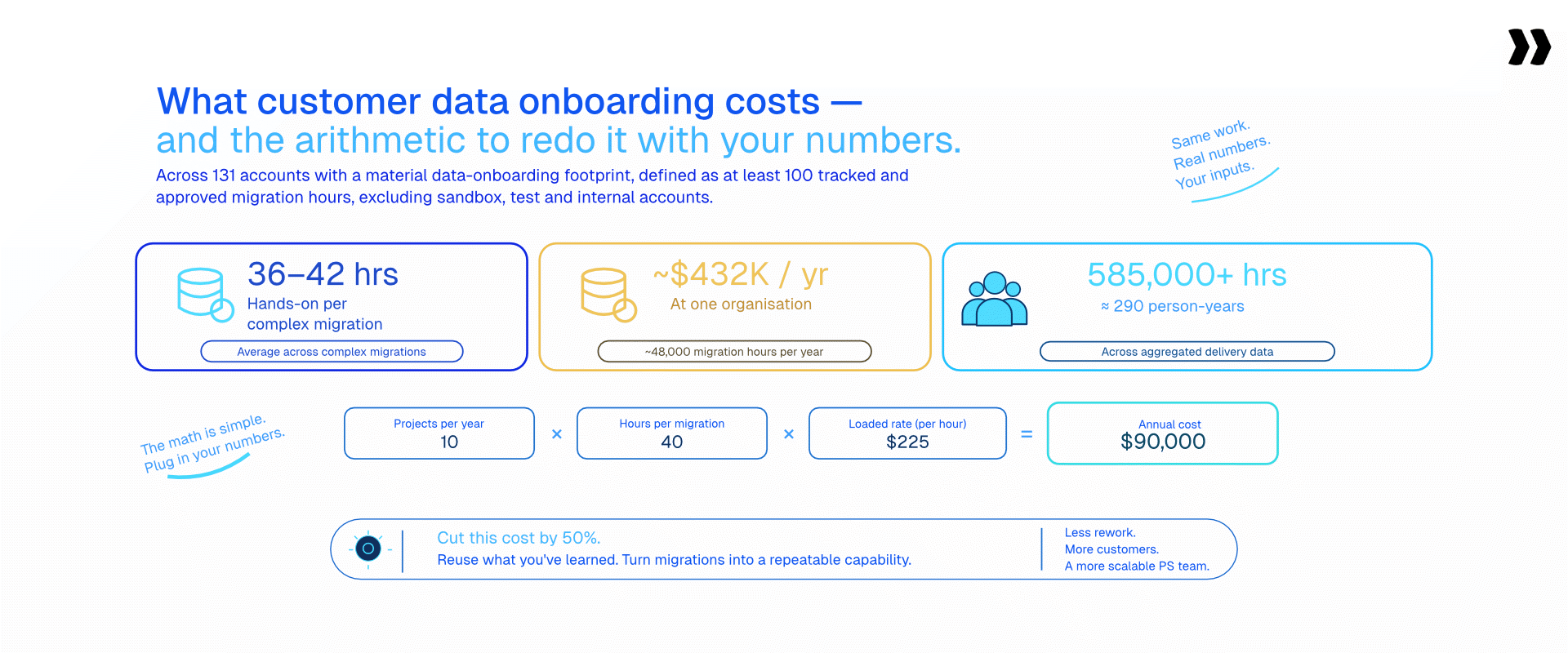
The arithmetic below is exposed so you substitute your own inputs. A complex customer migration averages 36 to 42 hours of hands-on effort, and at scale that compounds. One organization measured roughly 48,000 hours a year on migration work, costing about $432,000 annually.
Across aggregated delivery data, data onboarding work accounts for more than 585,000 tracked hours, roughly 290 person-years, across 356,000 migration tasks in 83,000 projects logged by more than 7,700 people.
The arithmetic: projects per year, multiplied by hours per migration, multiplied by your loaded hourly rate. Forty projects at 38 hours at $85 per hour is $129,200 a year in delivery capacity spent on customer data onboarding.
The per-customer figure lands hardest with delivery leaders. Across those same 131 accounts the average is roughly 3,400 hours, about 1.7 person-years, per account. The median exceeds 660 hours, the heaviest single account exceeded 93,000, and more than 38,600 projects in the cohort ran beyond 90 days.
Present improvement conservatively: a 50% reduction target is defensible and board-ready. One line for the CFO conversation. The cost above is delivery capacity, not cash. Those hours, freed, become billable work or absorbed growth without added headcount, which is where the operational efficiency argument lives.
Roughly 1.7 person-years of delivery capacity, per account.
A 50% reduction target is defensible and board-ready.
What does good customer data onboarding look like?
None of these four properties require a purchase. Good practice here has four: the transformation rules are written once per source system and reused, validation checks logic and not only format, the customer sees and corrects their own data before it loads, and the process runs in stages so nothing is a surprise at go-live.
Data onboarding strategies that skip staging, and go straight from a first look to a full load, produce go-live weekends nobody forgets. The customer review step deserves a note, because the usual justification is wrong. It gets presented as a convenience. The real reason is ownership: customers frequently must correct their own records for legal reasons, and a documented sign-off protects both sides when a value is disputed later.
Effective data onboarding is boring to watch, which is the point. Clean onboarded data accelerates time to value in the only way that matters: the customer opens the product and their history is there. That is where customer relationships are won, well before the first renewal.
How is AI changing customer data onboarding?
The data onboarding process has moved through three stages, and knowing which one your team is in tells you what to invest in next. Most hands-on time goes to three steps: cleaning the customer's data, mapping and transforming it to your schema, and validating it before load.
Those are the steps teams are automating, using AI agents that apply transformation rules described in plain language and run validation before anything is exported.
Stage one was hand-mapping in spreadsheets, where a large share of teams still sit. Stage two was scripts, which work until the source system changes or the author leaves. Stage three is agents that handle the middle steps with a human reviewing the output. Each stage removes manual processes from the data onboarding pipeline without removing the human decision about what the data means.
Be clear-eyed about how common this is. Several tools now accept plain-language or AI-driven transformation instructions. AI transformation is not unique to any vendor, and a page claiming otherwise loses its technical readers.
What differs is what the reuse is keyed to, and how much of the data pipeline each tool covers. That difference is the shift from merely tracking work to actively executing it: most platforms report on delivery, while an agentic execution platform performs a piece of it and hands a reviewer the output to approve.
Rocketlane's Migration Agent, part of Nitro, its agentic AI layer, covers the clean, transform, and validate steps. Rules are written in plain language rather than code, every run is versioned, and nothing loads without human review.
It runs through a conversational interface with a spreadsheet-style preview before anything commits, so reviewers see the data as data rather than a log file. Rocketlane Migration Agent maps, transforms and validates the data. Extraction and loading run through connectors or Workforce Agent, with a CSV or Excel export as the fallback.
Rocketlane Migration Agent, and what a per-source playbook is
Here is the compounding mechanic implemented rather than described. Rocketlane Migration Agent is part of Nitro, Rocketlane's agentic AI layer.
Nitro runs across three levels: Level 1 operations through Nitro Analyst and Timesheet Policies, Level 2 delivery through Project Governance and Nitro Signals, and Level 3 work execution through the Documentation Agent, Workforce Agent and Rocketlane Migration Agent. Level 3 is where delivery work gets done, and for customer data onboarding it means the rules you define for one source system run identically on every customer arriving from it.
In the product's own words: Migration Agent takes over data preparation, transformation rules, mapping, and validation so your team stops rebuilding the same migration logic from scratch every time. It turns one-off migrations into repeatable, schema-aware playbooks.
A per-source-system playbook means the schema, the field aliases, the transformation rules, and the validation rules are saved against the source system rather than the customer. The next customer leaving that platform is a repeat run, not a rebuild. Setup happens once per source system, execution once per customer.
Competitors reuse too, and the difference is worth stating precisely rather than overstating. Some tools retain account-level schema and past decisions, others retain templates or recorded transformations. The distinction is what the reuse is keyed to, not whether it exists.
One capability has no equivalent in the competitive set: the agent acts on what a customer said on a call and produces a new version for confirmation. A correction made verbally on Tuesday becomes a rule you approve on Wednesday.
Migration Agent planning figures, modelled on a 25-person delivery team: a 12% reduction in time to go-live, a 50% reduction in the data migration process, and 1,000 hours saved per year for a SaaS team or 750 for a services team.
These are planning baselines, not measured outcomes. Validation runs to 25 million cells per run, stress-tested between 1 and 5 million. Storable cut data migration time by 75% with no added headcount.
Security: Each run executes in an isolated container and raw data never enters the model's context window. Certifications cover ISO 42001, ISO 27001, SOC 1, SOC 2, HIPAA, and GDPR, with zero data retention and US and EU residency options. Rocketlane publishes ISO 42001 certification, the standard written specifically for AI management systems. Among dedicated data onboarding and importer tools, that remains rare.
Control: Human in the loop by design. Runs are staged, sample first and then live, with correction before the final load. First-run mapping accuracy sits around 85% and iterates to 100% through review. It is not a one-shot process and is not sold as one.
Rocketlane sits in the professional services automation category as an agentic AI-powered PSA platform for customer-facing professional services teams, which means the migration work lives in the same system as the project plan, the resourcing, and the client-facing portal your customer sees. Pricing for Nitro is at rocketlane.com/pricing.
A correction made Tuesday becomes a rule you approve Wednesday.
The agent acts on what the customer said on the call, then waits for sign-off.
What to know before you buy a customer data onboarding agentic software
Eight objections come up in every evaluation of tooling for this problem. Here they are with straight answers.
"If our base-level data isn't clean, an agent won't help." Messy input is the use case, not a prerequisite. If the data arrived clean, you would not need the middle three steps.
"Migration is error-prone. One mistake risks go-live." Validation runs before export, anomalies get flagged for a person, and a human approves before committing. Nothing loads unreviewed.
"Is it automated, or still manual underneath?" It automates the transform and validates work people do by hand. Collection and loading are not, and saying so is what makes the first two answers credible. Custom objects and years of history get phased: active records for go-live, historical backfill afterward.
"A full PSA costs more than a migration tool." True, and the wrong comparison. A 20-person services team at $150 per hour moving from 60% to 80% billable utilization generates roughly $300,000 in additional annual revenue. Add a 5 to 10 point margin improvement and a 30% to 50% reduction in time to value, and the platform recovers its cost inside 90 to 180 days.
"Reporting in PSA tools is rigid." Nitro Analyst answers financial and utilization questions in plain language against live data, with no manual exports and no BI dependency, and saves the analysis as a reusable report.
"Isn't Rocketlane an onboarding tool?" Rocketlane is a full agentic PSA for customer-facing professional services teams: delivery, resource management, financials, and client collaboration in one platform, not adapted from generic project management software. Teams that only need internal operations have other options in the category. Rocketlane's moat is the customer-facing delivery layer, and Nitro's Level 3 agents do delivery work rather than reporting on it.
"Will it connect to the rest of our stack?" Salesforce is a native two-way sync with field-level mapping, so a closed opportunity creates the project and project data pushes back to the account record. Jira is native, HubSpot and Dynamics 365 are supported, and BambooHR and Workday feed time off, skills, cost rates, and region into resource planning. Gong, Zoom, Google Meet, and Teams transcripts feed Nitro, and an MCP server lets Claude and other external AI tools read and write projects, tasks, and timesheets. Setup runs inside the 4 to 12 week go-live, not as a separate integration project.
"I have read that it has a steep learning curve." Judge that on time to first value, not feature count. Go-live runs 4 to 12 weeks against six to twelve months for a legacy PSA rollout, with a guided setup path, a playbook library, and dedicated onboarding included. Teams reach their first live project inside the first phase, and the 94% G2 recommendation rate is the aggregate answer.
Conclusion
Five steps, and the longest belongs to somebody who does not work for you. The hands-on effort sits in the middle three, cleaning, transformation, and validation, and so do the defects. Customer data onboarding stays expensive not because any single step is hard, but because the work gets thrown away and rebuilt for the next customer, and nobody logs the rebuild as a cost because it never appears as a line item.
The teams that got faster did not buy a faster tool. They designed the waiting instead of enduring it, and they moved the artifact they keep from the customer to the source system. Both moves are available to any team on the next project, with the software you already own.
What changes when a platform is built around that idea is the compounding. Rocketlane covers both halves of a services business, the back office of resourcing and margins and the front office your customer sees, and Rocketlane Migration Agent turns the middle three steps into a playbook you keep.. A quieter promise than most AI claims: not that the work disappears, but that you stop paying for it twice.
Not that the work disappears. That you stop paying for it twice.
Twenty minutes on a real file from a source system you see often.
Table of Contents

Regsiter for the live webinar


Great consultants didn't join your team to spend Fridays writing documentation.
Table of contents
18 of Forbes Cloud 100 chose Rocketlane. The best PS teams aren't waiting around.
FAQs
What is customer data onboarding?
Customer data onboarding is the process of getting a new customer's existing data into the platform they have bought, so it arrives complete, correct, and usable at go-live. It covers collecting the data from the customer, cleaning and standardizing it, mapping and transforming it to the destination schema, validating it, and loading it into the new system.
What are the steps in customer data onboarding?
There are five: collect the data from the customer, clean and standardize it, map and transform it to the destination schema, validate it, and load it. Collection takes the longest in elapsed time and the customer performs it. Loading is handled by the destination system. Cleaning, transformation, and validation consume the hands-on effort and carry almost all of the risk.
What is the difference between customer data onboarding and customer onboarding?
Customer data onboarding moves one customer's records into your platform. Customer onboarding is the whole implementation project around it: kickoff, configuration, training, and go-live. Data onboarding is one workstream inside it, and usually the one that decides the go-live date.
What is the difference between customer data onboarding and user onboarding?
Customer data onboarding moves records. User onboarding moves no data at all: it is in-app guidance, product tours, and activation prompts. Implementation teams own the first, product and growth teams the second.
What is the difference between customer data onboarding and data migration?
They describe the same work from different vantage points. Customer data onboarding frames it from the arriving customer's side. Data migration frames it from the departing source system's side. The tasks, the risks, and the people are identical.
How do you reduce time to value in customer onboarding?
Compress the data workstream first, because it consumes 35% or more of implementation time and gates go-live. Send the data request at contract signature rather than after kickoff, collect in stages tied to milestones, validate logic before load, reuse transformation rules per source system, and load active records first with history backfilled later. Rocketlane customers report a 12% reduction in time to go-live from the data workstream alone.
Why does collecting data from customers take so long?
The customer performs the export from a system you cannot see, on their own timeline, alongside their day job. Two to three months for a completed workbook is common. The delay is rarely unwillingness. It is an unclear ask, an oversized upfront request, no visible outstanding list, and no agreed escalation path.
What are the best practices for customer data onboarding?
Four practices separate teams that improve from teams that repeat: write transformation rules once per source system and reuse them, validate logic and not only format, let the customer review and correct their own records with a documented sign-off, and run the process in stages.
How long does customer data onboarding take?
Estimate it as a share of the implementation rather than in absolute weeks. Teams report data work consuming 35% or more of total implementation time, so on a twelve-week implementation that is roughly four weeks. The largest single component is waiting for the customer to export and send their data, which commonly runs two to three months for a complete workbook.
How much does customer data onboarding cost?
A complex migration averages 36 to 42 hours of hands-on effort. Multiply projects per year by hours per migration by your loaded hourly rate: forty projects at 38 hours at $85 per hour comes to $129,200 a year. One organization measured roughly 48,000 hours annually, costing about $432,000. Poor data quality costs organizations an average of $12.9 million a year according to Gartner.













Copyright © 2026 Rocketlane Corp. All rights reserved.




















.webp)