CRM data migration best practices: most failures are planning gaps, not technical ones


•
•
Summarize blog with






The migration went well. The records landed, the counts reconciled, and the customer signed off on a clean cutover. Then week three arrives. Someone notices that lead routing has quietly stopped, the invoicing handoff never fired, and the Slack alert that used to tell sales a deal closed has gone silent.
Every automation, every webhook, and every third-party app wired into the old system was never migrated. All of it has to be rebuilt. Nobody scoped that work, and nobody warned the customer it was coming.
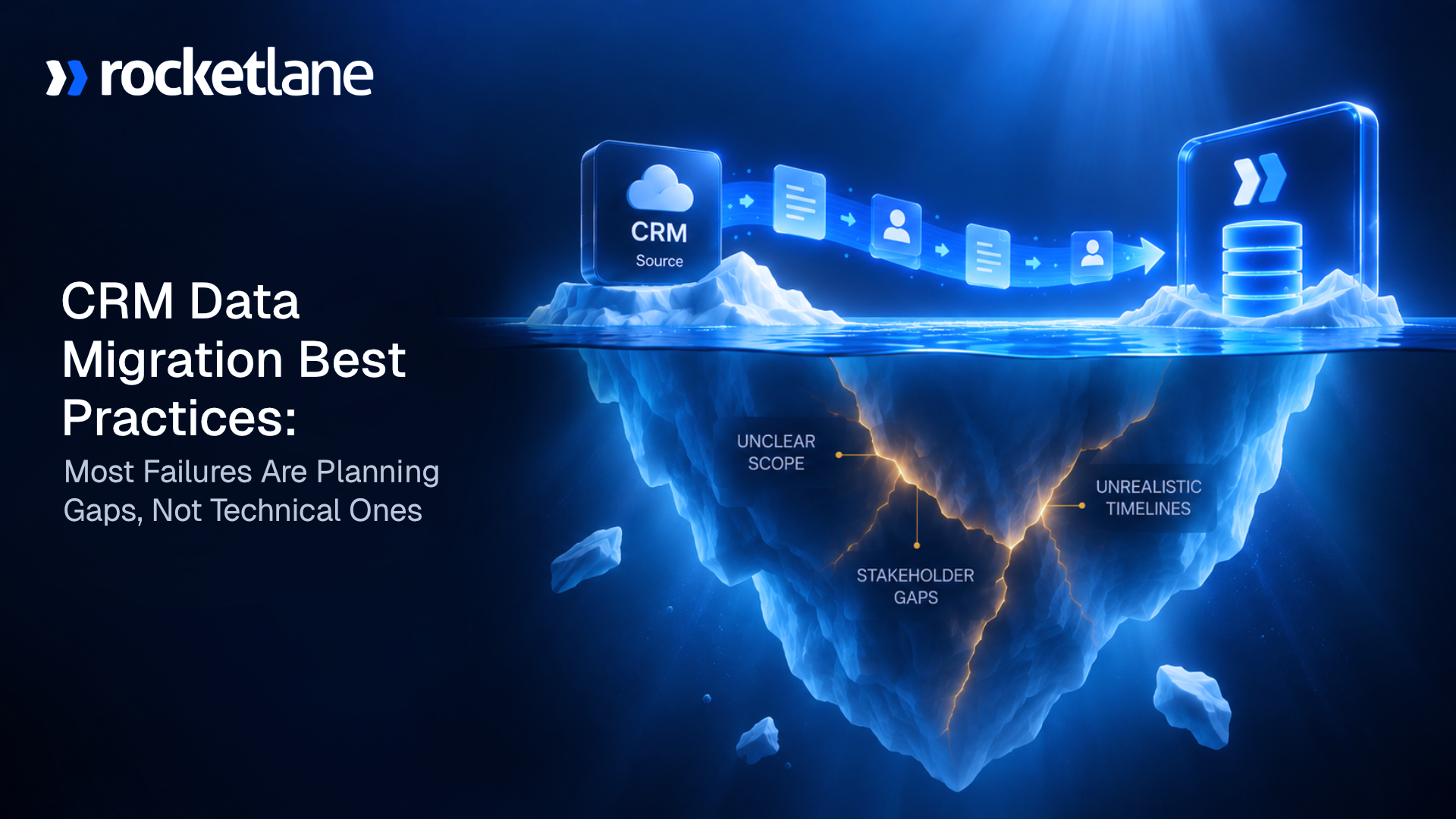
That is the pattern behind most failed CRM migrations, and it is worth saying plainly: most CRM data migration failures are not technical. They are planning gaps. Moving data out of a legacy system is rarely the hard part. The decisions around the records are.
CRM data migration best practices come down to four steps that practitioners and published guidance agree on. Audit and clean the data in its source system. Map the fields and plan the target architecture before you touch a single record.
Test in a sandbox on a representative sample with real end users. Then execute a controlled cutover with a parallel run and a tested rollback plan. That sequence is not controversial, and it is not where projects come apart.
What breaks a migration sits outside those four steps: integrations nobody inventoried, legacy history someone skipped to save time, and field types that matched on paper and truncated on load. The research backs the pattern. A study by Bloor Research put the failure rate for data migration projects at 38%, counting projects that overran their budget or were abandoned outright.
This guide is written for teams who migrate customer data onto a new CRM (customer relationship management) system repeatedly, whether that is your own product or a client's. If you run delivery or implementation at a 50 to 200 person services org, this is written to your seat. If you are switching your own CRM once, most of this still applies, though some of the economics near the end will not.
A quick note on who publishes it. Rocketlane is professional services automation (PSA) software, and the best agentic AI PSA software for enterprise SaaS and technology services companies. Resource management, project management, customer onboarding and collaboration, and financial management run in one platform, and Nitro, Rocketlane's agentic AI, works across operations, delivery oversight and work execution. We run migrations for a living, and most of what follows comes from watching them succeed and fail.
Scope note: This is about the data and the project around it. If you are choosing tools to keep two systems in sync after go-live, that is data integration, not data migration, and this page does not cover it.
The four steps every CRM migration guide agrees on
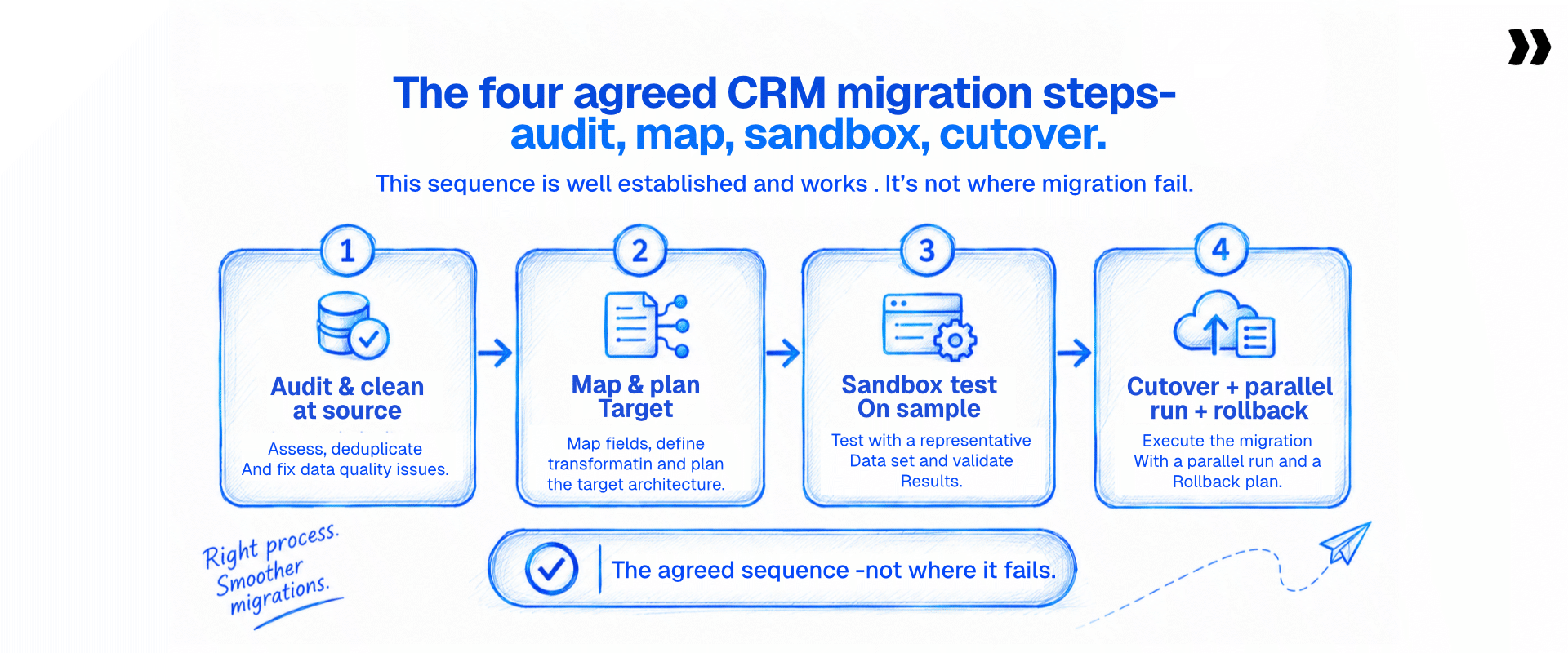
Four steps cover the agreed sequence. Audit and clean the data in the source system, not after import. Map fields and plan the target architecture before touching data.
Test in a sandbox on a representative sample with end users involved. Execute a controlled cutover with a parallel run and a tested rollback. The CRM data migration process is settled at this level, and this part is the easy part.
Here is the part most guides skip. This sequence is not where migrations fail. Read enough migration post-mortems and the same admission surfaces: the four steps were followed, and the project still went sideways.
The failures were planning gaps. You do not migrate data well by moving faster, you do it by deciding better. A written CRM migration project plan turns the four steps into owners and dates. Getting the three gaps below right is what separates a successful migration from a mess.
See the four steps run on a real customer CRM export
Watch Migration Agent map and validate one, then walk through yours with us.
Why CRM migration failures are planning gaps, not data volume

CRM migrations rarely fail on data volume. They fail on four planning gaps: integrations nobody inventoried, a decision about legacy history that was never made out loud, field mappings that looked correct and were not, and no way back when cutover goes wrong. Three of the four are decisions, not defects, which is why a bigger CRM data migration tool does not fix them.
The problem is rarely too many records. It is mismatched field types, custom objects with no equivalent in the new system, and duplicate data that gets faithfully copied over instead of cleaned. The risk is not only data loss, it is wrong data that looks right. Whether your customers arrive off Salesforce, HubSpot, a legacy CRM, or a stack of spreadsheets, the constraint is judgment, not size.
The rollback gap is the sharpest one. If cutover day goes sideways, you need a way back. Skipping that step is the most common reason a team says "we migrated, but now we are firefighting for two weeks." It is a planning decision, made or skipped weeks earlier.
For a company whose customers switch in from a competitor, the migration is a competitive lever, not a chore. A rough switching experience does not only cost delivery hours.
It costs the reference, the renewal, and the story your next prospect hears. Migration comes up again and again in the onboarding conversations we hear. An implementation leader at an ERP software company called data migration "the top problem" their project managers raise, which tells you how much weight buyers already put on it.
Treat it as a first-class workstream with a named owner, not an afterthought bolted onto the end of the project. Data governance and clear ownership decide the outcome long before anyone runs a script.
What is integration debt in a CRM migration?

Integration debt is the work of rebuilding everything that was connected to the old CRM.
Every automation, webhook, third-party app, and reporting connection has to be recreated against the new system, because integrations do not migrate. Teams discover this mid-project rather than during planning, and it is the single largest unscoped item in a CRM migration.
Every Zapier zap, webhook, and third-party app connected to your legacy CRM has to be rebuilt, not moved. The data can transfer cleanly while the connective tissue around it stays behind. This is the item that shows up three weeks after a "successful" cutover, and the one no CRM migration checklist on the first page of Google bothers to name.
Inventory it during the audit. Five things belong on that list.
Two rules make integration debt survivable.
- First, sequence integrations last, after the core objects and workflows are stable in the new CRM platform. Rebuilding them against a data structure that is still moving means rebuilding them twice.
- Second, watch the record IDs. Record IDs change on migration, and anything keyed to the old ID (a saved report, an external reference, an integration mapping) breaks silently rather than loudly. Silent breakage is why teams find it in week three instead of on cutover day.
Be clear about who owns this. No migration tool rebuilds your integrations, including the migration agent this guide ends with. This is the implementation team's work, full stop, and any vendor who tells you otherwise has not read their own product. Scope it, price it, and put it on the plan.
Integration debt only hurts when nobody owns it
Put every rebuild on the project plan, with an owner, a date and the customer following along
Decide what stays behind during the data audit

Decide explicitly which legacy records are not moving, and decide it during the audit, not during cutover. Teams skip activity history, notes, and email threads to save time, then find that a salesperson opening a key account with an empty timeline stops trusting the new system. Backfilling that history into a live system afterward is slower and messier than moving it up front.
The worst version plays out like clockwork. A client decides the legacy data has no value, activities and email history get skipped, and two weeks in someone opens a key account to an empty timeline. The fix is boring and it works: decide explicitly what stays behind during the audit. Incomplete handover hurts more than any mapping issue.
Not all existing data deserves the same treatment. Sort it into four buckets before you map a single field.
This matters more in CRM than almost anywhere else, and adoption is the reason. A CRM is only worth anything if the people using it trust what is in it. An empty account timeline is an adoption failure wearing the costume of a data decision. The relevant data is what a rep needs to do the next thing, not every row you happen to have.
One more discipline: get it in writing. The decision about what will not move needs the customer's signature before mapping starts, or it comes back as a complaint in month three. Handle sensitive data and any PII with a documented call on what travels and what does not, and run that call through security before a single record moves. Secure CRM data migration starts with moving less.
Data mapping and the three ways it fails quietly

Mapping errors are the most expensive CRM migration failures because they are silent. Three failures recur: field types that match on paper and truncate on load, custom objects with no home in the target, and picklist values that overlap without matching.
All three load cleanly and put wrong data into production, where you find them late.
Data mapping is where the real work of any migration lives, and it is where data accuracy is won or lost. The table below is the one to keep.
Truncation deserves its own warning because it is the quiet killer. Different CRM platforms store the same field differently, so data types cause trouble when the underlying databases differ, and data gets truncated on the way in even when the mapping looked correct. The record loads. Nothing throws an error.
Half a phone number or a clipped note sits in production until a human reads it and asks why. Field-level validation on length and type catches it before load. Nothing else will. A director of implementation at an enterprise software company described life without it: "It was about fixing issues after the fact, missing fields, formatting, inconsistencies."
Custom objects are a business decision, not a mapping decision. There is no correct automated answer to "where does this object go." Someone who knows the business has to decide, and that decision belongs in the project's decision log, not in the cutover window.
The last rule is the one every guide states and few teams follow: clean the data at the source, where the context still exists, not after import.
The stakes are real. Gartner puts the cost of poor data quality at 12.9 million dollars a year on average for the organizations carrying it. A migration is the moment dirty data either gets cleaned or gets multiplied, so cleansing before the move is the cheapest insurance on the project.
Truncation loads cleanly. Validation should fail it
See a migration agent flag type and length breaches field by field, before anything loads.
Phase the migration, run parallel, and keep a way back

Move core objects into a sandbox first, then workflows, then integrations last. Run both systems in parallel for one to two weeks before you switch off the old one, and keep a tested rollback with a named owner. Rollback is simple on a single cutover and hard on a phased one, because both systems keep changing. The four moves below are the sequence that holds.
Phase in the right order
- Move the core objects first: accounts and contacts into a sandbox.
- Confirm the workflows against that data.
- Wire the integrations last. They are built against a schema that keeps settling until the core objects are stable, so wiring them early means wiring them twice.
Test on a sample, with real users
- Run a test migration on a representative sample before you commit the full load.
- Put real end users in front of the sandbox data. They spot the wrong picklist and the missing field faster than any checklist, because it is their work on the screen.
- This step is user acceptance testing (UAT), not a formality. It is the last cheap chance to catch a mapping error.
Run both systems in parallel
One to two weeks is enough for most mid-market teams, long enough to confirm business operations keep flowing and system performance holds under real load.
- Decide the source of truth for the window before it opens.
- Decide how you reconcile records created in both systems, and who checks.
- Monitor system performance during the window, not after, so a slow report or a failed sync surfaces while you still have the old system to fall back on.
- Track the key performance indicators that tell you the migration held: matched record counts, sync success rate, and report accuracy.
Keep a way back
Rollback has four parts. Write all four down before cutover, because a smooth transition is the product of a rollback plan you never had to use.
- A verified backup.
- A numeric trigger that says when to pull the cord.
- A named owner who owns the call.
- A defined point of no return, after which reversing means losing the customer's work.
A note on strategy, kept short on purpose. Big-bang, phased, and parallel-run each have their place, depending on your data volume, your tolerance for downtime, and your team's bandwidth. Our guide on data migration strategy has the full breakdown.
How long a CRM data migration takes

For a mid-size team of 50 to 200 users with moderate customization, budget six to twelve weeks. That covers the audit, mapping, sandbox testing, cutover, and the parallel-run window. The largest single variable is not data volume. It is how long the customer takes to respond.
The realistic timeline
- Longer if the data models are tangled or the source is locked down.
- A clean migration over a weekend is overselling. Every other guide hedges on this number, so here it is committed to.
The variable that actually moves it
- The critical path runs through the customer, not the vendor.
- One team we work with reported customers taking two to three months to return a completed data workbook, which stalls the whole timeline no matter how fast the migration team moves.
- Resource allocation on your side is only half the equation.
- An implementation lead at a research software company put it in four words: "It's always client delay."
Where the effort really goes
- One team we work with reported 20 to 30 hours of hands-on work per migration, across roughly 300 migrations a year.
- At that volume, a small per-project number turns into a full workstream. Others describe two to three weeks of elapsed time per project.
- Transferring data is not the slow part. The back and forth to get it clean is, one workbook and one mapping revision at a time.
20 to 30 hours a migration, 300 migrations a year
That is up to 9,000 hours, most of it the same mapping and rules. Keep them per source CRM instead.
CRM migration is a change management project, not an IT project

The tooling is the easy part. A CRM migration succeeds when the people who have to use the new CRM system can find their work in it, which is a training and adoption problem, not a data problem. Teams that treat it as an IT project deliver clean data into a system nobody trusts, and user adoption stalls.
Train on workflows, not features
- Do not walk people through buttons. Show them how their existing process maps to the new system, so the first thing they try to do works.
- User training that starts from the user's job, not the software's menu, is what makes a new CRM platform stick.
Close the loop after go-live
- No amount of user training fixes a trust problem you created in the audit.
- Collect user feedback in the first weeks, and treat post-migration support as part of the project, not a courtesy after it.
What changes on the tenth customer switching off the same CRM
Everything above describes the work. This section is about doing it over and over, off the same handful of source systems. That repetition is the hidden cost of having to migrate CRM data by hand for every customer, and it is the one thing worth automating.
Rocketlane Migration Agent works on the export your customer gives you. You define your destination schema once. The agent maps the incoming fields, transforms them with the rules you wrote for that source CRM, validates each object field by field and across fields, and flags what fails so you can fix it before anything loads.
The mapping and the rules are saved against the source system, so the next customer switching off the same CRM starts from a built playbook.
Picture the first one. A customer switches off Salesforce. The export arrives as five files, one per object. You spend the first week working out what their custom objects were for. You build the mapping. You write the rules for their date formats, their picklist values, their phone formatting. You validate, find two hundred broken rows, email the list, wait, get a version two, find forty more. You load. Three weeks later someone finds a truncated notes field.
Two months later, another customer switches off Salesforce. And you do all of it again.
Their custom objects are different. Their picklists are different. Their mess is their own. But the shape of the work is not different. Salesforce exports the same way it did in March.
You paid full price for that work twice, and if your customers keep arriving off the same three or four CRMs, you are paying it again and again. The reason you paid twice is that the work had nowhere to live between the two projects.
What Rocketlane Migration Agent is
Rocketlane Migration Agent works on the T in ETL: transformation and validation, with a human in the loop throughout. It maps the incoming fields to a schema you define once, transforms them with rules you can write in plain language, validates each object field by field and across fields, and returns one validated file per object, ready for your system's import.
Extraction and loading are Workforce Agent territory, or run through the customer's export and your own import. It is part of Nitro, Rocketlane's agentic AI.
People call migration an ETL (extract, transform, load) problem, and that is the right way to see it. The transform is the slow middle, where cells get reformatted one rule at a time. The agent takes that part, so your team spends its time on judgment calls instead of reformatting cells.
Nitro is Rocketlane's agentic AI, built on the shift from tracking work to doing it, and it works across operations, delivery oversight and work execution.
Rocketlane serves 750+ customers, holds a 4.7/5 rating on G2 from 758 reviews, and raised a $60M Series C (Insight Partners, March 2026).
Run ten migrations, the same five moments
Validation runs up to 25 million cells per run, and the agent has been stress-tested on data sets of one to five million. First-pass mapping lands in the region of 85% and you iterate with the agent to 100% with review. It is not one-shot, and it is not hands-off. It is faster, and it is repeatable.
One public example: Storable cut its data migration time by about 75% with Rocketlane's Migration Agent, and absorbed rising onboarding demand without matching headcount growth.
How validation maps to the failures above
Line these up against the mapping failures from earlier. Truncation, the failure that survives testing, is caught by the field-level layer before load rather than in production. The failures that used to surface in week three surface at validation instead.
Where the line is
This is what makes the rest believable. Rocketlane Migration Agent does not rebuild your integrations. This page spent several hundred words arguing that integration debt is the largest unscoped item in a CRM migration, and no migration tool touches it. Every zap, webhook, and reporting connection is still your team's work.
It is built for teams that migrate customers repeatedly as part of onboarding, not for a one-off internal switch or an unattended data pipeline. It works on the files your customer exports and hands back validated files. It does not extract from the source or load into the destination; that is Workforce Agent territory or your own import. It does not decide which duplicate survives, or where a custom object with no equivalent should go.
Those are business judgments, and they stay business judgments. On sensitive data, the run happens in an isolated single-use environment, and raw data stays out of the model's context window.
The platform carries the certifications a CRM data migration security review will ask for: ISO 42001 for AI management, ISO 27001, ISO 27701, SOC 2, HIPAA, and GDPR.
Bring the messy one. Send us the export from whichever CRM your customers switch off most. Anonymize it, and make it the awkward one, with the custom objects nobody documented and three date formats in the same column. We will define the destination schema and build the mapping and validation rules for that source on the call.
Bring the export your customers switch off most
We build the mapping and validation rules on the call. Storable cut its migration time by about 75%.

You see what the tenth migration looks like on your own data, not on a sample set. The honest caveat: the first migration off an unfamiliar CRM still costs full price. The claim is that it costs once.
What to know before you buy a migration tool
If you are evaluating a migration tool instead of building your own, five questions separate the ones that hold up from the ones that stall. Our roundup of the best data migration tools compares them side by side.
- Does it cover the whole pipeline, and who runs which part? A tool that only transforms leaves your team to script the extract and the load. Ask which steps run in the tool, which run through connectors, and which run through your own export and import, so nothing falls between them.
- Does it validate before load, not after? The failures that hurt, truncation, broken relationships, mismatched picklists, are the ones that load cleanly. Field-level, cross-field, and cross-object checks before load catch them in the sandbox instead of in production.
- Is it honest about accuracy? First-pass mapping in the region of 85%, iterated to 100% with human review, is a real number. One-shot, hands-off, and fully automated are not.
- Can you trust the reports after go-live? Record IDs that changed on migration break saved reports first. Check the reporting layer for a custom report builder, dashboards and natural-language queries, so nobody exports to CSV for a separate BI tool.
Rocketlane answers this with Nitro Analyst, so post-migration reporting does not turn into its own project.
- Will it pass a security review? Sensitive data needs isolated runs and real certifications: ISO 42001, ISO 27001, ISO 27701, SOC 2, HIPAA, GDPR. Ask before you send a single record.
One thing no migration tool does: rebuild your integrations. Scope that work separately, every time.
Conclusion
The four steps are settled, and they are the easy part. Real CRM migration best practices are about the gaps, not the steps. What breaks a CRM migration is the integration nobody inventoried, the history somebody skipped, and the field that matched on paper and truncated on load.
Get those three right and you have a successful CRM migration. Miss them and you have clean-looking data in a system your team does not trust.
And if your customers keep switching off the same three or four CRMs, the most expensive thing you do is rebuild the same migration twice. That is the gap worth closing. Rocketlane Migration Agent exists to take the slow, repeatable middle of the work, the mapping, the rules and the validation, off your team's plate.
Moving customer data onto a new system stops being the reason a switch drags, and starts being a reason a prospect chooses you. Do the planning the four steps assume, name the gaps the checklists ignore, and the migration stops being the scariest line on the project plan.
Stop paying full price for the same migration twice
Keep the mapping and rules per source CRM, so the tenth customer starts where the first one finished.
Table of Contents

Regsiter for the live webinar


Great consultants didn't join your team to spend Fridays writing documentation.
Table of contents
18 of Forbes Cloud 100 chose Rocketlane. The best PS teams aren't waiting around.
FAQs
What are CRM data migration best practices?
CRM data migration best practices come down to four steps: audit and clean the data at its source, map the fields and plan the target architecture, test in a sandbox with end users, then run a controlled cutover with a parallel run and a rollback plan. Most failures come from planning gaps around those steps.
What actually breaks in a CRM migration?
Three things break most CRM migrations, and none are about data volume: integrations nobody inventoried, legacy history someone skipped, and field mappings that looked right but truncated data or misaligned picklists on load. All three are planning decisions made or skipped early.
What is integration debt in a CRM migration?
Integration debt is the work of rebuilding everything connected to the old CRM. Automations, webhooks, third-party apps, and reporting connections do not migrate with the data. Teams find this out mid-project because record IDs change on migration and anything keyed to the old ID breaks silently. No migration tool rebuilds it for you.
How long does a CRM data migration take?
For a mid-size team of 50 to 200 users with moderate customization, budget six to twelve weeks in the data migration plan, including a one to two week parallel run. The biggest variable is not the size of the dataset. It is how quickly the customer returns clean data.
What should you leave behind when migrating CRM data?
Move open deals, active contacts, and anything a rep needs in week one. Move a bounded window of closed history, usually one to two years, for reporting comparability. Archive older activity so it stays queryable without loading it. Leave records your retention policy should have purged. Decide all of this during the audit and get the customer's sign-off before mapping.
What happens if you skip legacy activity history in a CRM migration?
You create an adoption problem disguised as a data decision. A salesperson who opens a key account to an empty timeline stops trusting the new CRM. Backfilling history into a live system later is slower and messier, so decide deliberately rather than skipping to save time.
Should you clean CRM data before or after migration?
Clean it before, in the source system, where the context still exists. Standardize formats, resolve duplicate records, and fix data quality issues at the source rather than after import. Data cleansing before the move is the cheapest insurance on the project.
Why do fields that match on paper still lose data on load?
Because the source and target databases store types differently, a field that mapped correctly can truncate on load. The record imports, nothing errors, and half a value sits in production until a human notices. Field-level validation on length and type catches it before load.
How do you build a rollback plan for a CRM migration?
A rollback plan needs four parts: a verified backup, a numeric trigger that defines when to reverse, a named owner who makes the call, and a defined point of no return after which reversing means losing new work. Rollback is straightforward on a single cutover and hard on a phased one, so decide the approach before you start.
How long should you run two CRMs in parallel?
One to two weeks is enough for most mid-market teams. Before the window opens, decide which system is the source of truth, how you reconcile records created in both, and who checks. Monitor performance during the run, using the go-live checklist, so problems surface while the old system is still there to fall back on.













Copyright © 2026 Rocketlane Corp. All rights reserved.