Automated time tracking for professional services: what it is, how it works, and how to get it right in 2026


•
•
Summarize blog with






Manual time tracking fails the same way every month. A project shows 40 hours of delivery with zero time logged. A senior consultant codes client work as internal. A completed phase has no hours recorded. By the time the billing run opens, the hours are already lost, and no one has a clean way to reconstruct what happened.
The operations manager has 48 hours before invoices go out, and no clean way to reconstruct what actually happened. This is not a one-off. It is what manual time tracking looks like at scale, every single month, at firms that would never describe their delivery work as sloppy.
Automated time tracking captures billable and non-billable hours at the point of work, using calendar data, task activity, and built-in governance rules, instead of relying on consultants to remember and rebuild their weekdays later. For professional services teams, this turns time tracking data from an estimate into a measurement, which changes how every downstream number behaves.
That distinction, estimate versus measurement, is the thread running through everything below.
Rocketlane is built as an agentic execution platform for professional services, an Agentic PSA where time tracking, delivery, and billing run on one data model. This guide covers what automated time tracking is, why accuracy matters, the most common mistakes, the KPIs it moves, and what to check before you buy.
What is automated time tracking for professional services?
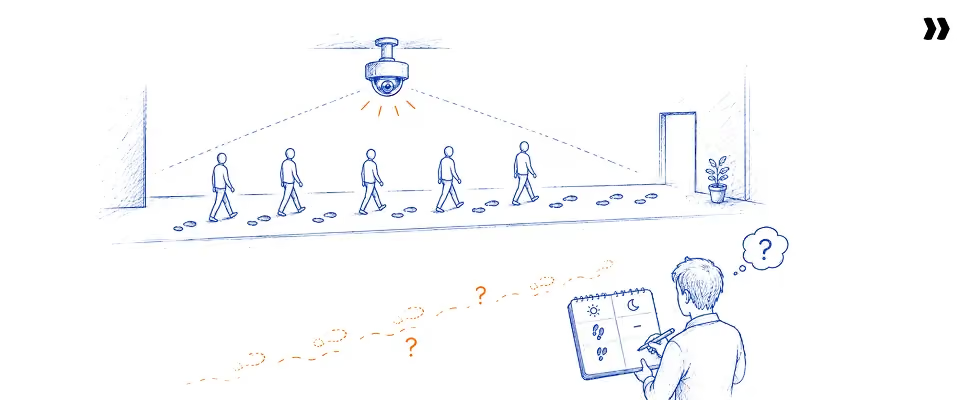
Professional services teams have used time tracking for decades. What changes with automation is when and how data is captured, not whether time is tracked at all.
Automated time tracking for professional services is software that captures billable and non-billable time against tasks, projects, and billing codes at the point of work. It replaces manual end-of-period entry with governance-enforced capture that is accurate enough for billing without a separate reconciliation step.
This replaces the Friday-afternoon ritual in which consultants try to remember what they did on Monday and Tuesday. By the time most people sit down to fill out a weekly timesheet, the details that matter- the extra call, the scope clarification, the quick fix- are already gone.
Three mechanisms typically do the capturing:
- Calendar integration: Meetings and blocked time from Google Calendar or Outlook are automatically pulled in and matched to the right project, so a call becomes a draft time entry rather than a blank line.
- Task completion triggers: When a consultant marks a task as complete or moves it across a board, the system prompts for time spent on that specific piece of work while it is still fresh.
- Activity-based prompts: Standard activities, such as internal meetings, documentation, or configuration work, are pre-tagged as billable or non-billable, so consultants can confirm rather than categorize from scratch.
Automated does not mean unattended. In a professional services context, automated time tracking still needs a person to confirm entries are correct. What automation removes is the blank page, not the judgment.
Some platforms describe this as "automatic time tracking" rather than "automated time tracking". The terms are interchangeable, and so are time tracking app, time tracker, and the plain instruction to track time. Whatever the label, what matters is when the capture happens, not what it is called.
Why does time tracking accuracy matter more than most PS leaders assume?

This is why automated time tracking matters more than the phrase suggests.
Time data is the input for nearly every financial metric a professional services firm produces. When entries are incomplete or miscoded, utilization, project margins, resource forecasts, and invoices are all wrong by the same margin, because they are all calculated from the same underlying numbers.
Think of it as a chain. Time data feeds utilization. Utilization feeds resource allocation decisions. Allocation feeds project staffing and forecasting. And at the same time, the entries populate the invoice sent to the client. One weak link affects everything downstream.
Manual time entry has a predictable bias. People remember the meetings and the obvious deliverables. They forget the twenty-minute Slack thread that solved a blocker, the call that ran long, or the half day spent re-scoping after a client request. Manual tracking systematically under-counts billable work, not over-counts it.
This is not a small gap. The 2026 SPI Research Professional Services Maturity Benchmark found that average billable utilization across professional services firms fell to 68.9%, below the 70-80% range that SPI considers healthy for profitability.
A two- or three-point utilization gap looks small on a single timesheet. Across a 50-person delivery team billing at typical consulting rates, that gap amounts to a meaningful share of annual revenue earned but never captured. That gap is the entire story of automated versus manual time tracking.
How time tracking data connects to NRR and customer outcomes
Time entries are not just a billing record. For PS teams running annual or multi-year contracts, patterns in delivery time data are often the earliest signal available on whether a customer will renew.
A phase tracking 20% over hours on a customer mid-implementation is not just a margin problem — it is a health score event. Teams that connect time data to customer outcomes move the conversation from "did we bill correctly?" to "are we protecting net revenue retention?"
What are the most common time tracking mistakes PS teams make?

The five most common time tracking mistakes are bulk end of period entry, inconsistent task and billing code usage, no approval step before billing, no billable versus non-billable separation at the task level, and treating timesheet compliance as a people problem instead of a system design problem.
- Bulk end-of-period entry: Consultants wait until Thursday or Friday to log a full week of work, which means every entry is a reconstruction rather than a record. The result is rounded numbers, missing entries, and time charged to the wrong project.
- Inconsistent task and billing code usage: Without a shared taxonomy, one consultant logs time against a project while another logs it against a specific task or phase. Reports built on this data cannot be compared across teams or clients.
- No approval step before billing: When time flows straight from timesheet to invoice with no review, errors reach the client. When approval happens after invoicing, errors require credit notes and apology emails.
- No billable versus non-billable separation at the task level: If this decision is left to the consultant on every entry, it gets made inconsistently. Internal meetings are billed to clients, and billable configuration work is logged as overhead.
- Treating compliance as an HR issue: Chasing timesheets becomes a recurring management task instead of something the system enforces, costing PS managers hours each week on follow-up emails that a workflow could handle.
None of these mistakes require more effort from consultants to fix. They require a system that makes the mistake structurally harder to make in the first place.
What KPIs improve when professional services teams automate time tracking?
Six KPIs improve measurably when professional services teams automate time tracking: billable utilization rate, timesheet compliance rate, invoice accuracy, billing cycle time, unbilled revenue ratio, and project margin visibility. Each one improves because the underlying time data becomes a measurement instead of an estimate.
How does automated time tracking improve billable utilization rate?
Billable utilization improves because the measurement gap closes. Time captured at the point of work reflects what actually happened, instead of what a consultant can reconstruct three to five days later. Since manual tracking under-counts billable hours, closing that gap typically moves utilization up.
Even a few points of improvement, applied across a delivery team, represent real revenue that already existed but was never recorded.
A note on utilization in 2026: Leading PS organisations are shifting from billable utilisation as the primary efficiency metric toward productive utilisation — a measure of how time is being spent relative to customer outcomes, not just how many hours were invoiced.
Automated time tracking supports this shift by capturing the full picture of how delivery time breaks down, not just what was billed.
How does automated time tracking affect timesheet compliance rate?
Compliance improves because the cognitive load is spread across the week rather than concentrated on a single deadline. When entries are pre-populated from calendar and task activity, confirming them daily takes minutes. Governance rules add a second layer, gating phase progress on time confirmation.
A consultant who confirms ten minutes of pre-filled entries each morning is far more likely to stay current than one facing a blank weekly grid every Friday afternoon. The deadline is no longer the only moment compliance is tested.
Compliance is enforcement at the point of entry, not reporting after the fact. The difference is whether you catch the error before it reaches the client or after it does.
How does automated time tracking improve invoice accuracy?
Invoice accuracy improves because billing rules are enforced when time is entered, not when the invoice is assembled. A rate mismatch, a missing note, or a billable entry on a fixed-fee phase gets flagged at the source before it becomes a line item a client questions.
Invoice disputes in professional services rarely stem from a single dramatic error. They build from small issues- a vague entry, a rate applied inconsistently, a note that was never added- that compound across a billing period (eBillity). Catching these at entry removes them before they reach the client.
For client billing teams, this means every line item already reflects the agreed rate and scope before an invoice goes out, not after a client questions it.
How does automated time tracking reduce billing cycle time?
Billing cycle time shortens when approved time data flows directly into billing without a manual export, clean up, and re-entry step. That sequence can otherwise add five to eight business days to every billing period.
How does automated time tracking reduce unbilled revenue and revenue leakage?
.avif)
Unbilled revenue is almost always a time capture failure: either the hours were never logged, or they were logged against the wrong code. Automated capture closes the first gap, and billing rule enforcement closes the second.
For a 30-person delivery team, recovering even 50 to 100 previously unbilled hours a month can represent $7,500 to $15,000 in monthly revenue that was already earned.
How does automated time tracking improve project margin visibility?
Margin visibility improves because time data updates the project financial model continuously instead of at month-end. A manager can see on day eight of a fifteen-day phase that hours are tracking 15% ahead of plan, while there is still time to act.
Compare that to discovering the same overrun during month-end reconciliation, when the only options left are absorbing the cost or having an uncomfortable conversation with the client about scope.
What does a well configured automated time tracking system look like in practice?
A well-configured automated time tracking system produces three things without manual intervention: a utilization number the operations team can trust for staffing decisions, time records that are billing-ready at period close, and project margin data that updates continuously during delivery, not after it.
- The consultant: Opens their timesheet on Monday morning and finds Friday's entries already drafted from calendar events and completed tasks. They spend three minutes confirming and adjusting before moving on to billable work.
- The PS manager: Notices on a Tuesday dashboard that one project is tracking 12% over its planned hours for the current phase. They raise it in that afternoon's check-in, while there is still room to adjust scope or resourcing.
- The finance lead: Closes the billing period and generates invoices within 24 hours, because approved, automated timesheets already carry the correct rates, codes, and notes, with no export, spreadsheet, or reconciliation run.
A consultant who trusts pre-filled entries produces the clean data a manager needs for real-time decisions, the same data finance needs for same-day invoicing.
What are the best practices for rolling out automated time tracking in a PS firm?

Timesheet automation succeeds or fails based on four practices.
Four practices separate firms that see fast results from those that struggle: define the task and billing code taxonomy before configuring any tool, pilot with one project team before a firm-wide rollout, address senior consultant resistance directly, and measure compliance and accuracy as two separate metrics from day one.
- Define the taxonomy first. Decide how time will be categorized, by project, phase, task, or activity, before anyone logs a single hour. Changing the taxonomy after rollout means historical data and new data cannot be compared.
- Encode billing rules at the task level. Mark tasks as billable or non-billable in project templates, so consultants are not making that call on every entry. This is also where rate cards and approval thresholds get attached.
- Pilot before a firm-wide rollout. Run the new system with one project team for two to four weeks. This surfaces taxonomy gaps and workflow friction while the impact is small.
- Address senior consultant resistance explicitly. The people most likely to resist are often the ones with the most untracked time. Frame the change around what it removes from their week, not what it adds.
- Measure compliance and accuracy separately. A team can submit timesheets on time and still log time against the wrong codes. Track both numbers from week one so you know which problem you are solving.
- Run a parallel period of four to six weeks. Keep the old process running alongside the new one long enough to confirm the numbers reconcile, before retiring manual timesheets entirely.
How does AI change what automated time tracking can do for PS teams?

Teams often call this next layer AI time tracking.
AI adds three capabilities that rules-based automation cannot provide on its own: anomaly detection that flags unusual time entry patterns before they reach billing, predictive compliance that targets reminders to the people most likely to miss a deadline, and portfolio-level intelligence that answers time-related questions in plain language.
- Level one, automated capture: Time is pre-populated from calendars and task activity, and consultants confirm rather than construct.
- Level two, governance automation: Billing and compliance rules are written once in plain language and enforced automatically at the point of entry.
- Level three, agentic intelligence: The system detects patterns across historical time data, such as a project consistently running ahead of its scoped hours, and surfaces them to managers before they become invoice problems.
Most PS teams already have level one. Level two and three are where the time saved on data entry turns into time saved on management.
What should PS teams look for when evaluating automated time tracking systems?
Five criteria separate time tracking that works from time tracking that creates new problems:
Many of these platforms call themselves project management tools first and time tracking second, or the other way around. The label on the time tracker tool matters less than whether it handles task management and project management the way your delivery team actually works.
Five criteria matter most when evaluating automated time tracking systems: native integration with project delivery rather than a separate tool, billing rule enforcement at the point of entry, a task structure that matches how the firm actually delivers work, configurable approval workflows, and built-in compliance reporting.
- Native project integration: If time tracking lives in a different system than project delivery, every hour logged requires a mental or manual translation between the two. Ask whether the platform's project management features include time tracking natively, and whether logging time is just as easy from the web app, the mobile app, a desktop app, or browser extensions while working in other tools.
- Billing rule enforcement at entry: Rules applied after the fact catch errors too late to prevent them. Ask how the system flags a rate mismatch or a missing note at the moment of entry, not at invoice review.
- Task structure matching the delivery model: A firm running fixed-fee, time-and-materials, and retainer engagements side by side needs a system that supports all three without separate workarounds.
- Configurable approval workflows: Different teams, clients, or billing thresholds often need different approval paths. Ask whether approval routing can be configured per project, not just per organization.
- Compliance reporting and anomaly surfacing: Ask whether the system generates detailed reports on who has not submitted time, which entries look unusual, and how compliance has trended over the last quarter, without a custom build.
Most teams evaluating automated time tracking start with tools they already use for project coordination: Smartsheet, Wrike, ClickUp, or Teamwork. Standalone time trackers like Harvest or Timely also enter the conversation early.
At higher delivery complexity, PSA platforms such as Kantata, Certinia, BigTime, Scoro, Productive, and Accelo form the comparison set. The five criteria above apply across all of them. The core question is whether time tracking is native to the delivery model or a separate integration requiring reconciliation every billing period.
When evaluating PSA fit, Gartner's PSA market reviews provide independent capability assessments across time tracking, billing, and resource planning for mid-market professional services firms.
Which PS teams benefit most from automated time tracking, and which are not yet ready?

Not every team needs the same starting point. The right entry point depends on team size and which symptom is causing the most pain right now.
A useful signal: if your team runs more than one billing model at once, or if the PS leader can no longer personally review every time entry before billing goes out, it is time to move beyond basic time tracking.
What should PS leaders know before they buy automated time tracking?

Three factors are consistently underestimated before a rollout: the quality of the task taxonomy determines the quality of every governance rule built on top of it, senior consultant adoption is a framing problem more than a training problem, and the parallel run period is a risk control, not a delay.
- Task taxonomy quality: Every billing rule, report, and governance policy is built on top of the taxonomy decided in week one. A taxonomy that is too broad makes reporting useless. One that is too granular makes entry tedious. Get this right before anything else.
- Senior consultant reframing: The consultants with the least structured time tracking habits are often the ones whose time is most valuable to capture. Position the change as removing the Friday reconstruction exercise, not as adding oversight.
- Parallel period as risk management: Running old and new systems side by side for four to six weeks is not wasted time. It is how a firm catches taxonomy gaps and workflow friction before they affect a real billing cycle.
Why do PS teams choose Rocketlane for automated time tracking?
For B2B SaaS professional services teams in the 25- to 150-employee range, time tracking works best when it is part of the same system used to deliver the project, rather than a separate tool that needs to be reconciled. Rocketlane integrates billing rules, project structure, and time data into a single data model.
Here is what that looks like in practice.
- Native time tracking, not a bolt-on integration: Billing rules configured on a project apply automatically when time is entered against it. Phase completion and budget consumption updates are updated as time is confirmed, with no sync lag between a separate time tool and the billing module.
- Governance enforcement at the point of entry: A time entry that applies the wrong rate for a resource on a specific engagement gets flagged immediately. Entries that would push a fixed-price project over its budget threshold trigger an approval step before acceptance.
- Calendar-integrated pre-population: Time entries are drafted from calendar events and completed tasks, so consultants confirm rather than construct their week. This is the mechanism behind moving from a Friday reconstruction to a daily three-minute review.
- Configurable approval workflows: Project manager approval, finance review above a threshold, and client confirmation for milestone billing can all be configured to match how a firm already operates.
- Real-time utilization feeding resource decisions: Because time is captured continuously, not in batches, utilization is visible as it happens rather than compiled at month-end, giving resource managers a current picture instead of a lagging one.
Rocketlane is trusted by 750+ professional services teams with a 94% G2 recommendation rate. Rocketlane closed a $60 million Series C in March 2026 as revenue more than doubled year-over-year and average deal size grew 4.5× since 2023.
How does Rocketlane Nitro transform time tracking for PS teams?
Rocketlane's Timesheet Policies is the agentic AI layer for time-tracking governance. It enforces compliance and surfaces anomalies before they reach billing, representing the shift from merely tracking work to actively executing it.
Teams using Rocketlane Timesheet Policies recover 680 hours per year in timesheet management overhead, reduce revenue leakage by 2%, and cut timesheet escalations by 55% for a 25-person SaaS delivery team. (As per Rocketlane benchmark data)
Three capabilities make this possible:
- Natural language policy definition: Policies are written in plain language, such as "flag any entry over eight hours on a fixed-fee project without a comment" or "require manager approval when a phase budget exceeds 90%." No workflow builder, no code.
- Anomaly detection before billing: The agent surfaces time-entry patterns that do not match expected behavior for a project type or role, such as a phase consuming hours at 15% above scope, while there is still time to act.
- Predictive compliance reminders: Instead of a single reminder sent to the whole team on Friday afternoon, reminders go to the people who actually need them, calibrated to each person's submission history.
Portfolio-level time intelligence: Questions like "which projects carry the highest risk of timesheet-driven billing discrepancies this month?" are answered in plain language across the full portfolio, with no batch processing and real-time data.
The outcome: Compliance at the point of entry, not at the time of review.
Conclusion: Is your PS team ready to automate time tracking in 2026?
Manual time tracking produces estimates. Automated time tracking produces measurements. That distinction sounds small until you remember that utilization, margin, invoicing, and resource planning are all built on whatever number comes from the timesheet.
The team in our opening scene was not dealing with a billing problem. They were dealing with a measurement problem that only showed up at billing time. Fixing that means moving time capture to the point of work, enforcing billing rules before submission instead of after, and giving managers real-time visibility instead of a month-end surprise.
Rocketlane brings time tracking, project delivery, resource planning, and billing into one system, so the same data that tells a consultant what to log also tells a finance lead what to invoice and a delivery director where margin is heading. For a PS team trying to move from estimated numbers to measured ones, that connection is the difference between a tool and an operating model.
The question worth asking is not whether your team can keep tracking time manually. It is how much you are currently paying, in missed hours, late invoices, and decisions made on stale data, to keep doing it that way.
Table of Contents

Regsiter for the live webinar


Great consultants didn't join your team to spend Fridays writing documentation.
Table of contents
18 of Forbes Cloud 100 chose Rocketlane. The best PS teams aren't waiting around.
FAQs
What is automated time tracking for professional services?
Automated time tracking for professional services is software that captures billable and non-billable hours against tasks, projects, and billing codes at the point of work. It uses calendar data and task activity to draft entries, replacing manual end-of-period entry with accurate, billing-ready time records that need only quick confirmation.
How does automated time tracking differ from manual time entry?
Manual time entry asks consultants to reconstruct a full week of work from memory days after it happened, leading to systematic under-reporting of billable hours. Automated time tracking captures activity as it occurs through calendar and task data, so consultants can confirm entries rather than recreating their week from memory each week.
What are the signs a PS team needs automated time tracking?
The clearest signs are running more than one billing model at once, a PS leader who can no longer review every time entry before billing, recurring invoice disputes tied to time data, missing entries against completed work, and utilization numbers that do not match what the delivery team experiences day to day once the team grows.
How does automated time tracking improve billable utilization?
It closes the measurement gap between what consultants actually did and what they can recall days later. Manual tracking undercounts billable work because people forget short calls and quick fixes. Capturing time at the point it happens recovers hours that were always billable but were never recorded, often the largest source of unbilled revenue.
What is revenue leakage in PS, and how does time tracking automation address it?
Revenue leakage is billable work performed but never invoiced, and unbilled time is consistently its largest source, running an estimated 5 to 11% of revenue in professional services. Automated time tracking closes this gap by capturing hours at the point of work and enforcing billing codes before submission, so fewer hours go unrecorded.
How long does it take to implement automated time tracking?
Most professional services teams can pilot automated time tracking with one project team within two to four weeks, covering taxonomy setup and workflow configuration. A firm-wide rollout, including a four- to six-week parallel run alongside existing timesheets, typically takes eight to twelve weeks from start to finish, depending on team size.
What is the difference between automated time tracking and a PSA platform?
Automated time tracking captures and governs time entries, while a PSA, or professional services automation platform, connects that time data to resource planning, project delivery, budgets, and invoicing within a single, connected system. Time tracking is one PSA component, not a replacement, and firms can adopt it first and expand later.
How does AI improve time tracking for PS teams beyond basic automation?
AI adds anomaly detection, flagging entries that do not match expected patterns for a project or role, and predictive compliance, sending reminders calibrated to each person's submission history. Together, these turn time data into an early warning system that managers can act on, rather than a historical record reviewed only at billing time.
What should PS teams look for in an automated time tracking platform?
Look for native integration with project delivery rather than a separate tool, billing rules enforced at the point of entry, support for multiple billing models, configurable approval workflows, and compliance reporting that surfaces missing or unusual entries without a custom report. These factors matter more than a long feature list.
What is the ROI of automated time tracking for a mid-sized PS team?
For a 30-person delivery team, recovering even 50 to 100 previously unbilled hours a month can represent $7,500 to $15,000 in monthly revenue that was already earned. Add faster billing cycles and fewer invoice disputes, and the return compounds across utilization, cash flow, and client trust, often within the first two billing cycles.













Copyright © 2026 Rocketlane Corp. All rights reserved.





















.webp)